

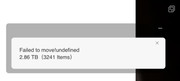
When I try to move large folders using the TOS 6 File Manager I get this error and have to cancel the operation.
“Failed to move!undefined“
Move size or file count limit isn’t document in the TOS6 help that I find. How do I move large folders?
[Help] Cannot move folders

Re: [Help] Cannot move folders
TOS6 File Manager supports handling large file sizes and a high volume of operations.
This error may have been caused by an unknown issue. Possible causes include problems with the source file, destination permissions, insufficient free space, a read-only file system, file system errors, or disk issues.
You can try moving files in smaller batches over multiple passes to see if the issue resolves.
Additionally, to prevent unexpected issues, we recommend using “Copy” instead of ‘Move’ (“Cut”). After confirming that the copy is complete, you can then delete the files from the source directory.
This error may have been caused by an unknown issue. Possible causes include problems with the source file, destination permissions, insufficient free space, a read-only file system, file system errors, or disk issues.
You can try moving files in smaller batches over multiple passes to see if the issue resolves.
Additionally, to prevent unexpected issues, we recommend using “Copy” instead of ‘Move’ (“Cut”). After confirming that the copy is complete, you can then delete the files from the source directory.
To contact our team, please send email to following addresses, remember to replace (at) with @:
Technical team: support(at)terra-master.com (for technical support)
Service team: service(at)terra-master.com (for purchasing, return, replacement, RMA service)
Technical team: support(at)terra-master.com (for technical support)
Service team: service(at)terra-master.com (for purchasing, return, replacement, RMA service)