

I have a single camera (Tapo C325WB),
It was working fine. Post upgrade it has issues:
[list=]
Testing the camera at config (camera verifications are unsuccsessful dialog box)
Displaying live feed (black screen)
Displaying playback of recordings (black screen)
Showing in timeline (blackscreen)[/list]
Downloaded recordings show they are working.
Its a good thing I have the Tapo app and cloud storage as well.
Post update issues

Re: Post update issues
Hi,
Please describe the specific steps involved in the upgrade you mentioned.
Is it an upgrade to a new version of TOS, or an upgrade to a new version of the Surveillance Manager app?
Also, please provide the TOS and app versions before and after the upgrade; this will help us identify the issue.
Please describe the specific steps involved in the upgrade you mentioned.
Is it an upgrade to a new version of TOS, or an upgrade to a new version of the Surveillance Manager app?
Also, please provide the TOS and app versions before and after the upgrade; this will help us identify the issue.
To contact our team, please send email to following addresses, remember to replace (at) with @:
Technical team: support(at)terra-master.com (for technical support)
Service team: service(at)terra-master.com (for purchasing, return, replacement, RMA service)
Technical team: support(at)terra-master.com (for technical support)
Service team: service(at)terra-master.com (for purchasing, return, replacement, RMA service)
Re: Post update issues
Upgrade to Security Manager only via App Centre and auto download and install as prompted. Current version 1.0.110, Release Date 2026-04-02 10:47:44.
Current TOS version 6.0.694. Boot version 5.19
System has ben restarted since update of Security Manager with no change in status. Uptime 4:10:55:xx.
Camera has been 'deleted' and configured from scatch - no change.
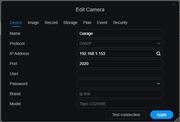
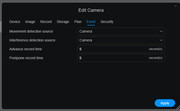
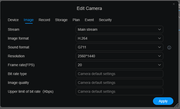
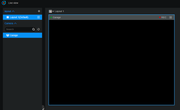
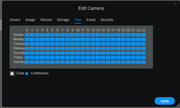
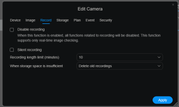
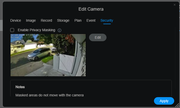
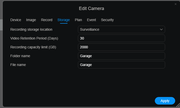
Images added showing camera config and "live" - weirdly 'security' tab config shows an image.
[url=https://postimg.cc/8sc9F0L4][img]https://i.postimg.cc/8sc9F0L4/Device.png[/img][/url]
[url=https://postimg.cc/BPjVdjq8][img]https://i.postimg.cc/BPjVdjq8/Event.png[/img][/url]
[url=https://postimg.cc/mhkJc57w][img]https://i.postimg.cc/mhkJc57w/Image.png[/img][/url]
[url=https://postimg.cc/0KzBLz8Q][img]https://i.postimg.cc/0KzBLz8Q/Live.png[/img][/url]
[url=https://postimg.cc/mhkJc57Q][img]https://i.postimg.cc/mhkJc57Q/PLan.png[/img][/url]
[url=https://postimg.cc/pyr496KJ][img]https://i.postimg.cc/pyr496KJ/Record.png[/img][/url]
[url=https://postimg.cc/G9tVB5vJ][img]https://i.postimg.cc/G9tVB5vJ/Security.png[/img][/url]
[url=https://postimg.cc/14X2gjD0][img]https://i.postimg.cc/14X2gjD0/Storage.png[/img][/url]
Current TOS version 6.0.694. Boot version 5.19
System has ben restarted since update of Security Manager with no change in status. Uptime 4:10:55:xx.
Camera has been 'deleted' and configured from scatch - no change.
Images added showing camera config and "live" - weirdly 'security' tab config shows an image.
[url=https://postimg.cc/8sc9F0L4][img]https://i.postimg.cc/8sc9F0L4/Device.png[/img][/url]
[url=https://postimg.cc/BPjVdjq8][img]https://i.postimg.cc/BPjVdjq8/Event.png[/img][/url]
[url=https://postimg.cc/mhkJc57w][img]https://i.postimg.cc/mhkJc57w/Image.png[/img][/url]
[url=https://postimg.cc/0KzBLz8Q][img]https://i.postimg.cc/0KzBLz8Q/Live.png[/img][/url]
[url=https://postimg.cc/mhkJc57Q][img]https://i.postimg.cc/mhkJc57Q/PLan.png[/img][/url]
[url=https://postimg.cc/pyr496KJ][img]https://i.postimg.cc/pyr496KJ/Record.png[/img][/url]
[url=https://postimg.cc/G9tVB5vJ][img]https://i.postimg.cc/G9tVB5vJ/Security.png[/img][/url]
[url=https://postimg.cc/14X2gjD0][img]https://i.postimg.cc/14X2gjD0/Storage.png[/img][/url]
Re: Post update issues
OK - I think this is might be a Chrome issue.
I've just tested on Edge and Duck Duck Go - and both show live and time line as they should. Neithr appears to be able to playback recordings in the native player though.
With Chrome, I've tried enableing hardware acceleration, and deleting the cache. Will test any other suggestions.
Edit: Just tested ignocnito mode and it worked fine - so something else somewhere in Chrome. All suggestions welcome.
Edit edit: Worked out how to delete all site specific sotered info (cookies, images, cache, etc) and Chrome now works - so no idea what had gone on here
I've just tested on Edge and Duck Duck Go - and both show live and time line as they should. Neithr appears to be able to playback recordings in the native player though.
With Chrome, I've tried enableing hardware acceleration, and deleting the cache. Will test any other suggestions.
Edit: Just tested ignocnito mode and it worked fine - so something else somewhere in Chrome. All suggestions welcome.
Edit edit: Worked out how to delete all site specific sotered info (cookies, images, cache, etc) and Chrome now works - so no idea what had gone on here


Re: Post update issues
Thank you for the update!
The issue with being unable to playback recordings in the native player is because it doesn't support H.265. You can either change the format to H.264 or consider using VLC for playback.
The issue with being unable to playback recordings in the native player is because it doesn't support H.265. You can either change the format to H.264 or consider using VLC for playback.
To contact our team, please send email to following addresses, remember to replace (at) with @
Technical team: support(at)terra-master.com(for technical support)
Service team: service(at)terra-master.com(for purchasing, return, replacement, RMA service)
Technical team: support(at)terra-master.com(for technical support)
Service team: service(at)terra-master.com(for purchasing, return, replacement, RMA service)
Re: Post update issues
So something weird is going on.
I came back to the main Chrome live surveilance page after a couple of hours and now the camera is displaying a black screen again.
Edge is fine.
What could be impacting on Chrome like this?
FWIW the recordings are H264 so not sure why the video player doesn't work - across browsers.
I came back to the main Chrome live surveilance page after a couple of hours and now the camera is displaying a black screen again.
Edge is fine.
What could be impacting on Chrome like this?
FWIW the recordings are H264 so not sure why the video player doesn't work - across browsers.
Re: Post update issues
To accurately identify and resolve the issue, I need to confirm a detail: Are the live view, recordings, and timeline all showing a black screen?
To contact our team, please send email to following addresses, remember to replace (at) with @
Technical team: support(at)terra-master.com(for technical support)
Service team: service(at)terra-master.com(for purchasing, return, replacement, RMA service)
Technical team: support(at)terra-master.com(for technical support)
Service team: service(at)terra-master.com(for purchasing, return, replacement, RMA service)
Re: Post update issues
Hi
On Chrome - recording and live are showing a black screen. Timeline appears to be working.
Using incognito on Chrome - recording is showing a black screen. Timeline and live are working.
On Edge - recording is showing a black screen. Timeline and live are working.
For all recording shows 'connection dots" and the screen with a camera icon (not black). I've tried leaving the playback for several minutes and there is no change. Downloading a recording allows it to be played in VLC.
MediaInfo (program) provides the following details about the file.
General
Complete name : D:\Downloads\Garage_1775635399_8.mp4
Format : MPEG-4
Format profile : Base Media
Codec ID : isom (isom/iso2/avc1/mp41)
File size : 218 MiB
Duration : 10 min 0 s
Overall bit rate : 3 041 kb/s
Frame rate : 20.028 FPS
Writing application : Lavf58.76.100
Video
ID : 1
Format : AVC
Format/Info : Advanced Video Codec
Format profile : Main@L5
Format settings : CABAC / 1 Ref Frames
Format settings, CABAC : Yes
Format settings, Reference frames : 1 frame
Format settings, GOP : M=1, N=40
Codec ID : avc1
Codec ID/Info : Advanced Video Coding
Duration : 9 min 59 s
Source duration : 9 min 58 s
Bit rate : 3 000 kb/s
Width : 2 560 pixels
Height : 1 440 pixels
Display aspect ratio : 16:9
Frame rate mode : Variable
Frame rate : 20.028 FPS
Minimum frame rate : 1.201 FPS
Maximum frame rate : 90 000.000 FPS
Color space : YUV
Chroma subsampling : 4:2:0
Bit depth : 8 bits
Scan type : Progressive
Bits/(Pixel*Frame) : 0.041
Stream size : 214 MiB (98%)
Source stream size : 214 MiB (98%)
Color range : Full
mdhd_Duration : 599764
Codec configuration box : avcC
Audio
ID : 2
Format : AAC LC
Format/Info : Advanced Audio Codec Low Complexity
Codec ID : mp4a-40-2
Duration : 10 min 0 s
Bit rate mode : Constant
Bit rate : 43.5 kb/s
Channel(s) : 2 channels
Channel layout : L R
Sampling rate : 8 000 Hz
Frame rate : 7.812 FPS (1024 SPF)
Compression mode : Lossy
Stream size : 3.11 MiB (1%)
Default : Yes
Alternate group : 1
On Chrome - recording and live are showing a black screen. Timeline appears to be working.
Using incognito on Chrome - recording is showing a black screen. Timeline and live are working.
On Edge - recording is showing a black screen. Timeline and live are working.
For all recording shows 'connection dots" and the screen with a camera icon (not black). I've tried leaving the playback for several minutes and there is no change. Downloading a recording allows it to be played in VLC.
MediaInfo (program) provides the following details about the file.
General
Complete name : D:\Downloads\Garage_1775635399_8.mp4
Format : MPEG-4
Format profile : Base Media
Codec ID : isom (isom/iso2/avc1/mp41)
File size : 218 MiB
Duration : 10 min 0 s
Overall bit rate : 3 041 kb/s
Frame rate : 20.028 FPS
Writing application : Lavf58.76.100
Video
ID : 1
Format : AVC
Format/Info : Advanced Video Codec
Format profile : Main@L5
Format settings : CABAC / 1 Ref Frames
Format settings, CABAC : Yes
Format settings, Reference frames : 1 frame
Format settings, GOP : M=1, N=40
Codec ID : avc1
Codec ID/Info : Advanced Video Coding
Duration : 9 min 59 s
Source duration : 9 min 58 s
Bit rate : 3 000 kb/s
Width : 2 560 pixels
Height : 1 440 pixels
Display aspect ratio : 16:9
Frame rate mode : Variable
Frame rate : 20.028 FPS
Minimum frame rate : 1.201 FPS
Maximum frame rate : 90 000.000 FPS
Color space : YUV
Chroma subsampling : 4:2:0
Bit depth : 8 bits
Scan type : Progressive
Bits/(Pixel*Frame) : 0.041
Stream size : 214 MiB (98%)
Source stream size : 214 MiB (98%)
Color range : Full
mdhd_Duration : 599764
Codec configuration box : avcC
Audio
ID : 2
Format : AAC LC
Format/Info : Advanced Audio Codec Low Complexity
Codec ID : mp4a-40-2
Duration : 10 min 0 s
Bit rate mode : Constant
Bit rate : 43.5 kb/s
Channel(s) : 2 channels
Channel layout : L R
Sampling rate : 8 000 Hz
Frame rate : 7.812 FPS (1024 SPF)
Compression mode : Lossy
Stream size : 3.11 MiB (1%)
Default : Yes
Alternate group : 1
Re: Post update issues
Additional info:
A second camera has been added - which worked fine last night.
This morning it has stopped working in live view.
Time line works for both, and recordings are still occuring.
This seems to be browser independent as live view for the second camera does not work for Duck Duck Go, or Edge. I also tested on a linux machine with a new Chrome profile and its the same there - so not Chrome or profile specific.
Native recording playback does not work on any machine or browser for any camera, but downloads work fine.
Let me know if there's anything I can try to assist testing/diagnosis.
A second camera has been added - which worked fine last night.
This morning it has stopped working in live view.
Time line works for both, and recordings are still occuring.
This seems to be browser independent as live view for the second camera does not work for Duck Duck Go, or Edge. I also tested on a linux machine with a new Chrome profile and its the same there - so not Chrome or profile specific.
Native recording playback does not work on any machine or browser for any camera, but downloads work fine.
Let me know if there's anything I can try to assist testing/diagnosis.
Re: Post update issues
I should say - I have sufficient workarounds that I'm not concered, but happy to help try wot work out what's going on.