
Hi there!
I am seeking guidance on my Terramaster F4-210.
I recently moved houses, so all my networking has changed. As a result, on TNAS PC, I get a request to update / modify the IP address of the NAS.
I get a prompt to type in the admin password and the IP address is automatically chosen / assigned.
I then get a 'loading' page on the new IP Address. Then a message comes saying "Checking file system... please wait. If abnormality found, the system will repair it, which can take several hours'.
For a few minutes, the NAS makes a lot of noises from the HDDs. After maybe 5-10 minutes, it goes a little quiet.
However, when I access the new IP Address, it doesn't work anymore and on TNAS PC the NAS has disappeared.
Is the NAS still trying to check / repair the file system?
[Help] New IP address after change in networking - 'checking file system'?


Re: [Help] New IP address after change in networking - 'checking file system'?
Regarding the issue of TerraMaster F4-210 being inaccessible after IP modification and showing "Checking file system" following a move and network environment change, here is the analysis and troubleshooting steps:
Problem Analysis
Troubleshooting Steps:
Please follow these steps to troubleshoot. Be patient and do not forcibly power off the device during the file system check.
Step 1: Observe if the TNAS has become quiet. Is the hard drive light still flashing frequently? If it is, wait until the hard drive light stops flashing before using TNAS PC to search for the device.
Step 2: Find the IP through the Router Management Backend
Since TNAS PC cannot find the device, the most direct method is to check the source.
If the device is not found in the router, or the subnets are not connected, please refer to this official troubleshooting guide.
Step 4: Patience During "Loading/Checking"
If the device is found but the TOS webpage remains in a Loading state, follow this official troubleshooting guide.
Step 5: Power-On Test Without Drives (to Determine Hardware and Boot System)
If the above steps fail to find the IP, we need to confirm that the NAS's basic boot is normal.
If not found: It may be due to a damaged built-in boot USB (Initboot) on the F4-210.
Problem Analysis
- File System Self-Check: Due to the power-off migration and abnormal disk plugging during the move, the system will automatically enter the file system scan process upon detecting an abnormal shutdown or startup. The noise from the hard drive is a result of the read/write head performing high-speed checks.
- Possible Causes for "Disappearance":
IP Segment Conflict/Change: The IP address automatically assigned by TNAS PC may conflict with existing devices on your new router, or the NAS may have acquired a different DHCP address after the self-check.
- Scan Hanging or Timeout: If the file system is damaged, the scanning process may cause the network service to temporarily stop responding.
- Inconsistent Network Segments: Your computer and NAS may currently not be in the same subnet (e.g., the computer is 192.168.1.x, while the NAS is 192.168.0.x).
Troubleshooting Steps:
Please follow these steps to troubleshoot. Be patient and do not forcibly power off the device during the file system check.
Step 1: Observe if the TNAS has become quiet. Is the hard drive light still flashing frequently? If it is, wait until the hard drive light stops flashing before using TNAS PC to search for the device.
Step 2: Find the IP through the Router Management Backend
Since TNAS PC cannot find the device, the most direct method is to check the source.
- Log in to the management interface of your new router (usually 192.168.1.1 or 192.168.0.1).
- Check the "Connected Devices List" or "DHCP Client List."
- Look for the TNAS device.
- If you find the new IP, try accessing it directly in another browser or in private mode by entering http://IP:8181.
If the device is not found in the router, or the subnets are not connected, please refer to this official troubleshooting guide.
Step 4: Patience During "Loading/Checking"
If the device is found but the TOS webpage remains in a Loading state, follow this official troubleshooting guide.
Step 5: Power-On Test Without Drives (to Determine Hardware and Boot System)
If the above steps fail to find the IP, we need to confirm that the NAS's basic boot is normal.
- Power off the TNAS and remove all hard drives (remember the order of the hard drives and mark the 1, 2, 3, 4 slots).
- Power on the device without the hard drives and wait for about 2 minutes.
- Observe if TNAS PC can find a device in the "Pending Initialization" state.
If not found: It may be due to a damaged built-in boot USB (Initboot) on the F4-210.
To contact our team, please send email to following addresses, remember to replace (at) with @
Technical team: support(at)terra-master.com(for technical support)
Service team: service(at)terra-master.com(for purchasing, return, replacement, RMA service)
Technical team: support(at)terra-master.com(for technical support)
Service team: service(at)terra-master.com(for purchasing, return, replacement, RMA service)
Re: [Help] New IP address after change in networking - 'checking file system'?
Thank you so much for the step by step guidance.
I will try to work through this carefully.
1. It has been around 8 hours since starting up the NAS. The drives are generally silent, but do occasionally seem to have some activity.
2. This is the odd part. On my router / backend, the NAS only shows up as a MAC address without any IP address. Picture: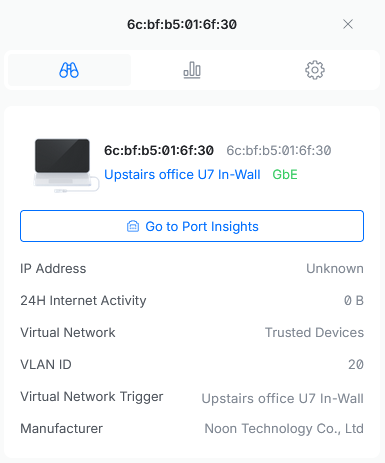 .
.
However, after boot, I am able to access the NAS when TNAS 'finds' it, but only for a few minutes before I lose the connection.
So, it looks:
- on boot up, TNAS is able to find the NAS and I am able to access it briefly using the IP Address that shows up on TNAS. There is still no IP address on my router / network switch (Unifi / Ubiquiti)
- then the NAS goes into File System Self-Check at which point I completely lose connection.
3. I will try these steps soon.
I will try to work through this carefully.
1. It has been around 8 hours since starting up the NAS. The drives are generally silent, but do occasionally seem to have some activity.
2. This is the odd part. On my router / backend, the NAS only shows up as a MAC address without any IP address. Picture:
. However, after boot, I am able to access the NAS when TNAS 'finds' it, but only for a few minutes before I lose the connection.
So, it looks:
- on boot up, TNAS is able to find the NAS and I am able to access it briefly using the IP Address that shows up on TNAS. There is still no IP address on my router / network switch (Unifi / Ubiquiti)
- then the NAS goes into File System Self-Check at which point I completely lose connection.
3. I will try these steps soon.
Re: [Help] New IP address after change in networking - 'checking file system'?
That link doesn't seem to be a guide on how to connect NAS to PC directly? Could you please check this? Thank you!EriChan wrote: ↑02 Apr 2026, 15:51
Step 3: Directly Connect the Computer to TNAS (to Exclude Network Environment Interference)
If the device is not found in the router, or the subnets are not connected, please refer to this official troubleshooting guide.
Re: [Help] New IP address after change in networking - 'checking file system'?
Forgive my oversight, please refer to this corresponding official troubleshooting guide for step three. Looking forward to your follow-up feedback!
To contact our team, please send email to following addresses, remember to replace (at) with @
Technical team: support(at)terra-master.com(for technical support)
Service team: service(at)terra-master.com(for purchasing, return, replacement, RMA service)
Technical team: support(at)terra-master.com(for technical support)
Service team: service(at)terra-master.com(for purchasing, return, replacement, RMA service)
Re: [Help] New IP address after change in networking - 'checking file system'?
Thank you so much for the link.
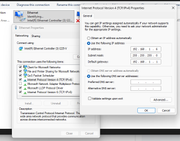
I connected the NAS directly to my PC and set up the IP address as per the link /guide:
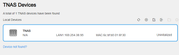
I then switched on the NAS again and during the first couple of minutes, TNAS recognises the NAS and I am am able to set a new IP after entering the password:
If I try to open that IP for TOS, I get this for the first couple of minutes:
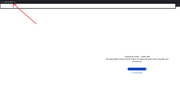
Then, TOS doesn't load:

Because the 'Loading' Page doesn't remain on screen, should I just move to step 5?
Thank you!
I connected the NAS directly to my PC and set up the IP address as per the link /guide:
I then switched on the NAS again and during the first couple of minutes, TNAS recognises the NAS and I am am able to set a new IP after entering the password:
If I try to open that IP for TOS, I get this for the first couple of minutes:
Then, TOS doesn't load:
Because the 'Loading' Page doesn't remain on screen, should I just move to step 5?
Thank you!

Re: [Help] New IP address after change in networking - 'checking file system'?
According to screenshots you have provided, it looks like file system check / repair did not succeed.
Please 1. refresh on TNAS PC and check if TNAS can be recognized.
2. if it can't be recognized, please follow our guide to troubleshoot viewtopic.php?f=75&t=2250
3. when you can find TNAS on TNAS PC, you may follow our instruction to repair file system manually viewtopic.php?f=75&t=2575
If it doesn't help, please visit our official site online chat for more help.
To contact our team, please send email to following addresses, remember to replace (at) with @
Technical team: support(at)terra-master.com(for technical support)
Service team: service(at)terra-master.com(for purchasing, return, replacement, RMA service)
Technical team: support(at)terra-master.com(for technical support)
Service team: service(at)terra-master.com(for purchasing, return, replacement, RMA service)
Re: [Help] New IP address after change in networking - 'checking file system'?
Thank you. I will try that out.
Can I just check something, does the order of HDDs matter? Thinking about it, I'm not 100% sure I inserted the HDDs in the same order
Can I just check something, does the order of HDDs matter? Thinking about it, I'm not 100% sure I inserted the HDDs in the same order
Re: [Help] New IP address after change in networking - 'checking file system'?
The TOS system can recognize and reassemble out-of-order hard drives under normal circumstances, but it is strongly recommended that you maintain the original slot order during daily use to ensure system stability and correct data mounting.
The file system check information you saw earlier was most likely triggered by protective file system scanning due to some abnormal factors during the relocation process.
Please continue to follow the guide and look forward to your updates!
To contact our team, please send email to following addresses, remember to replace (at) with @
Technical team: support(at)terra-master.com(for technical support)
Service team: service(at)terra-master.com(for purchasing, return, replacement, RMA service)
Technical team: support(at)terra-master.com(for technical support)
Service team: service(at)terra-master.com(for purchasing, return, replacement, RMA service)
Re: [Help] New IP address after change in networking - 'checking file system'?
Thank you!
I have finally removed the HDDs and connected the TNAS directly to the PC.
TNAS PC is able to find the TNAS and now there is a new IP (directly on the PC I guess?). When I log in, I get this:
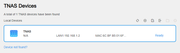
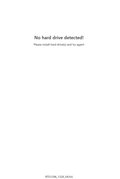
Is this good news? Does this mean it's a filesystem / partition issue that I can solve without data loss?
Thank you!
I have finally removed the HDDs and connected the TNAS directly to the PC.
TNAS PC is able to find the TNAS and now there is a new IP (directly on the PC I guess?). When I log in, I get this:
Is this good news? Does this mean it's a filesystem / partition issue that I can solve without data loss?
Thank you!