[Help] SCP fails unless using legacy mode (-O) - SFTP subsystem appears broken

SMB, NFS, FTP, web file manager and Rsync server.
Post Reply
User avatar
nenominal
Posts: 8
Joined: 20 Mar 2026, 15:37
Romania

[Help] SCP fails unless using legacy mode (-O) - SFTP subsystem appears broken

Post by nenominal »

Hi,

I have an F2-425 Plus running the latest TOS 6.x branch (6.0.794-01324) and I want to use scp to transfer files.

I'm trying to use scp to transfer files to/from my NAS, but it fails with "connection closed."
However, if I use scp -O (legacy mode), the transfer works fine. I've attached a screenshot showing both attempts.

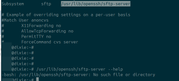
I looked into it and the issue seems to be with the SFTP subsystem. In sshd_config, the subsystem is configured to point to /usr/lib/openssh/sftp-server, but that file doesn't exist on the system.

The openssh-sftp-server package only installs /usr/sbin/sftpd, and when I run it with --help, it actually shows sshd usage — so it looks like it's not the right binary.

Is this a known issue, or is there something I need to configure differently to get normal SCP (non-legacy) and SFTP working?


Image

Image
User avatar
TMnight
TM Support
Posts: 181
Joined: 30 Sep 2022, 16:40

Re: [Help] SCP fails unless using legacy mode (-O) - SFTP subsystem appears broken

Post by TMnight »

Thank you for your feedback.
We have confirmed that this issue does exist and is related to compatibility. We recommend using scp -O as a temporary workaround for file transfers.

This issue has been reported to our product team and will be evaluated for optimization in a future update. We appreciate your patience and understanding.
To contact our team, please send email to following addresses, remember to replace (at) with @:
Technical team: support(at)terra-master.com(for technical support)
Service team: service(at)terra-master.com(for purchasing, return, replacement, RMA service)
Post Reply

Return to “File Services”