

Hello!
I replaced the old disks sequentially with larger disks, each time performing an online migration according to the instructions on the tos help website. After the first replacements, it was possible to expand the volume, but after the last two disk replacements, I did not expand after each replacement, and now when I press the increase volume button (the volume is set by the MAX button), it says the operation was completed successfully, but the volume was not increased.
[Help] I can't increase the volume size after replacing the disks


Re: [Help] I can't increase the volume size after replacing the disks
To pinpoint the root cause of the issue, I need to confirm the following key details with you:Youry wrote: ↑24 Mar 2026, 02:51 Hello!
I replaced the old disks sequentially with larger disks, each time performing an online migration according to the instructions on the tos help website. After the first replacements, it was possible to expand the volume, but after the last two disk replacements, I did not expand after each replacement, and now when I press the increase volume button (the volume is set by the MAX button), it says the operation was completed successfully, but the volume was not increased.
1. What type of RAID configuration is your storage pool using?
2. Please provide the capacity of each old hard drive and the capacity of the new hard drive.
Re: [Help] I can't increase the volume size after replacing the disks
I use TRAID and have swapped 2 and 4tb drives for 22 and 22tb
Re: [Help] I can't increase the volume size after replacing the disks
Based on the situation you described, I need to collect your system log files to identify and resolve the issue.
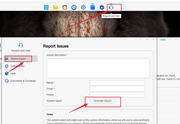
You can refer to the image-based report generation system and then send it to our email address ([email protected]). You can also attach the link to the forum in the email. I will continue to follow up on your issue afterwards.
Thank you for your understanding and cooperation. After you send the email, please be sure to come back to this post and reply to me with a sentence, such as "The email has been sent", so that I can immediately check and handle it in my email inbox.
You can refer to the image-based report generation system and then send it to our email address ([email protected]). You can also attach the link to the forum in the email. I will continue to follow up on your issue afterwards.
Thank you for your understanding and cooperation. After you send the email, please be sure to come back to this post and reply to me with a sentence, such as "The email has been sent", so that I can immediately check and handle it in my email inbox.