Duplicate Retension settings are different

TerraMaster Snapshot is a disaster recovery tool developed based on the BTRFS file system.
Post Reply
User avatar
rfbjr
Silver Member
Posts: 400
Joined: 16 May 2024, 23:43
United States of America

Duplicate Retension settings are different

Post by rfbjr »

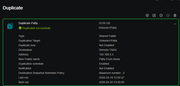
On my source NAS, here is the settings (Note number of retention)

Image

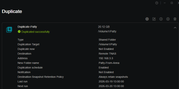
But the entry created on the Target NAS has a different value
Image

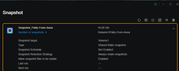
This is also on the target NAS (which is not on the source NAS)

Image
F6-424 & F4-425 Plus at 7.0.0777
F4-424 Pro also at 7.0.0777
D4-320
User avatar
Phil
TM Support
Posts: 91
Joined: 23 Feb 2026, 09:38
China

Re: Duplicate Retension settings are different

Post by Phil »

Based on the screenshots and information you provided, are you referring to an issue regarding the retention policy of snapshots generated by the synchronization task on the target device, which is inconsistent with your settings on the source device? Could you describe your problem in more detail?
User avatar
rfbjr
Silver Member
Posts: 400
Joined: 16 May 2024, 23:43
United States of America

Re: Duplicate Retension settings are different

Post by rfbjr »

Yes that is. If I look at the @snapshot folder on the source NAS, it has more than 3 already.
It the source is set to 3, the target setting should show the same and do the same. Target snapshot folder also has more than 3.
I was just pointing out the discrepancy. Bottom line, the duplication task does work as configured.
F6-424 & F4-425 Plus at 7.0.0777
F4-424 Pro also at 7.0.0777
D4-320
User avatar
Phil
TM Support
Posts: 91
Joined: 23 Feb 2026, 09:38
China

Re: Duplicate Retension settings are different

Post by Phil »

rfbjr wrote: 20 Mar 2026, 18:03 Yes that is. If I look at the @snapshot folder on the source NAS, it has more than 3 already.
It the source is set to 3, the target setting should show the same and do the same. Target snapshot folder also has more than 3.
I was just pointing out the discrepancy. Bottom line, the duplication task does work as configured.

Image
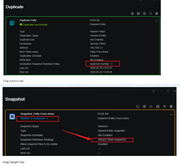
There is a policy conflict on your target device. Please refer to the image.

You can try modifying the policy and trying again.
User avatar
rfbjr
Silver Member
Posts: 400
Joined: 16 May 2024, 23:43
United States of America

Re: Duplicate Retension settings are different

Post by rfbjr »

That is my point. I didn't create the target setting. The Duplication task does it. I created the Duplication task on the Source NAS and set what I wanted, and it creates the entry on the Target.
You can't edit the setting of the Duplication task on the Target NAS. (I just double checked to make sure)
F6-424 & F4-425 Plus at 7.0.0777
F4-424 Pro also at 7.0.0777
D4-320
User avatar
rfbjr
Silver Member
Posts: 400
Joined: 16 May 2024, 23:43
United States of America

Re: Duplicate Retension settings are different

Post by rfbjr »

More info that might help. On the source NAS, there are only the entries that I created in the Duplicate section. The Snapshot section is empty. But on the target NAS, entries are created in the Duplicate section but also in the Snapshot section. Those Snapshot entries there I can edit, so I changed then to 3 retentions. I'll see what happens after the next scheduled run.

Image
F6-424 & F4-425 Plus at 7.0.0777
F4-424 Pro also at 7.0.0777
D4-320
Post Reply

Return to “Snapshot”