[Help] TerraSync does not show mnt or media folder

TerraSync is a cloud drive service application that helps users build their own private cloud drive services with their TNAS devices.
Post Reply
User avatar
jmiguelsn
Posts: 1
Joined: 17 Feb 2026, 03:06
Spain

[Help] TerraSync does not show mnt or media folder

Post by jmiguelsn »

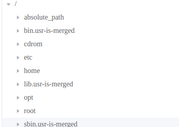
I'm trying to create a TerraSync task from content on a secondary disk mounted on /mnt or /media/ , but these folders don't appear in TerraSync explorer.
I thought could be permission issue but /opt folders is listed with same perms

there is same perms on /mnt /media and /opt

Image

but /mnt and /media does not appear
Image

How can I sync conent of this folders ?

Devices:
- Desktop PC
- OS: Linux Mint 22.3 - Xfce x64
- TNAS PC: 5.2.520
User avatar
Felix
TM Support
Posts: 105
Joined: 28 Jan 2026, 15:24
China

Re: [Help] TerraSync does not show mnt or media folder

Post by Felix »

We apologize, but your current operating system version is not supported by our TerraSync client. At this time, we only support Windows 10 version 2004 and later, Windows 11, macOS, and Ubuntu 20.04 and later. We recommend mounting your NAS locally and then using file backup software compatible with your operating system to perform the synchronization.
Post Reply

Return to “TerraSync”