
Please refresh GUI or restart your NAS, if it's same result, please update to us, we will verify in our lab.
TOS 7.0.0408 Beta (X86) is Released for Update
Re: TOS 7.0.0408 Beta (X86) is Released for Update
To contact our team, please send email to following addresses, remember to replace (at) with @
Technical team: support(at)terra-master.com(for technical support)
Service team: service(at)terra-master.com(for purchasing, return, replacement, RMA service)
Technical team: support(at)terra-master.com(for technical support)
Service team: service(at)terra-master.com(for purchasing, return, replacement, RMA service)


Re: TOS 7.0.0408 Beta (X86) is Released for Update
Restart NAS, update some version, refresh page. Same result.
F4-423


Re: TOS 7.0.0408 Beta (X86) is Released for Update
Maybe my question went unnoticed, so here it is again:
Update of my F2-221 to 7.0.0408:
Update: Operation Failed, Started update again: continued where it left off, with system restart
After reboot/ end of update: 2 Errors (/v2/storage/CheckCapacity and /v2/extstoragedevice/CheckUsbCapacity)
StoragePools/Volumes/Shares survived
After manual Reboot: USB SingleDisk "Raid Corrupted" !!
Mounted StoragePool
Volume corrupted, but OK after few secs
After manual Reboot: USB SingleDisk Raid Corrupted !!
Mounted StoragePool
Volume corrupted, but OK after few secs
Since it is a USB single Disk (SATA in USB-enclosure), RAID Corrupted is utterly nonsense?
I will just delete the StoragePool and build a new one.
Update/New Findings:
When I delete the volume and storage pool, after a reboot storage manager STILL tells me that the RAID (it's SingleDisk, ext4, One 4TB HDD in an USB enclosure) in the storage pool is corrupted.
So I connected the disk to a PC, removed all partitions, create a basic one and deleted that.
After connecting it to my NAS, storage manager saw an empty disk and let me create a smaller storage pool and volume.
After the reboot again: RAID is corrupted, and it expects a large size of the storage pool again.
Is there some residual info on my NAS that persists in the previous disk/storagepool configuration?
How/What should I whack where to make my NAS forget so I can reinstall my HDD?
Update:
I installed a new version of storage manager: Problem persisted..
Update of my F2-221 to 7.0.0408:
Update: Operation Failed, Started update again: continued where it left off, with system restart
After reboot/ end of update: 2 Errors (/v2/storage/CheckCapacity and /v2/extstoragedevice/CheckUsbCapacity)
StoragePools/Volumes/Shares survived
After manual Reboot: USB SingleDisk "Raid Corrupted" !!
Mounted StoragePool
Volume corrupted, but OK after few secs
After manual Reboot: USB SingleDisk Raid Corrupted !!
Mounted StoragePool
Volume corrupted, but OK after few secs
Since it is a USB single Disk (SATA in USB-enclosure), RAID Corrupted is utterly nonsense?
I will just delete the StoragePool and build a new one.
Update/New Findings:
When I delete the volume and storage pool, after a reboot storage manager STILL tells me that the RAID (it's SingleDisk, ext4, One 4TB HDD in an USB enclosure) in the storage pool is corrupted.
So I connected the disk to a PC, removed all partitions, create a basic one and deleted that.
After connecting it to my NAS, storage manager saw an empty disk and let me create a smaller storage pool and volume.
After the reboot again: RAID is corrupted, and it expects a large size of the storage pool again.
Is there some residual info on my NAS that persists in the previous disk/storagepool configuration?
How/What should I whack where to make my NAS forget so I can reinstall my HDD?
Update:
I installed a new version of storage manager: Problem persisted..
F5-221 - TOS7.0.1298 - 5x4TB TRAID - 1x4TB Single USB - 2x4TB HwRAID1 USB
F2-221 - TOS7.0.1298 - 2x3TB JBOD - 1x4TB Single USB
F2-221 - TOS7.0.1298 - 2x3TB JBOD - 1x4TB Single USB


Re: TOS 7.0.0408 Beta (X86) is Released for Update
My F2-424 updated successfully.
F5-221 TOS7.0.1278 - 4x4TB (Ironwolf) Traid
F2-424 TOS7.0.1278 - 2x500GB nvme (P3) Traid, 2x6TB HDD (HGST) Traid
F2-221 TOS7.0.1278 - 1x3TB Ext4, 1x4TB Btrfs
F2-425+ TOS7.0.1278 - 2x500GB nvme (P3) Traid, 2x6TB HDD (EXOS) Traid
F2-424 TOS7.0.1278 - 2x500GB nvme (P3) Traid, 2x6TB HDD (HGST) Traid
F2-221 TOS7.0.1278 - 1x3TB Ext4, 1x4TB Btrfs
F2-425+ TOS7.0.1278 - 2x500GB nvme (P3) Traid, 2x6TB HDD (EXOS) Traid
Re: TOS 7.0.0408 Beta (X86) is Released for Update
Have you at sometime used the USB drive as a system disk in a nas?
F5-221 TOS7.0.1278 - 4x4TB (Ironwolf) Traid
F2-424 TOS7.0.1278 - 2x500GB nvme (P3) Traid, 2x6TB HDD (HGST) Traid
F2-221 TOS7.0.1278 - 1x3TB Ext4, 1x4TB Btrfs
F2-425+ TOS7.0.1278 - 2x500GB nvme (P3) Traid, 2x6TB HDD (EXOS) Traid
F2-424 TOS7.0.1278 - 2x500GB nvme (P3) Traid, 2x6TB HDD (HGST) Traid
F2-221 TOS7.0.1278 - 1x3TB Ext4, 1x4TB Btrfs
F2-425+ TOS7.0.1278 - 2x500GB nvme (P3) Traid, 2x6TB HDD (EXOS) Traid


Re: TOS 7.0.0408 Beta (X86) is Released for Update
Not my TNS PC version had a problem, when i updated to newer version of TOS yerterday, the problem gone.... This is my TNAS PC version when the problem show (I know that Terra Master release update of TNAS PC and I'm in process to update).
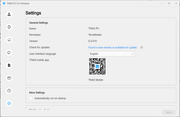
That's the status of my NAS from TNAS PC from 5.2.510 after I updating TOS version to newest version
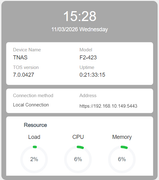
My conclusion is.... TOS version 7.0.0408 that make the problem, because after I updating to newer version the problem gone
Thanks for the update
Re: TOS 7.0.0408 Beta (X86) is Released for Update
Glad to hear the problem gone, sorry for the inconvenience, wish you a happy experience.
To contact our team, please send email to following addresses, remember to replace (at) with @
Technical team: support(at)terra-master.com(for technical support)
Service team: service(at)terra-master.com(for purchasing, return, replacement, RMA service)
Technical team: support(at)terra-master.com(for technical support)
Service team: service(at)terra-master.com(for purchasing, return, replacement, RMA service)
Re: TOS 7.0.0408 Beta (X86) is Released for Update
Yup - once it was used in my F5-221, but then in RAID5. But this disk was then, and now after the update, cleared - all partitions removed.
Before this update it was happily functioning as SingleDisk in USBenclosure. Although the last 3or4 updates if had to rebuild the volume...
But you suggest that there's still something on the disk? How to proceed then?
F5-221 - TOS7.0.1298 - 5x4TB TRAID - 1x4TB Single USB - 2x4TB HwRAID1 USB
F2-221 - TOS7.0.1298 - 2x3TB JBOD - 1x4TB Single USB
F2-221 - TOS7.0.1298 - 2x3TB JBOD - 1x4TB Single USB
Re: TOS 7.0.0408 Beta (X86) is Released for Update
It can sometimes happen that just 'removing partitions' does not always do enough. Search "superblock" on this forum. The long-winded fix, typically, is a secure wipe (writing 'zeros and or ones' across the drive). Other methods may depend on what tools you have available and access to the drive in question. {I usually use a 3rd party partition manager on Windows as I have an 'old-fashioned' desktop with drive caddies available.}
F5-221 TOS7.0.1278 - 4x4TB (Ironwolf) Traid
F2-424 TOS7.0.1278 - 2x500GB nvme (P3) Traid, 2x6TB HDD (HGST) Traid
F2-221 TOS7.0.1278 - 1x3TB Ext4, 1x4TB Btrfs
F2-425+ TOS7.0.1278 - 2x500GB nvme (P3) Traid, 2x6TB HDD (EXOS) Traid
F2-424 TOS7.0.1278 - 2x500GB nvme (P3) Traid, 2x6TB HDD (HGST) Traid
F2-221 TOS7.0.1278 - 1x3TB Ext4, 1x4TB Btrfs
F2-425+ TOS7.0.1278 - 2x500GB nvme (P3) Traid, 2x6TB HDD (EXOS) Traid
Re: TOS 7.0.0408 Beta (X86) is Released for Update
Will give it a try. Thanks!!!Gremlin wrote: ↑12 Mar 2026, 09:32It can sometimes happen that just 'removing partitions' does not always do enough. Search "superblock" on this forum. The long-winded fix, typically, is a secure wipe (writing 'zeros and or ones' across the drive). Other methods may depend on what tools you have available and access to the drive in question. {I usually use a 3rd party partition manager on Windows as I have an 'old-fashioned' desktop with drive caddies available.}
F5-221 - TOS7.0.1298 - 5x4TB TRAID - 1x4TB Single USB - 2x4TB HwRAID1 USB
F2-221 - TOS7.0.1298 - 2x3TB JBOD - 1x4TB Single USB
F2-221 - TOS7.0.1298 - 2x3TB JBOD - 1x4TB Single USB