

Hi everyone,
I am using the TerraMaster F4-425 Plus NAS, running the latest version of TOS and the latest Surveillance Manager app.
I have connected a Tapo C200C and a Mercusys MC200 camera via ONVIF on port 2020.
The system correctly detects and shows the manufacturer and model name, and the video feed/recording works very well. However, I am unable to use the PTZ controls to rotate the cameras.
Does anyone know how to fix this?
Thanks.
PTZ controls not working with Tapo and Mercusys cameras (ONVIF)


Re: PTZ controls not working with Tapo and Mercusys cameras (ONVIF)
Hello, we need to confirm the following with you:
1. Which TOS system version is the latest Terms of Service? For example: 6.0.794;
2. You mentioned that you can't use PTZ control to rotate the camera? Where exactly is this issue located? Please provide a screenshot.
We will further clarify this issue. Thank you for your understanding and support.
To contact our team, please send email to following addresses. "(at)" = "@"
Technical team: support(at)terra-master.com
Service team: service(at)terra-master.com
Technical team: support(at)terra-master.com
Service team: service(at)terra-master.com


Re: PTZ controls not working with Tapo and Mercusys cameras (ONVIF)
I have the same situation. PTZ controls within the app do not work for my Tapo C236 and C216 cameras. They also do not work for a BESDERSEC PTZ camera with model info of XM533_X3-WQ-B_8M. All cameras are accessed via ONVIF protocol.
All these cameras respond properly to PTZ commands from their own apps and also from generic apps like IP CENTCOM V 4.63.115 and Onvier V21.39
I am using Surveillance Manager 1.0.099 (provided by Terramaster tech support), running TOS 6.0.794 on an F2-423.
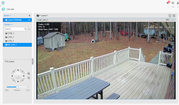
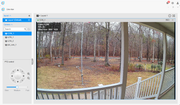
Below are screenshots of live view with a single camera focused. Clicking on the PTZ control has no effect.
All these cameras respond properly to PTZ commands from their own apps and also from generic apps like IP CENTCOM V 4.63.115 and Onvier V21.39
I am using Surveillance Manager 1.0.099 (provided by Terramaster tech support), running TOS 6.0.794 on an F2-423.
Below are screenshots of live view with a single camera focused. Clicking on the PTZ control has no effect.
F2-423 TOS 7.0.1298 20GB RAM, 2x NVMe drives (.25TB + 1TB JBOD as Volume1), 2x 12TB TRAID as Volume2 D4-320 4x 8TB TRAID as Volume3


Re: PTZ controls not working with Tapo and Mercusys cameras (ONVIF)
Thanks for your detailed feedback. Please answer the following questions to assist with the analysis:
- Is it that clicking the PTZ control button directly has no effect, or is it another issue?
- Has the camera been set up with a patrol task?
To contact our team, please send email to following addresses, remember to replace (at) with @
Technical team: support(at)terra-master.com(for technical support)
Service team: service(at)terra-master.com(for purchasing, return, replacement, RMA service)
Technical team: support(at)terra-master.com(for technical support)
Service team: service(at)terra-master.com(for purchasing, return, replacement, RMA service)
Re: PTZ controls not working with Tapo and Mercusys cameras (ONVIF)
Clicking the ptz control points has no effect. None of the cameras are in patrol mode.
F2-423 TOS 7.0.1298 20GB RAM, 2x NVMe drives (.25TB + 1TB JBOD as Volume1), 2x 12TB TRAID as Volume2 D4-320 4x 8TB TRAID as Volume3

Re: PTZ controls not working with Tapo and Mercusys cameras (ONVIF)
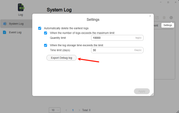
Please follow the steps shown in the screenshot below to export the Debug logs and send them to us at [email protected]. This will help us locate and resolve the issue more efficiently.
To contact our team, please send email to following addresses, remember to replace (at) with @:
Technical team: support(at)terra-master.com(for technical support)
Service team: service(at)terra-master.com(for purchasing, return, replacement, RMA service)
Technical team: support(at)terra-master.com(for technical support)
Service team: service(at)terra-master.com(for purchasing, return, replacement, RMA service)
Re: PTZ controls not working with Tapo and Mercusys cameras (ONVIF)
email sent with link to debug logs
F2-423 TOS 7.0.1298 20GB RAM, 2x NVMe drives (.25TB + 1TB JBOD as Volume1), 2x 12TB TRAID as Volume2 D4-320 4x 8TB TRAID as Volume3

Re: PTZ controls not working with Tapo and Mercusys cameras (ONVIF)
In case you haven't received the email. The shared file you provided is unavailable—perhaps a setting was missed? Please resubmit the logs or provide them through an alternative method.
To contact our team, please send email to following addresses, remember to replace (at) with @:
Technical team: support(at)terra-master.com (for technical support)
Service team: service(at)terra-master.com (for purchasing, return, replacement, RMA service)
Technical team: support(at)terra-master.com (for technical support)
Service team: service(at)terra-master.com (for purchasing, return, replacement, RMA service)
Re: PTZ controls not working with Tapo and Mercusys cameras (ONVIF)
Although all support ONVIF, there may be differences in the completeness of ONVIF support and the degree of customization among various camera manufacturers.
Regarding PTZ control, the logs can only display limited information. It is recommended that you consider scheduling an engineer for remote troubleshooting via Live Chat on the official website.
Please remember to include the forum post URL and your nickname.
Regarding PTZ control, the logs can only display limited information. It is recommended that you consider scheduling an engineer for remote troubleshooting via Live Chat on the official website.
Please remember to include the forum post URL and your nickname.
To contact our team, please send email to following addresses, remember to replace (at) with @:
Technical team: support(at)terra-master.com (for technical support)
Service team: service(at)terra-master.com (for purchasing, return, replacement, RMA service)
Technical team: support(at)terra-master.com (for technical support)
Service team: service(at)terra-master.com (for purchasing, return, replacement, RMA service)