Engage in discussions, seek assistance, and report issues related to client applications, including: TNAS PC for Windows and macOS, TNAS mobile for iOS and Android, as well as smart TV applications and clients.
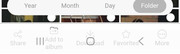
With TNAS Mobile on Android all the bottom menus are behind the default Android/Samsung bottom menu options so they are impossible to access. This is the only app I've seen do this. The only way I've found to access the TNAS mobile bottom menu is to activate the gesture navigation so the Android menu bar disappears.
Please fix!