I have 2 F5-221 NAS devices. I have successfully installed TOS7 on the older device but the newer one will not boot after attempting to install TOS7. I have opened up both units to see what differences there are and here is what I know so far:
Older NAS
1) Older unit has a sticker on the "motherboard" stating TM-J3355-2G2L V2.0 and another sticker with 000-F5221-FBA008-0001
2) Older unit has a MAPL0304V16 BIOS
3) Older unit has no additional RAM
4) Successfully upgraded to TOS7 392
Newer NAS
1) Newer unit has a sticker stating TM-J3355-2G2L V3.0 and another sticker with 000-F5221-FBA002-2000
2) Newer unit has a MAPL0304V22
3) New unit has a 2GB RAM chip installed for 8 months without issue
4) will not re-boot when upgrading to TOS7 392 (tried using both .ins and .bz2 methods over 10 times).
Any idea why the older one works and the newer one doesn't???
[Help] I have 2 F5-221 devices but only 1 will update to TOS7 [SOLVED]


Re: [Help] I have 2 F5-221 devices but only 1 will update to TOS7
Why the repost?
F5-221 TOS7.0.1201 - 4x4TB (Ironwolf) Traid
F2-424 TOS7.0.1278 - 2x500GB nvme (P3) Traid, 2x6TB HDD (HGST) Traid
F2-221 TOS7.0.1278 - 1x3TB Ext4, 1x4TB Btrfs
F2-425+ TOS7.0.1278 - 2x500GB nvme (P3) Traid, 2x6TB HDD (EXOS) Traid
F2-424 TOS7.0.1278 - 2x500GB nvme (P3) Traid, 2x6TB HDD (HGST) Traid
F2-221 TOS7.0.1278 - 1x3TB Ext4, 1x4TB Btrfs
F2-425+ TOS7.0.1278 - 2x500GB nvme (P3) Traid, 2x6TB HDD (EXOS) Traid


Re: [Help] I have 2 F5-221 devices but only 1 will update to TOS7
Can the new NAS hear a beep sound when starting up? Normally, when powering on an empty machine, you will hear one self-test beep followed by three beeps.
To contact our team, please send email to following addresses, remember to replace (at) with @
Technical team: support(at)terra-master.com(for technical support)
Service team: service(at)terra-master.com(for purchasing, return, replacement, RMA service)
Technical team: support(at)terra-master.com(for technical support)
Service team: service(at)terra-master.com(for purchasing, return, replacement, RMA service)
Re: [Help] I have 2 F5-221 devices but only 1 will update to TOS7
As mentioned in the previous post, which image file did you use to create the boot system? When starting up, does the monitor display a prompt indicating 'boot from init'? Please confirm that your current boot order is set to TOS first.
To contact our team, please send email to following addresses, remember to replace (at) with @
Technical team: support(at)terra-master.com(for technical support)
Service team: service(at)terra-master.com(for purchasing, return, replacement, RMA service)
Technical team: support(at)terra-master.com(for technical support)
Service team: service(at)terra-master.com(for purchasing, return, replacement, RMA service)
Re: [Help] I have 2 F5-221 devices but only 1 will update to TOS7
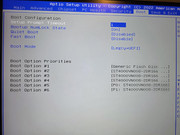
Where do I do that? I installed a monitor and keyboard so I can see the boot & install process. The BIOS boot process list starts with Generic USB, then the last 3 of the 5 drives install then lastly P0 and P1. The boot always says "from INIT unless I select P0: manually on each restart of the system.

Re: [Help] I have 2 F5-221 devices but only 1 will update to TOS7
Thanks for your detailed feedback and cooperation. Please try the following steps to help us accurately locate and resolve the issue:
Boot -> Boot Mode
CSM Support
- Start the new TNAS without installing any hard drives. Pay attention to whether there are three consecutive beeps within 1-3 minutes after the first beep.
- Check and compare the BIOS settings between the old and new NAS units, focusing on the following three options. If there are any differences, try to switch the new machine to the same mode as the old one:
Boot -> Boot Mode
CSM Support
To contact our team, please send email to following addresses, remember to replace (at) with @
Technical team: support(at)terra-master.com(for technical support)
Service team: service(at)terra-master.com(for purchasing, return, replacement, RMA service)
Technical team: support(at)terra-master.com(for technical support)
Service team: service(at)terra-master.com(for purchasing, return, replacement, RMA service)
Re: [Help] I have 2 F5-221 devices but only 1 will update to TOS7
the older NAS has BIOS V16 and does have CSM Support but the newer NAS has BIOS V22 and it does not list CSM in the BIOS settings. All SATA & Boot options and the same on both NAS'EriChan wrote: ↑23 Feb 2026, 21:54 Thanks for your detailed feedback and cooperation. Please try the following steps to help us accurately locate and resolve the issue:
- Start the new TNAS without installing any hard drives. Pay attention to whether there are three consecutive beeps within 1-3 minutes after the first beep.
Advanced -> SATA Configuration
- Check and compare the BIOS settings between the old and new NAS units, focusing on the following three options. If there are any differences, try to switch the new machine to the same mode as the old one:
Boot -> Boot Mode
CSM Support

Re: [Help] I have 2 F5-221 devices but only 1 will update to TOS7
The problem may be coming from the boot partition. You can connect an HDMI monitor before you boot NAS and see where it gets stuck after a restart or boot failure.
To contact our team, please send email to following addresses, remember to replace (at) with @:
Technical team: support(at)terra-master.com (for technical support)
Service team: service(at)terra-master.com (for purchasing, return, replacement, RMA service)
Technical team: support(at)terra-master.com (for technical support)
Service team: service(at)terra-master.com (for purchasing, return, replacement, RMA service)
Re: [Help] I have 2 F5-221 devices but only 1 will update to TOS7
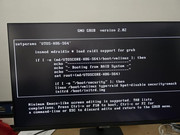
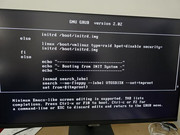
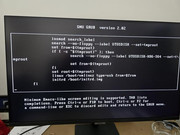
I did this and the last step in the boot process is to execute a script called "UTOS-X86-S64" (see pictures.) On the failing NAS this script always branches to "Booting from INIT System". The working NAS branches to "Booting from RAID System"