Regarding the issues you've encountered, here is a detailed explanation and suggestions for each:
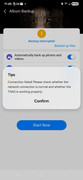
1. **Regarding Interrupted Photo Backup**
When your phone is locked or you switch to another app, the Android/iOS system may pause or terminate the background process of TNAS mobile to save battery, which can cause the photo backup task to stop. This is a normal mechanism of the mobile operating system.
2. **Regarding VPN and Android CarPlay Conflict**
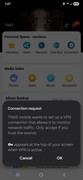
The VPN feature is designed to help you access your home NAS faster and more stably when you are on an external network.
Please note that enabling a global VPN on your phone **may affect** the normal connection of Android CarPlay. This is a system-level limitation and currently unavoidable.
**Suggestion**: If you need to use CarPlay in your vehicle, you can first **exit the TNAS mobile app** on your phone to temporarily disconnect the VPN. After you finish using CarPlay, you can reopen the app.
3. **How to Disable VPN for TNAS Mobile**
If you want to disable VPN specifically for TNAS mobile, the general steps are: Go to your phone's **Settings** > **Network & Internet** or **Connections** > **VPN**. In the list of configured VPN connections, find the one corresponding to TNAS mobile and disable or delete it.
4. **Regarding Remote Access Prompts Without VPN**
When accessing remotely without enabling VPN, due to complex network environments, the app is more likely to prompt "network connection error" due to poor connectivity. The VPN service is provided precisely to simplify this connection process and improve success rates.
To contact our team, please send email to following addresses, remember to replace (at) with @
Technical team: support(at)terra-master.com (for technical support)
Service team: service(at)terra-master.com (for purchasing, return, replacement, RMA service)