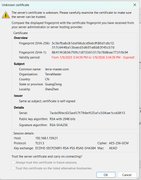
Regarding the terra-master.com certificate, here is the update method.
Please go to TOS Control Panel - General Settings - Security - Certificates, select the 'terra-master.com' certificate, and then click the lit 'Update' button.
To contact our team, please send email to following addresses, remember to replace (at) with @:
Technical team: support(at)terra-master.com (for technical support)
Service team: service(at)terra-master.com (for purchasing, return, replacement, RMA service)
Thank you so much for your patient clarification and for the time and effort you've invested.
The plan is not currently displayed in the system, but please rest assured!
We have recorded the details of your request and will forward it to the product team for priority evaluation before the end of today's workday. We will keep you informed of any new developments as soon as possible. Thank you for your understanding and support.
To contact our team, please send email to following addresses. "(at)" = "@"
Technical team: support(at)terra-master.com
Service team: service(at)terra-master.com