[Help] Idle Disk usage every 10 seconds

CPU, memory, fan, process, services status, system log, tempreture
Post Reply
User avatar
FatherOfMayhem
Posts: 4
Joined: 06 Jul 2022, 21:15
Great Britain

[Help] Idle Disk usage every 10 seconds

Post by FatherOfMayhem »

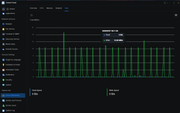
Every 10 seconds or so the disk make a noise.

Current TOS version 7.0.0403
BIOS/InitBoot version MTWL0101.V04
Model F2-425+
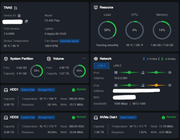
2 x 8TB Disks
1 X NVME for hypercache

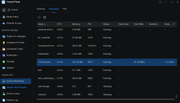
I have watched the services and see TOS Daemon doing something at the same time every time!

Its frustrating sitting and listening to this constant click all day. The system is a few months old so should have synced by now.... I have read about 'Lazy initialisation' sometimes causing this but no fix?

I can disable all applications abut nothing changes. any ideas how to make this thing sleep!!!

Image

Image

Image
User avatar
TMroy
TM Support
Posts: 3060
Joined: 10 Mar 2020, 14:04
China

Re: [Help] Idle Disk usage every 10 seconds

Post by TMroy »

Did you enable debug mode or continuous system resources monitor?
To contact our team, please send email to following addresses, remember to replace (at) with @:
Support team: support(at)terra-master.com (for technical support only)
Service team: service(at)terra-master.com (for purchasing, return, replacement, RMA service)
User avatar
FatherOfMayhem
Posts: 4
Joined: 06 Jul 2022, 21:15
Great Britain

Re: [Help] Idle Disk usage every 10 seconds

Post by FatherOfMayhem »

No neither.
I tried continuous monitor on the disk for more info but there was nothing valuable there. Its not off
User avatar
OrionXie
TM Support
Posts: 151
Joined: 14 Apr 2025, 18:30
Saudi Arabia

Re: [Help] Idle Disk usage every 10 seconds

Post by OrionXie »

FatherOfMayhem wrote: 07 Feb 2026, 19:47
If continuous resource monitoring is enabled, try disabling it and observe after a while. You should be able to see the system daemon running in your processes list. You can also try using the hard drive hibernation function: Control Panel - General Settings - Hardware and Power - Disk Hibernation.
To contact our team, please send email to following addresses. "(at)" = "@"
Technical team: support(at)terra-master.com
Service team: service(at)terra-master.com
User avatar
FatherOfMayhem
Posts: 4
Joined: 06 Jul 2022, 21:15
Great Britain

Re: [Help] Idle Disk usage every 10 seconds

Post by FatherOfMayhem »

OrionXie wrote: 07 Feb 2026, 23:17
FatherOfMayhem wrote: 07 Feb 2026, 19:47
If continuous resource monitoring is enabled, try disabling it and observe after a while. You should be able to see the system daemon running in your processes list. You can also try using the hard drive hibernation function: Control Panel - General Settings - Hardware and Power - Disk Hibernation.
Continuous resource monitoring is not active on any of the resources.
Enable built-in disk hibernation is also active and I have tried changing timings from 10min to 15 etc. Still ticks every 10 seconds
User avatar
Gremlin
Gold Member
Posts: 1627
Joined: 02 Dec 2022, 22:31
Great Britain

Re: [Help] Idle Disk usage every 10 seconds

Post by Gremlin »

If your single nvme is dedicated to hyper-cache, then the operating system is on the hdd (one or both). The linux based os is always "doing something", even if it is only "yeah, I'm still here". Get rid of hyper-cache and move o/s to nvme. It won't stop the activity, but it will reduce the "moving parts". I don't know the internals of hyper-cache, but it may even be causing the activity if is moving stuff from/to the cache or checking for potential moves. I doubt if hyper-cache actually has that much benefit that could be noticed.
Alternatively buy another nvme for the o/s.
F5-221 TOS7.0.0777 - 4x4TB (Ironwolf) Traid
F2-424 TOS7.0.0777 - 2x500GB nvme (P3) Traid, 2x6TB HDD (HGST) Traid
F2-221 TOS7.0.0777 - 1x3TB Ext4, 1x4TB Btrfs
F2-425+ TOS7.0.0777 - 2x500GB nvme (P3) Traid, 2x6TB HDD (EXOS) Traid
User avatar
TMjack
TM Support
Posts: 185
Joined: 27 Oct 2020, 08:41

Re: [Help] Idle Disk usage every 10 seconds

Post by TMjack »

The current TOS 7 version has a defect where the system disk cannot enter sleep mode, and this issue is currently being fixed. At this stage, only non-system disks are supported for entering sleep mode. Based on the information you provided, the TOS system should be installed on a hard drive.
To contact our team, please send email to following addresses, remember to replace (at) with @
Technical team: support(at)terra-master.com (for technical support)
Service team: service(at)terra-master.com (for purchasing, return, replacement, RMA service)
User avatar
FatherOfMayhem
Posts: 4
Joined: 06 Jul 2022, 21:15
Great Britain

Re: [Help] Idle Disk usage every 10 seconds

Post by FatherOfMayhem »

Gremlin wrote: 08 Feb 2026, 19:19 If your single nvme is dedicated to hyper-cache, then the operating system is on the hdd (one or both). The linux based os is always "doing something", even if it is only "yeah, I'm still here". Get rid of hyper-cache and move o/s to nvme. It won't stop the activity, but it will reduce the "moving parts". I don't know the internals of hyper-cache, but it may even be causing the activity if is moving stuff from/to the cache or checking for potential moves. I doubt if hyper-cache actually has that much benefit that could be noticed.
Alternatively buy another nvme for the o/s.
Thank you, I have moved the System Disk to the NVME and removed the Hypercache.
No difference yet but will monitor the current bug that is there apparently.
Thanks
Post Reply

Return to “System Resources”