[Help] TOS 7 Access rights problem  [SOLVED]

Permissions, Users, Uear groups, shared folders, LDAP/domain
Post Reply
User avatar
snapsh0t
Posts: 64
Joined: 19 Oct 2025, 03:23
Great Britain

[Help] TOS 7 Access rights problem

Post by snapsh0t »

I updated my F2-425 Plus from TOS 6.0.794 to 7.0.0299 then to 7.0.0392. I note it's now updated to 7.0.0398.
I now have a problem with almost half my shared folders where, if I map them with my user ID, I can only see the top-level folders, getting a permission error when I try to see the files and sub-folders inside them. If I map them with the admin ID then I have full access to the files and sub-folders.
My user ID is a member of the admin group and I've been through all the combinations of folder/group/user access rights I can find to make sure they're consistent.

Accessing the NAS from fully patched W10 & W11 PCs.
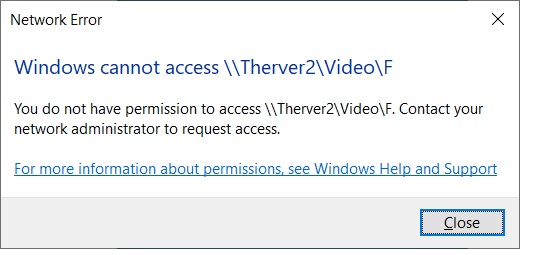
Image

So what have I missed?
F2-425 Plus, 16GB RAM, 2 x 500GB WD SN700 EXT4 RAID1, 2 x 18TB WD Red Pro EXT4 RAID1, TOS 7.0.<latest>
User avatar
CursaYang
TM Support
Posts: 740
Joined: 06 Jan 2025, 16:34
China

Re: [Help] TOS 7 Access rights problem  [SOLVED]

Post by CursaYang »

If you are in file management and manually click to replace the permissions of subfolders with those of the top-level folder, can you access it normally?
To contact our team, please send email to following addresses, remember to replace (at) with @

Technical team: support(at)terra-master.com(for technical support)
Service team: service(at)terra-master.com(for purchasing, return, replacement, RMA service)
User avatar
snapsh0t
Posts: 64
Joined: 19 Oct 2025, 03:23
Great Britain

Re: [Help] TOS 7 Access rights problem

Post by snapsh0t »

Thank you, that fixed it. Presumably not everything filtered down when the permissions were converted from TOS 6 to 7.
F2-425 Plus, 16GB RAM, 2 x 500GB WD SN700 EXT4 RAID1, 2 x 18TB WD Red Pro EXT4 RAID1, TOS 7.0.<latest>
Post Reply

Return to “Privileges”