

With a monitor attached to the unit which is running TOS 7 v398 when I boot the unit sometimes after the TerraMaster logo appears it takes over a minute before the Grub/Boot menu appears, other times less than 15-20 seconds. Does the delay mean anything?
Sometimes the HDMI console will show unable to start Journal Service, when this happens the WebGui as well as mobile client will timeout when attempting to logon. Even Putty will prompt for username but never shows the password prompt.
Only thing left is to power off the unit, then back on. (Always afraid of the RAID re-sync)
My other question is, there some sort of hardware diagnosis which could be run? The counter argument is no issues like this at all with TOS 6.
[Discussion] F4-424 Pro Boot time
[Discussion] F4-424 Pro Boot time
F6-424 & F4-425 Plus at 7.0.1298
F4-424 Pro (x2) at 7.0.1298
D4-320 (Offline until I can afford more HDDs)
F4-424 Pro (x2) at 7.0.1298
D4-320 (Offline until I can afford more HDDs)

Re: [Discussion] F4-424 Pro Boot time
Have you installed TOS on both the HDD and SSD? There is a significant difference in boot time between the two types of disks.
Regarding 'Even Putty will prompt for username but never shows the password prompt,' could you please provide a photo to check the specific situation?
Regarding the other anomalies you mentioned, if possible, we hope you can provide photos or video. You can also check the load status of CPU/RAM/Disk/Network/processes using Linux universal commands via HDMI and USB keyboard.(If you finally login in successfully)
By the way, is the time from startup to hearing the first beep (RAM self-test passed) fixed?
Regarding 'Even Putty will prompt for username but never shows the password prompt,' could you please provide a photo to check the specific situation?
Regarding the other anomalies you mentioned, if possible, we hope you can provide photos or video. You can also check the load status of CPU/RAM/Disk/Network/processes using Linux universal commands via HDMI and USB keyboard.(If you finally login in successfully)
By the way, is the time from startup to hearing the first beep (RAM self-test passed) fixed?
To contact our team, please send email to following addresses, remember to replace (at) with @:
Technical team: support(at)terra-master.com (for technical support)
Service team: service(at)terra-master.com (for purchasing, return, replacement, RMA service)
Technical team: support(at)terra-master.com (for technical support)
Service team: service(at)terra-master.com (for purchasing, return, replacement, RMA service)
Re: [Discussion] F4-424 Pro Boot time
1) I don't have TOS on the SSD, never did. (presently SSD for Hypercache) **Unless the system for some reason thinks the TOS is on the SSD and waits a bit?
I have this video and one screen shot. The screen shot is when you can't logon or putty in.
I will record more.
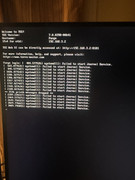
The mov file I will post of my shared link. https://1drv.ms/f/s!AgP4K-RskQ9MjLwJvJG ... Q?e=2GWq4N
Also, you mentioned the first beep I will check that, I don't remember when I hear the beep.
I have this video and one screen shot. The screen shot is when you can't logon or putty in.
I will record more.
The mov file I will post of my shared link. https://1drv.ms/f/s!AgP4K-RskQ9MjLwJvJG ... Q?e=2GWq4N
Also, you mentioned the first beep I will check that, I don't remember when I hear the beep.
F6-424 & F4-425 Plus at 7.0.1298
F4-424 Pro (x2) at 7.0.1298
D4-320 (Offline until I can afford more HDDs)
F4-424 Pro (x2) at 7.0.1298
D4-320 (Offline until I can afford more HDDs)
Re: [Discussion] F4-424 Pro Boot time
Ok I upload into my share, two videos. One after the unit was powered off for ~2hrs. The beep is heard with a few seconds after powering the unit on.
One thing I hear what I think is the attempt to read a disk(s) but not, not a clicking noise when there are read errors. It did that three times before the boot menu appears. The other video is just a normal reboot from the webgui.
The drives are 4x Iron Wolf Pro 20TB. I hope it's not them somehow.
What I can do if we get snowed in again this weekend is I have 2 8tb iron wolf, remove all 4 20tb and build new on the 2-8tb, bring it all the way to v398 and see if I get the same results. Worth a shot. Thing is my F4-425 Plus also has 4x20TB Iron and no issues at all on that unit.
One thing I hear what I think is the attempt to read a disk(s) but not, not a clicking noise when there are read errors. It did that three times before the boot menu appears. The other video is just a normal reboot from the webgui.
The drives are 4x Iron Wolf Pro 20TB. I hope it's not them somehow.
What I can do if we get snowed in again this weekend is I have 2 8tb iron wolf, remove all 4 20tb and build new on the 2-8tb, bring it all the way to v398 and see if I get the same results. Worth a shot. Thing is my F4-425 Plus also has 4x20TB Iron and no issues at all on that unit.

F6-424 & F4-425 Plus at 7.0.1298
F4-424 Pro (x2) at 7.0.1298
D4-320 (Offline until I can afford more HDDs)
F4-424 Pro (x2) at 7.0.1298
D4-320 (Offline until I can afford more HDDs)
Re: [Discussion] F4-424 Pro Boot time
Finally (maybe) a useful syslog you can review.
I have the 424 booting from the M.2 SSD now and re-mounted the 4x20TB without losing any data (all backed up anyway)
Booting from the M2 obviosity is way faster.
Don't ask about the mixed up vol/storage pool
Syslog in my shared link: ups-syslog
I'm done tinkering or making things worse (for now)
I have the 424 booting from the M.2 SSD now and re-mounted the 4x20TB without losing any data (all backed up anyway)
Booting from the M2 obviosity is way faster.
Don't ask about the mixed up vol/storage pool
Syslog in my shared link: ups-syslog
I'm done tinkering or making things worse (for now)
F6-424 & F4-425 Plus at 7.0.1298
F4-424 Pro (x2) at 7.0.1298
D4-320 (Offline until I can afford more HDDs)
F4-424 Pro (x2) at 7.0.1298
D4-320 (Offline until I can afford more HDDs)
Re: [Discussion] F4-424 Pro Boot time
This is a normal situation. It often occurs in scenarios involving multi-HDD setups with larger capacities. When starting the NAS, it needs to wait for the HDDs to boot up and requires time to 'adapt' to the HDDs (training). The reason restarting takes less time is that the NAS hardware itself does not power off during a restart, so it 'remembers' the previous training parameters.
In addition, regarding your issue of 'can't logon or putty in'. It should just be that the subsequent output information is covering the display. If you press Enter, it should continue to show 'login:' agian.
In addition, regarding your issue of 'can't logon or putty in'. It should just be that the subsequent output information is covering the display. If you press Enter, it should continue to show 'login:' agian.
To contact our team, please send email to following addresses, remember to replace (at) with @:
Technical team: support(at)terra-master.com (for technical support)
Service team: service(at)terra-master.com (for purchasing, return, replacement, RMA service)
Technical team: support(at)terra-master.com (for technical support)
Service team: service(at)terra-master.com (for purchasing, return, replacement, RMA service)
Re: [Discussion] F4-424 Pro Boot time
Fair enough. I get the boot explanation, it makes total sense. Thank you
Next time I do a cold boot I will watch the HDMI console and if I do see the journald not starting, I'll try the Putty session and see what happens.
The last thing is the constant scrolling in syslog of these messages. (Just a few lines copied and my commands below)
Jan 30 08:13:21 Forge kernel: [61486.827851] pcieport 0000:00:1c.6: [ 0] RxErr
Jan 30 08:13:21 Forge kernel: [61486.876699] pcieport 0000:00:1c.6: AER: Correctable error message received from 0000:00:1c.6
Jan 30 08:13:21 Forge kernel: [61486.876728] pcieport 0000:00:1c.6: PCIe Bus Error: severity=Correctable, type=Physical Layer, (Receiver ID)
Jan 30 08:13:21 Forge kernel: [61486.876734] pcieport 0000:00:1c.6: device [8086:54be] error status/mask=00000001/00002000
Jan 30 08:13:21 Forge kernel: [61486.876745] pcieport 0000:00:1c.6: [ 0] RxErr
Jan 30 08:13:22 Forge kernel: [61486.926153] pcieport 0000:00:1c.6: AER: Correctable error message received from 0000:00:1c.6
Jan 30 08:13:22 Forge kernel: [61486.926161] pcieport 0000:00:1c.6: PCIe Bus Error: severity=Correctable, type=Physical Layer, (Receiver ID)
Jan 30 08:13:22 Forge kernel: [61486.926163] pcieport 0000:00:1c.6: device [8086:54be] error status/mask=00000001/00002000
Jan 30 08:13:22 Forge kernel: [61486.926164] pcieport 0000:00:1c.6: [ 0] RxErr
=================
lspci (output edited)
00:1c.6 PCI bridge: Intel Corporation Device 54be
====================
dmidecode -t slot (output edited)
Handle 0x0020, DMI type 9, 17 bytes
System Slot Information
Designation: J8B4
Type: x1 PCI Express
Current Usage: In Use
Length: Short
ID: 4
Characteristics:
3.3 V is provided
Opening is shared
PME signal is supported
Bus Address: 0000:00:1c.6
Next time I do a cold boot I will watch the HDMI console and if I do see the journald not starting, I'll try the Putty session and see what happens.
The last thing is the constant scrolling in syslog of these messages. (Just a few lines copied and my commands below)
Jan 30 08:13:21 Forge kernel: [61486.827851] pcieport 0000:00:1c.6: [ 0] RxErr
Jan 30 08:13:21 Forge kernel: [61486.876699] pcieport 0000:00:1c.6: AER: Correctable error message received from 0000:00:1c.6
Jan 30 08:13:21 Forge kernel: [61486.876728] pcieport 0000:00:1c.6: PCIe Bus Error: severity=Correctable, type=Physical Layer, (Receiver ID)
Jan 30 08:13:21 Forge kernel: [61486.876734] pcieport 0000:00:1c.6: device [8086:54be] error status/mask=00000001/00002000
Jan 30 08:13:21 Forge kernel: [61486.876745] pcieport 0000:00:1c.6: [ 0] RxErr
Jan 30 08:13:22 Forge kernel: [61486.926153] pcieport 0000:00:1c.6: AER: Correctable error message received from 0000:00:1c.6
Jan 30 08:13:22 Forge kernel: [61486.926161] pcieport 0000:00:1c.6: PCIe Bus Error: severity=Correctable, type=Physical Layer, (Receiver ID)
Jan 30 08:13:22 Forge kernel: [61486.926163] pcieport 0000:00:1c.6: device [8086:54be] error status/mask=00000001/00002000
Jan 30 08:13:22 Forge kernel: [61486.926164] pcieport 0000:00:1c.6: [ 0] RxErr
=================
lspci (output edited)
00:1c.6 PCI bridge: Intel Corporation Device 54be
====================
dmidecode -t slot (output edited)
Handle 0x0020, DMI type 9, 17 bytes
System Slot Information
Designation: J8B4
Type: x1 PCI Express
Current Usage: In Use
Length: Short
ID: 4
Characteristics:
3.3 V is provided
Opening is shared
PME signal is supported
Bus Address: 0000:00:1c.6
F6-424 & F4-425 Plus at 7.0.1298
F4-424 Pro (x2) at 7.0.1298
D4-320 (Offline until I can afford more HDDs)
F4-424 Pro (x2) at 7.0.1298
D4-320 (Offline until I can afford more HDDs)


Re: [Discussion] F4-424 Pro Boot time
FYI: google "pcie port correctable errors - linux"
+ a lot morePCIe port correctable errors in Linux, often logged as "AER: Correctable error" in
dmesg or journalctl, are hardware-corrected issues (e.g., link retries) that generally do not cause data loss or system crashes. While they don't affect functionality, they can cause log spamming, latency, or indicate underlying hardware issues, such as poor seating, power, or BIOS compatibility.
F5-221 TOS7.0.1278 - 4x4TB (Ironwolf) Traid
F2-424 TOS7.0.1278 - 2x500GB nvme (P3) Traid, 2x6TB HDD (HGST) Traid
F2-221 TOS7.0.1278 - 1x3TB Ext4, 1x4TB Btrfs
F2-425+ TOS7.0.1278 - 2x500GB nvme (P3) Traid, 2x6TB HDD (EXOS) Traid
F2-424 TOS7.0.1278 - 2x500GB nvme (P3) Traid, 2x6TB HDD (HGST) Traid
F2-221 TOS7.0.1278 - 1x3TB Ext4, 1x4TB Btrfs
F2-425+ TOS7.0.1278 - 2x500GB nvme (P3) Traid, 2x6TB HDD (EXOS) Traid
Re: [Discussion] F4-424 Pro Boot time
Thanks for that info, especially the "a lot more"Gremlin wrote: ↑30 Jan 2026, 21:37 FYI: google "pcie port correctable errors - linux"
+ a lot morePCIe port correctable errors in Linux, often logged as "AER: Correctable error" in
dmesg or journalctl, are hardware-corrected issues (e.g., link retries) that generally do not cause data loss or system crashes. While they don't affect functionality, they can cause log spamming, latency, or indicate underlying hardware issues, such as poor seating, power, or BIOS compatibility.
What I am concerned about, what if there is something physically wrong, I mean all of my units were purchased via Amazon. I hope/assume warranties are still applicable.
F6-424 & F4-425 Plus at 7.0.1298
F4-424 Pro (x2) at 7.0.1298
D4-320 (Offline until I can afford more HDDs)
F4-424 Pro (x2) at 7.0.1298
D4-320 (Offline until I can afford more HDDs)


Re: [Discussion] F4-424 Pro Boot time
Our equipment comes with a two-year warranty. If there is a malfunction during the warranty period, we will provide you with after-sales service.
To contact our team, please send email to following addresses, remember to replace (at) with @
Technical team: support(at)terra-master.com(for technical support)
Service team: service(at)terra-master.com(for purchasing, return, replacement, RMA service)
Technical team: support(at)terra-master.com(for technical support)
Service team: service(at)terra-master.com(for purchasing, return, replacement, RMA service)