I'd like to ask a couple of questions. I've just started using the F4-423, I put 4 Toshiba N300 Pro 20TB drives in it and started out with TOS6, using TRAID. I put close to 20TB of video files on it, and then tried to get either Jellyfin or Emby to work with it, with the goal of direct streaming to an Nvidia Shield Pro. The issue I ran into was, by all accounts due to insufficient permissions though I couldn't see anywhere that I could give more than read or read/write permissions to anything in particular.
TLDR, I also read that TOS7 apparently solved permissions issues with those apps, so I updated to the Beta. I have given it what I surmised was sufficient time to process the public/Movies directory yet it has yet to show up in the file manager. A second, smaller directory that I moved just a few files into does display however. But... the pool is still occupied by the 19 point whatever TB of data, despite its not showing up anywhere.
So, should I, or even can I, reformat the pool and spend the next few days copying the files over again to experiment? Or is there another way to solve my problem? Or will it just take longer to index or whatever the 4000+ subdirectories/files in that currently invisible mass of space?
TOS 7 Beta Is Available for Testing

Re: TOS 7 Beta Is Available for Testing
Dareshiranu wrote: ↑25 Jan 2026, 02:03 I'd like to ask a couple of questions. I've just started using the F4-423, I put 4 Toshiba N300 Pro 20TB drives in it and started out with TOS6, using TRAID. I put close to 20TB of video files on it, and then tried to get either Jellyfin or Emby to work with it, with the goal of direct streaming to an Nvidia Shield Pro. The issue I ran into was, by all accounts due to insufficient permissions though I couldn't see anywhere that I could give more than read or read/write permissions to anything in particular.
TLDR, I also read that TOS7 apparently solved permissions issues with those apps, so I updated to the Beta. I have given it what I surmised was sufficient time to process the public/Movies directory yet it has yet to show up in the file manager. A second, smaller directory that I moved just a few files into does display however. But... the pool is still occupied by the 19 point whatever TB of data, despite its not showing up anywhere.
So, should I, or even can I, reformat the pool and spend the next few days copying the files over again to experiment? Or is there another way to solve my problem? Or will it just take longer to index or whatever the 4000+ subdirectories/files in that currently invisible mass of space?
Hello,
Issue 1: You cannot see your files in the file manager. May I ask if you removed the data disk from the NAS when upgrading from TOS6 to TOS7? It is known that if you upgrade to TOS7 without bringing the data disk from TOS6, the shared folders may not display when you reconnect the TOS6 data disk to the TOS7 system. We plan to address this issue in future updates.
Issue 2: To use files in your shared folder with Jellyfin or Emby, you need to go to the Control Panel, navigate to “Shared Folders,” select “Edit Shared Folder,” and then under “Permissions,” choose the Jellyfin or Emby user in “Applied Users” and configure the read/write permissions for the shared folder. This is necessary for access.
Suggestion: You could create a new shared folder and store a few movies in it. Afterward, follow the above steps to configure the applied user’s permissions, ensuring you understand this method before trying to re-import the previous movies. If you have backups of these movies, you can also try formatting the disk, recreating the shared folder, and then re-importing the movies.
Thank you!
To contact our team, please send email to following addresses, remember to replace (at) with @:
Technical team: support(at)terra-master.com(for technical support)
Service team: service(at)terra-master.com(for purchasing, return, replacement, RMA service)
Technical team: support(at)terra-master.com(for technical support)
Service team: service(at)terra-master.com(for purchasing, return, replacement, RMA service)


Re: TOS 7 Beta Is Available for Testing
Hello everyone.
I upgraded my F2-424 from TOS6 to TOS7, then to the latest v7.0.0392. The interface looks more modern. All the problems with starting nginx/php/iptables services at the systemd script level have disappeared. But:
1. All my disks have completely disappeared (I only have two nvme disks installed so far). Storage Manager shows empty lists in Disk, System Disk, Virtual Disk, Storage Pool, Volume, etc.
2. File Manager and App Center start with a blank window and a "502 Bad Gateway, nginx/1.21.0 message".
3. I can see the disks themselves in the console; they are mounted and accessible at /Volume1 and /Volume2.
What should I do? Wait for an update? Or wipe all the disks and install from scratch?
--
in russian:
Всем привет.
Я обновил свой F2-424 с TOS6 на TOS7, затем на самую свежую v7.0.0392. Интерфейс выглядит современнее. Все проблемы стартов служб nginx/php/iptables на уровне systemd-скриптов прошли. Но:
1. У меня полностью пропали все диски (установлено пока только два nvme). Storage Manager выдаёт пустые списки в Disk, System Disk, Virtual Disk, Storage Pool, Volume, etc.
2. File Manager и App Center запускаются с пустым окном и сообщением 502 Bad Gateway, nginx/1.21.0.
3. Сами диски через консоль я вижу, они примаунчены и доступны по /Volume1 и /Volume2.
Что мне делать? Ждать обновления? Или чистить все диски и устанавливать с нуля?
I upgraded my F2-424 from TOS6 to TOS7, then to the latest v7.0.0392. The interface looks more modern. All the problems with starting nginx/php/iptables services at the systemd script level have disappeared. But:
1. All my disks have completely disappeared (I only have two nvme disks installed so far). Storage Manager shows empty lists in Disk, System Disk, Virtual Disk, Storage Pool, Volume, etc.
2. File Manager and App Center start with a blank window and a "502 Bad Gateway, nginx/1.21.0 message".
3. I can see the disks themselves in the console; they are mounted and accessible at /Volume1 and /Volume2.
What should I do? Wait for an update? Or wipe all the disks and install from scratch?
--
in russian:
Всем привет.
Я обновил свой F2-424 с TOS6 на TOS7, затем на самую свежую v7.0.0392. Интерфейс выглядит современнее. Все проблемы стартов служб nginx/php/iptables на уровне systemd-скриптов прошли. Но:
1. У меня полностью пропали все диски (установлено пока только два nvme). Storage Manager выдаёт пустые списки в Disk, System Disk, Virtual Disk, Storage Pool, Volume, etc.
2. File Manager и App Center запускаются с пустым окном и сообщением 502 Bad Gateway, nginx/1.21.0.
3. Сами диски через консоль я вижу, они примаунчены и доступны по /Volume1 и /Volume2.
Что мне делать? Ждать обновления? Или чистить все диски и устанавливать с нуля?
Re: TOS 7 Beta Is Available for Testing
Hello,sup wrote: ↑25 Jan 2026, 21:47 Hello everyone.
I upgraded my F2-424 from TOS6 to TOS7, then to the latest v7.0.0392. The interface looks more modern. All the problems with starting nginx/php/iptables services at the systemd script level have disappeared. But:
1. All my disks have completely disappeared (I only have two nvme disks installed so far). Storage Manager shows empty lists in Disk, System Disk, Virtual Disk, Storage Pool, Volume, etc.
2. File Manager and App Center start with a blank window and a "502 Bad Gateway, nginx/1.21.0 message".
3. I can see the disks themselves in the console; they are mounted and accessible at /Volume1 and /Volume2.
What should I do? Wait for an update? Or wipe all the disks and install from scratch?
--
in russian:
Всем привет.
Я обновил свой F2-424 с TOS6 на TOS7, затем на самую свежую v7.0.0392. Интерфейс выглядит современнее. Все проблемы стартов служб nginx/php/iptables на уровне systemd-скриптов прошли. Но:
1. У меня полностью пропали все диски (установлено пока только два nvme). Storage Manager выдаёт пустые списки в Disk, System Disk, Virtual Disk, Storage Pool, Volume, etc.
2. File Manager и App Center запускаются с пустым окном и сообщением 502 Bad Gateway, nginx/1.21.0.
3. Сами диски через консоль я вижу, они примаунчены и доступны по /Volume1 и /Volume2.
Что мне делать? Ждать обновления? Или чистить все диски и устанавливать с нуля?
Since your issue is quite unusual, I recommend visiting our official website at www.terra-master.com and contacting customer support in the bottom right corner. Please send them this link as well, so they can arrange for an engineer to assist you remotely.
To contact our team, please send email to following addresses, remember to replace (at) with @:
Technical team: support(at)terra-master.com(for technical support)
Service team: service(at)terra-master.com(for purchasing, return, replacement, RMA service)
Technical team: support(at)terra-master.com(for technical support)
Service team: service(at)terra-master.com(for purchasing, return, replacement, RMA service)

Re: TOS 7 Beta Is Available for Testing
Confirming an issue I saw posted earlier: Can't change permissions on shared folders created in TOS 6.
Workaround: Edit share; check option to enable storage quota. Then, change permissions. Will see 'Operation succeeded' when applied. In list of shares, storage quota will show enabled, even if no value was set when option first checked. Re-edit, make sure storage quota enabled not checked and Apply. In share list, folder no longer shows storage quota enabled. Going forward, ermissions can be changed as needed without having to reenable storage quota option.
Workaround: Edit share; check option to enable storage quota. Then, change permissions. Will see 'Operation succeeded' when applied. In list of shares, storage quota will show enabled, even if no value was set when option first checked. Re-edit, make sure storage quota enabled not checked and Apply. In share list, folder no longer shows storage quota enabled. Going forward, ermissions can be changed as needed without having to reenable storage quota option.


Re: TOS 7 Beta Is Available for Testing
Hi, I havent check your inputs in details, but it looks like you have the same problem as I had in the past. After updating TOS6 to TOS7 the NAS reboots and I am getting TOS6 back. We went online with customer support and they actually fixed it. The root cause is described here below:k.wechselberger wrote: ↑24 Jan 2026, 20:58 My previous posts on the same topic are:
viewtopic.php?p=52749#p52749
viewtopic.php?p=52768#p52768
viewtopic.php?p=52776#p52776
viewtopic.php?p=52790#p52790
viewtopic.php?p=52806#p52806
viewtopic.php?p=52942#p52942
viewtopic.php?p=52982#p52982
I have written several emails to support and also sent videos showing my approach. That's really all I have.
"upport-01 Lukin (10:34) The boot partition of this NVMe SSD is incorrectly set to Legacy (it should be UEFI). This caused the completed TOS7 update to fail to boot..."
The system disл was formatted to the right format and TOS7 booted well.
-
Dareshiranu

- Posts: 3
- Joined: 25 Jan 2026, 01:37

Re: TOS 7 Beta Is Available for Testing
Interestingly, I managed to solve my problem, though in an incredibly time consuming manner. First, to respond to the advise above for Issue 1: I kept the data drives attached when I upgraded, which I imagine is why one of the directories was visible, but not the larger one.TMeric wrote: ↑25 Jan 2026, 10:22Dareshiranu wrote: ↑25 Jan 2026, 02:03 I'd like to ask a couple of questions. I've just started using the F4-423, I put 4 Toshiba N300 Pro 20TB drives in it and started out with TOS6, using TRAID. I put close to 20TB of video files on it, and then tried to get either Jellyfin or Emby to work with it, with the goal of direct streaming to an Nvidia Shield Pro. The issue I ran into was, by all accounts due to insufficient permissions though I couldn't see anywhere that I could give more than read or read/write permissions to anything in particular.
TLDR, I also read that TOS7 apparently solved permissions issues with those apps, so I updated to the Beta. I have given it what I surmised was sufficient time to process the public/Movies directory yet it has yet to show up in the file manager. A second, smaller directory that I moved just a few files into does display however. But... the pool is still occupied by the 19 point whatever TB of data, despite its not showing up anywhere.
So, should I, or even can I, reformat the pool and spend the next few days copying the files over again to experiment? Or is there another way to solve my problem? Or will it just take longer to index or whatever the 4000+ subdirectories/files in that currently invisible mass of space?
Hello,
Issue 1: You cannot see your files in the file manager. May I ask if you removed the data disk from the NAS when upgrading from TOS6 to TOS7? It is known that if you upgrade to TOS7 without bringing the data disk from TOS6, the shared folders may not display when you reconnect the TOS6 data disk to the TOS7 system. We plan to address this issue in future updates.
Issue 2: To use files in your shared folder with Jellyfin or Emby, you need to go to the Control Panel, navigate to “Shared Folders,” select “Edit Shared Folder,” and then under “Permissions,” choose the Jellyfin or Emby user in “Applied Users” and configure the read/write permissions for the shared folder. This is necessary for access.
Suggestion: You could create a new shared folder and store a few movies in it. Afterward, follow the above steps to configure the applied user’s permissions, ensuring you understand this method before trying to re-import the previous movies. If you have backups of these movies, you can also try formatting the disk, recreating the shared folder, and then re-importing the movies.
Thank you!
To explain what I did to solve my problem, at least so far: I reformatted the RAID, then once again copied a subset of the files I intend to have reside on the unit to experiment with. Then reinstalled both Jellyfin and Emby. I made a directory in both Volume1 and in /public, with the same set of subdirectories/files in each and set the same permissions in each but had zero luck getting anything to index.
Then I had an idea, I made yet another directory, this inside Jellyfin. Then I copied the subdirectories/files there and behold! Everything worked as advertised! Glorious. None of the things that, seemingly, are the "proper" solutions solved my problem, but this did. So as long as I'm able to direct feed to my Shield I'll be golden. Fingers crossed.
-
k.wechselberger

- Posts: 24
- Joined: 15 Feb 2022, 23:23

Re: TOS 7 Beta Is Available for Testing
Thanks for the info. I have now saved initBoot on my USB stick and rewritten “USB Initboot Image (TOS 6 UEFI 120MB)” with Balena Etcher. Then I booted the system. That worked too. After updating the file “TOS_X642.0_Update_7.0.0392_00623_2601161550.bz2” and finally rebooting, I had TOS 6.0.794 again. So that didn't help me. Thanks anyway. It was worth a try.
-
koalakoala

- Posts: 104
- Joined: 14 Jan 2023, 06:34

Re: TOS 7 Beta Is Available for Testing
Hi team.
Sometimes, whe you login, you can get a message indicating a new version is available (message "1" - a new system update....) but the system says it can not connect to internet and therefore can not access the latest version (message "1" - Update check failed. Please check your network connection and try again. which seems to be a contradiction.
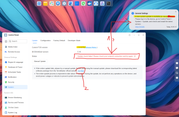
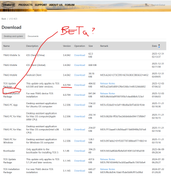
when pressing the "go now" option in the first dot point (message "2"), to download the "latest" versio of TOS, this does not include TOS7 beta versions.
Can go please update the "go now" to say " up to TOS6" and add another link for "TOS7 beta" files IF the system is running TOS7 (this TOS7 beta links should not be visible for users running TOS6 or less. --- or a link to "Update Notice" , viewforum.php?f=28
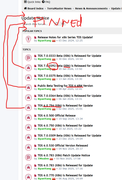
Probably not a bad idea to create subforums for new releases according to the main version + system, instead of keeping everything under viewforum.php?f=28... for example, collect all TOS7x-x86 in one forum, TOS7x-ARM, TOS6x-x86 in different ones. These specific links can be added to the "go now" mentioned above, based in the system of the current machine, OR...
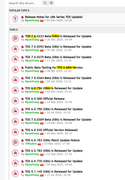
... OR, pin them to the top,
Thanks all!
Sometimes, whe you login, you can get a message indicating a new version is available (message "1" - a new system update....) but the system says it can not connect to internet and therefore can not access the latest version (message "1" - Update check failed. Please check your network connection and try again. which seems to be a contradiction.
when pressing the "go now" option in the first dot point (message "2"), to download the "latest" versio of TOS, this does not include TOS7 beta versions.
Can go please update the "go now" to say " up to TOS6" and add another link for "TOS7 beta" files IF the system is running TOS7 (this TOS7 beta links should not be visible for users running TOS6 or less. --- or a link to "Update Notice" , viewforum.php?f=28
Probably not a bad idea to create subforums for new releases according to the main version + system, instead of keeping everything under viewforum.php?f=28... for example, collect all TOS7x-x86 in one forum, TOS7x-ARM, TOS6x-x86 in different ones. These specific links can be added to the "go now" mentioned above, based in the system of the current machine, OR...
... OR, pin them to the top,
Thanks all!

Re: TOS 7 Beta Is Available for Testing
Sorry, we didn't make sense of this from the information you provided earlier. Are you referring to entering the TOS6-specific initialization installation page or the TOS6 system page after restarting? The cause is not apparent at the moment.
You might try starting up without the USB connected to see if the possibly updated TOS7 can be activated.
Unlike PkcDe‘s NAS, your F2-422 requires the Legacy version of the boot partition.
To contact our team, please send email to following addresses, remember to replace (at) with @:
Technical team: support(at)terra-master.com (for technical support)
Service team: service(at)terra-master.com (for purchasing, return, replacement, RMA service)
Technical team: support(at)terra-master.com (for technical support)
Service team: service(at)terra-master.com (for purchasing, return, replacement, RMA service)