

Good day,
How I can schedule FAN speed in TOS by time of day?
For example during day it might be Automatic, but at the night - silent
Schedule FAN speed


Re: Schedule FAN speed
Currently, the TOS task plan does not temporarily support setting fan speed. I will feed this requirement back to the product team.
To contact our team, please send email to following addresses, remember to replace (at) with @
Technical team: support(at)terra-master.com(for technical support)
Service team: service(at)terra-master.com(for purchasing, return, replacement, RMA service)
Technical team: support(at)terra-master.com(for technical support)
Service team: service(at)terra-master.com(for purchasing, return, replacement, RMA service)


Re: Schedule FAN speed
You can create scripts in Task Scheduler.
F5-221 TOS7.0.1278 - 4x4TB (Ironwolf) Traid
F2-424 TOS7.0.1278 - 2x500GB nvme (P3) Traid, 2x6TB HDD (HGST) Traid
F2-221 TOS7.0.1278 - 1x3TB Ext4, 1x4TB Btrfs
F2-425+ TOS7.0.1278 - 2x500GB nvme (P3) Traid, 2x6TB HDD (EXOS) Traid
F2-424 TOS7.0.1278 - 2x500GB nvme (P3) Traid, 2x6TB HDD (HGST) Traid
F2-221 TOS7.0.1278 - 1x3TB Ext4, 1x4TB Btrfs
F2-425+ TOS7.0.1278 - 2x500GB nvme (P3) Traid, 2x6TB HDD (EXOS) Traid
Re: Schedule FAN speed
The fan adjusts its speed intelligently based on the internal temperature of the device. If the hard disk enters sleep mode at night, the corresponding fan speed will also decrease. If you need more flexible adjustment, you can set it up by combining scripts with Task Scheduler.
To contact our team, please send email to following addresses, remember to replace (at) with @
Technical team: support(at)terra-master.com(for technical support)
Service team: service(at)terra-master.com(for purchasing, return, replacement, RMA service)
Technical team: support(at)terra-master.com(for technical support)
Service team: service(at)terra-master.com(for purchasing, return, replacement, RMA service)

Re: Schedule FAN speed
Hi. We are debugging and verifying feasible practices. Please wait.
To contact our team, please send email to following addresses, remember to replace (at) with @:
Technical team: support(at)terra-master.com (for technical support)
Service team: service(at)terra-master.com (for purchasing, return, replacement, RMA service)
Technical team: support(at)terra-master.com (for technical support)
Service team: service(at)terra-master.com (for purchasing, return, replacement, RMA service)
Re: Schedule FAN speed
You can use Schedule Task to set up custom tasks and input relevant commands at scheduled times to realize your ideas:
Day|Auto
Night|Low
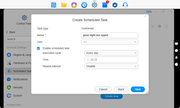
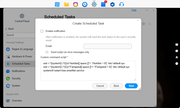
Day|Auto
Code: Select all
sed -i '/\[system\]/,/^\[/{s/^Autofan[[:space:]]*=.*/Autofan = 1/}' /etc/.default.sys
sed -i '/\[system\]/,/^\[/{s/^Fanspeed[[:space:]]*=.*/Fanspeed = 4/}' /etc/.default.sys
systemctl restart tnas-smartfan.serviceCode: Select all
sed -i '/\[system\]/,/^\[/{s/^Autofan[[:space:]]*=.*/Autofan             = 0/}' /etc/.default.sys
sed -i '/\[system\]/,/^\[/{s/^Fanspeed[[:space:]]*=.*/Fanspeed            = 0/}' /etc/.default.sys
systemctl restart tnas-smartfan.service
To contact our team, please send email to following addresses, remember to replace (at) with @:
Technical team: support(at)terra-master.com (for technical support)
Service team: service(at)terra-master.com (for purchasing, return, replacement, RMA service)
Technical team: support(at)terra-master.com (for technical support)
Service team: service(at)terra-master.com (for purchasing, return, replacement, RMA service)