[Help] F4-424 not possible to connect anymore


Re: [Help] F4-424 not possible to connect anymore
Well so much for that theory. F4-424 Pro came up at 5am and journald process taking 80% CPU and CPU temp 67C and that was only after 20min or so.
F6-424 & F4-425 Plus at 7.0.1298
F4-424 Pro (x2) at 7.0.1298
D4-320 (Offline until I can afford more HDDs)
F4-424 Pro (x2) at 7.0.1298
D4-320 (Offline until I can afford more HDDs)
Re: [Help] F4-424 not possible to connect anymore
If it will help, I can attach a 20tb external usb drive and confirm I have everything backed up. Rebuild the system first to TOS 6, then bring it up to latest TOS 7 beta release and see if issue is still there. Otherwise if someone has the link to the download site to pull down the file for TOS 7 v375 I can try to reapply the release. It is odd that in my case it's only on the F4-424 Pro and not on the F4-425 Plus or F4-223. Well the F4-424 Pro does have the fastest processor of the three.
F6-424 & F4-425 Plus at 7.0.1298
F4-424 Pro (x2) at 7.0.1298
D4-320 (Offline until I can afford more HDDs)
F4-424 Pro (x2) at 7.0.1298
D4-320 (Offline until I can afford more HDDs)

Re: [Help] F4-424 not possible to connect anymore
Okay, we will keep an eye on your subsequent information if you intend to do so.
To contact our team, please send email to following addresses, remember to replace (at) with @:
Technical team: support(at)terra-master.com (for technical support)
Service team: service(at)terra-master.com (for purchasing, return, replacement, RMA service)
Technical team: support(at)terra-master.com (for technical support)
Service team: service(at)terra-master.com (for purchasing, return, replacement, RMA service)
Re: [Help] F4-424 not possible to connect anymore
One last thing 
I'm going to pop out the 4 20TB drives, boot the box do the install like brand new.
My question is to save some time Can I just insert one drive, build the TOS 6 system the first time with just the one 20TB, then apply TSO 7 and bring it up to 375 before I add the other three drives? Since I have to add one drive at a time into the RAID and that takes forever.
I'm starting it today since on the east coast of USA it's presently -7C, too cold to go outside and do anything else.
I'm going to pop out the 4 20TB drives, boot the box do the install like brand new.
My question is to save some time
Can I just insert one drive, build the TOS 6 system the first time with just the one 20TB, then apply TSO 7 and bring it up to 375 before I add the other three drives? Since I have to add one drive at a time into the RAID and that takes forever.I'm starting it today since on the east coast of USA it's presently -7C, too cold to go outside and do anything else.
F6-424 & F4-425 Plus at 7.0.1298
F4-424 Pro (x2) at 7.0.1298
D4-320 (Offline until I can afford more HDDs)
F4-424 Pro (x2) at 7.0.1298
D4-320 (Offline until I can afford more HDDs)
Re: [Help] F4-424 not possible to connect anymore
Ok rebooted twice to get disk 1 empty. System on latest TOS 6. All four HDDs in and traid building. So basically tomorrow when raid build is done I’ll bring it up to initial beta 7 release. Boot it there and check processes and such before the final step to the 375 release. Funny part is building it before noon on EST no Terramaster emails come in so had to bypass security email validation.
F6-424 & F4-425 Plus at 7.0.1298
F4-424 Pro (x2) at 7.0.1298
D4-320 (Offline until I can afford more HDDs)
F4-424 Pro (x2) at 7.0.1298
D4-320 (Offline until I can afford more HDDs)
Re: [Help] F4-424 not possible to connect anymore
Yes, you can add disks later.rfbjr wrote: ↑19 Jan 2026, 21:52 One last thing
I'm going to pop out the 4 20TB drives, boot the box do the install like brand new.
My question is to save some time
I'm starting it today since on the east coast of USA it's presently -7C, too cold to go outside and do anything else.
To contact our team, please send email to following addresses, remember to replace (at) with @:
Technical team: support(at)terra-master.com (for technical support)
Service team: service(at)terra-master.com (for purchasing, return, replacement, RMA service)
Technical team: support(at)terra-master.com (for technical support)
Service team: service(at)terra-master.com (for purchasing, return, replacement, RMA service)
Re: [Help] F4-424 not possible to connect anymore
Ok here is the latest NAS was rebuilt with TSO 6 latest version. Four 20TB TRAID. took system report when all completed.
Installed TOS 7 299 initial public beta, so far so good. took system report
Installed latest 392 release. All when fine but system never came back, device was pingable. Forced power off, then back on. System came up fine, no raid resync. Did receive the update completed email after system did come back up.
WHat I should have done while at v299 was re-enable ssh, oh well.
So far no issues with systemd/journald.
One note and I think it did the same with v364 when I generated a system report I only saw for a sec that 5 min count down screen, it just jumped to ok to download. But the file is still being generated, so if you wait the 5min, then you can download.
About to reboot with it at 392, stay tuned
Installed TOS 7 299 initial public beta, so far so good. took system report
Installed latest 392 release. All when fine but system never came back, device was pingable. Forced power off, then back on. System came up fine, no raid resync. Did receive the update completed email after system did come back up.
WHat I should have done while at v299 was re-enable ssh, oh well.
So far no issues with systemd/journald.
One note and I think it did the same with v364 when I generated a system report I only saw for a sec that 5 min count down screen, it just jumped to ok to download. But the file is still being generated, so if you wait the 5min, then you can download.
About to reboot with it at 392, stay tuned
F6-424 & F4-425 Plus at 7.0.1298
F4-424 Pro (x2) at 7.0.1298
D4-320 (Offline until I can afford more HDDs)
F4-424 Pro (x2) at 7.0.1298
D4-320 (Offline until I can afford more HDDs)
Re: [Help] F4-424 not possible to connect anymore
Rebooting after the 392 was installed broke it.
I have a screen shot of the boot screen, 2nd monitor attached to NAS
webgui not reachable
I did remember to activate ssh before installing v392 can i can putty into the nas
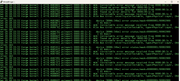
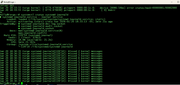
screen shot of what's scrolling in syslog and the status of systemd-journald service
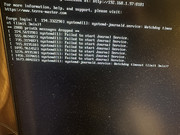
I have a screen shot of the boot screen, 2nd monitor attached to NAS
webgui not reachable
I did remember to activate ssh before installing v392 can i can putty into the nas
screen shot of what's scrolling in syslog and the status of systemd-journald service
F6-424 & F4-425 Plus at 7.0.1298
F4-424 Pro (x2) at 7.0.1298
D4-320 (Offline until I can afford more HDDs)
F4-424 Pro (x2) at 7.0.1298
D4-320 (Offline until I can afford more HDDs)
Re: [Help] F4-424 not possible to connect anymore
I won't reboot again just yet and leave the putty session open. I can tar up files if need be. Another note, no data was restored yet and no apps/utilities installed. This is a system built from scratch with TOS 6 then applied TOS 7 v299, looked good no issues. Then 392 well......
F6-424 & F4-425 Plus at 7.0.1298
F4-424 Pro (x2) at 7.0.1298
D4-320 (Offline until I can afford more HDDs)
F4-424 Pro (x2) at 7.0.1298
D4-320 (Offline until I can afford more HDDs)
Re: [Help] F4-424 not possible to connect anymore
Bottom line to all this is, after v392 was installed and the website never refreshed (again I forgot to enable ssh) the fact that I had to force power off the NAS is the first issue. The second issue went you can't logon it seems that in my case the systemd-journald service didn't start. Another reboot did have the webgui come up and you can logon, the journald process was 1% and normal cpu temp. One more reboot and you can logon but journald was > 80%. Each of these reboots the syslog is constantly spewing the correctable error messages.I have system reports taken after tos 6, after tos 7 299, after the forced off/on after 392 and two more after each reboot.
F6-424 & F4-425 Plus at 7.0.1298
F4-424 Pro (x2) at 7.0.1298
D4-320 (Offline until I can afford more HDDs)
F4-424 Pro (x2) at 7.0.1298
D4-320 (Offline until I can afford more HDDs)