[Discussion] File Manager default location


[Discussion] File Manager default location
Is it possible to configure the default location when launching file manager to /Volume1 and not the home directory of the user? Can you just create a short cut to /Volume1 on the desktop?
F6-424 & F4-425 Plus at 7.0.1298
F4-424 Pro (x2) at 7.0.1298
D4-320 (Offline until I can afford more HDDs)
F4-424 Pro (x2) at 7.0.1298
D4-320 (Offline until I can afford more HDDs)
Re: [Discussion] File Manager default location
To create a desktop shortcut to a volume in TerraMaster, follow these steps:
Select the Volume: Open the TerraMaster file manager and navigate to the volume you want to create a shortcut for.
Right-Click: Right-click on the volume and choose the option to create a shortcut.
Desktop Shortcut: The shortcut will be created on your desktop, allowing you to quickly access the volume from there.
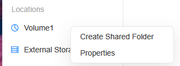
Select the Volume: Open the TerraMaster file manager and navigate to the volume you want to create a shortcut for.
Right-Click: Right-click on the volume and choose the option to create a shortcut.
Desktop Shortcut: The shortcut will be created on your desktop, allowing you to quickly access the volume from there.
F6-424 & F4-425 Plus at 7.0.1298
F4-424 Pro (x2) at 7.0.1298
D4-320 (Offline until I can afford more HDDs)
F4-424 Pro (x2) at 7.0.1298
D4-320 (Offline until I can afford more HDDs)

Re: [Discussion] File Manager default location
Currently, when opening the File Manager on TOS7, it automatically displays the personal directory. In actual multi-user scenarios, not all users may have permission to the shared folders on the Volume. We will discuss the feasibility and rationality with the project team.
To contact our team, please send email to following addresses, remember to replace (at) with @:
Technical team: support(at)terra-master.com (for technical support)
Service team: service(at)terra-master.com (for purchasing, return, replacement, RMA service)
Technical team: support(at)terra-master.com (for technical support)
Service team: service(at)terra-master.com (for purchasing, return, replacement, RMA service)
Re: [Discussion] File Manager default location
Fair enough
F6-424 & F4-425 Plus at 7.0.1298
F4-424 Pro (x2) at 7.0.1298
D4-320 (Offline until I can afford more HDDs)
F4-424 Pro (x2) at 7.0.1298
D4-320 (Offline until I can afford more HDDs)