

I am using the latest version of TOS 6 with the latest BIOS on the F4-424 Pro.
Even after setting up the the TNAS and even deleting the RAID pool once, I am getting a warning in the Disk view.
I have my 2xNVME setup as TRAID with the operating system installed there.
There are 2 additionally HDDs setup in RAID 1. I have tried and completed a scrub on the RAID 1.
All the disks are reporting "RAID member lacking an independent file system".
There is no help anywhere on the forum except that someone said tech help remoted into their TNAS and fixed it.
Can someone provide the steps needed for this fix or is this a TOS 6 problem?
It took me almost 4 days to copy files to the NAS so if the response is that the drives are not in RAID mode, then I am yet again surprised and scared to be using a Terramaster NAS.
TerraMaster F4-424 Pro - Lacking File System? [SOLVED]


Re: TerraMaster F4-424 Pro - Lacking File System?
I would say this is quite normal and not something you should be concerned about. It might help if you posted full screen shots of the items you are concerned about.
F5-221 TOS7.0.1278 - 4x4TB (Ironwolf) Traid
F2-424 TOS7.0.1278 - 2x500GB nvme (P3) Traid, 2x6TB HDD (HGST) Traid
F2-221 TOS7.0.1278 - 1x3TB Ext4, 1x4TB Btrfs
F2-425+ TOS7.0.1278 - 2x500GB nvme (P3) Traid, 2x6TB HDD (EXOS) Traid
F2-424 TOS7.0.1278 - 2x500GB nvme (P3) Traid, 2x6TB HDD (HGST) Traid
F2-221 TOS7.0.1278 - 1x3TB Ext4, 1x4TB Btrfs
F2-425+ TOS7.0.1278 - 2x500GB nvme (P3) Traid, 2x6TB HDD (EXOS) Traid
Re: TerraMaster F4-424 Pro - Lacking File System?
As requested.
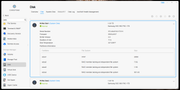
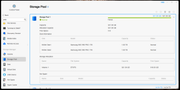
If this is a known issue and the message should be ignored, then hopefully TOS 7 will remove this or hide the text. It is only creating confusion and doubts for someone new setting up the system.
If this is a known issue and the message should be ignored, then hopefully TOS 7 will remove this or hide the text. It is only creating confusion and doubts for someone new setting up the system.


Re: TerraMaster F4-424 Pro - Lacking File System? [SOLVED]
In a NAS (especially in a Linux / mdadm / LVM architecture), this hard drive is a member disk of the RAID array and cannot be mounted and directly read or written to as a standalone disk; the file system (such as ext4, Btrfs, XFS) exists on the RAID device (such as /dev/md0, /dev/md1) rather than on a single physical hard drive, which is why the system indicates that this RAID member disk does not have an "independent file system."
To contact our team, please send email to following addresses, remember to replace (at) with @
Technical team: support(at)terra-master.com(for technical support)
Service team: service(at)terra-master.com(for purchasing, return, replacement, RMA service)
Technical team: support(at)terra-master.com(for technical support)
Service team: service(at)terra-master.com(for purchasing, return, replacement, RMA service)
Re: TerraMaster F4-424 Pro - Lacking File System?
That explanation is solid. It helps to have this info when searching the forum so others don't second guess their settings. Thank you.