Hi,
this is more so just to let people know of a scenario that people need to be aware of
if you are using TFM to backup to a remote share (i.e another network location)
if that remote share is offline say following a power cut, then TFM just fills your local storage with a copy of ALL the data and grinds the unit to a halt due to it running out of space and trying to backup but failing
so i guess my advice is if you are using TFM in this manner make sure everything is working as it should with regards to Remote Shares i get the boot up sequence right for the different devices
Remote Folders
-
sianderson

- Silver Member
- Posts: 452
- Joined: 02 Aug 2020, 03:42

Remote Folders
F2-424 TOS 7.0.1278
F2-423 TOS 7.0.1278
F2-210 TOS 4.2.44
D4-320
C/O
F4-424 TOS 6.0.794
F2-423 TOS 7.0.1278
F2-210 TOS 4.2.44
D4-320
C/O
F4-424 TOS 6.0.794

Re: Remote Folders
Hello,
If a remote device shuts down due to a power outage, its mount point on the NAS will disappear, preventing the TFM backup task from continuing. Once the remote device is powered back on and successfully reconnects, the backup task should resume and continue running normally.
However, given that the issue you described is different, we would like to understand the method you used to mount the remote folder. This will help us investigate the root cause of the problem.
To contact our team, please send email to following addresses, remember to replace (at) with @
Technical team: support(at)terra-master.com (for technical support)
Service team: service(at)terra-master.com (for purchasing, return, replacement, RMA service)
Technical team: support(at)terra-master.com (for technical support)
Service team: service(at)terra-master.com (for purchasing, return, replacement, RMA service)
-
sianderson
- Silver Member
- Posts: 452
- Joined: 02 Aug 2020, 03:42
Re: Remote Folders
its the successfully re-connects bit that was failing, as the network drive was offline when the nas drive booted up it didnt reconnect automatically to the remote folder, i had to manually go in and force it to connect
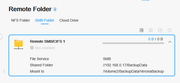
this is how it appeared, i do have automatically mount at boot ticked
so what happens is the F2-423 backups up every day to the F2-210 using a remote folder link
so both the F2-423 and F2-210 went down at the same time due to no power
i booted the F2-423 before the F2-210, this obviously meant that the F2-423 didnt detect the remote folder as the F2-210 was still offline so the auto mount would have failed
i then powered up the F2-210
TFM then on its schedule tried to backup to the local designated for the remote folder (as it was not enabled automatically) and instead of doing the backup across the network it treated it as a local folder and started its backup
so as point of memory i have to remember to go in and enable the remote folder if i booted the two nas's up in that order so that it displays it being enabled
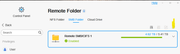
this is how it appeared, i do have automatically mount at boot ticked
so what happens is the F2-423 backups up every day to the F2-210 using a remote folder link
so both the F2-423 and F2-210 went down at the same time due to no power
i booted the F2-423 before the F2-210, this obviously meant that the F2-423 didnt detect the remote folder as the F2-210 was still offline so the auto mount would have failed
i then powered up the F2-210
TFM then on its schedule tried to backup to the local designated for the remote folder (as it was not enabled automatically) and instead of doing the backup across the network it treated it as a local folder and started its backup
so as point of memory i have to remember to go in and enable the remote folder if i booted the two nas's up in that order so that it displays it being enabled
F2-424 TOS 7.0.1278
F2-423 TOS 7.0.1278
F2-210 TOS 4.2.44
D4-320
C/O
F4-424 TOS 6.0.794
F2-423 TOS 7.0.1278
F2-210 TOS 4.2.44
D4-320
C/O
F4-424 TOS 6.0.794

Re: Remote Folders
Sorry for the inconvenience you have encountered.
We have fully understood this issue and will discuss optimization plans with the project team to prevent similar problems from occurring.
We have fully understood this issue and will discuss optimization plans with the project team to prevent similar problems from occurring.
To contact our team, please send email to following addresses, remember to replace (at) with @:
Technical team: support(at)terra-master.com (for technical support)
Service team: service(at)terra-master.com (for purchasing, return, replacement, RMA service)
Technical team: support(at)terra-master.com (for technical support)
Service team: service(at)terra-master.com (for purchasing, return, replacement, RMA service)
-
sianderson
- Silver Member
- Posts: 452
- Joined: 02 Aug 2020, 03:42
Re: Remote Folders
no problem, now i know about this issue i will just check it in the future  so just wanted to raise it for other people to be aware of it also
so just wanted to raise it for other people to be aware of it alsoF2-424 TOS 7.0.1278
F2-423 TOS 7.0.1278
F2-210 TOS 4.2.44
D4-320
C/O
F4-424 TOS 6.0.794
F2-423 TOS 7.0.1278
F2-210 TOS 4.2.44
D4-320
C/O
F4-424 TOS 6.0.794


Re: Remote Folders
This exact scenario happened to me just recently. I had forgotten to check the auto mount option and when my TNAS went down and restarted, the TFM Backup task started backing up all the files locally instead of aborting when the remote path was not available.
Luckily I caught it in time before it was completed, but this should not happen under any circumstances, no matter if the problem is local or if the remote server is unreachable.
Earlier responses seem to indicate you have understood the problem, hopefully this is something that will be corrected.
Luckily I caught it in time before it was completed, but this should not happen under any circumstances, no matter if the problem is local or if the remote server is unreachable.
Earlier responses seem to indicate you have understood the problem, hopefully this is something that will be corrected.

Re: Remote Folders
I missed this thread earlier. I just observed this behaviour in TOS7 whereby I mirror a remote folder (from a TOS6 nas). If the remote folder is disconnected, the mirrored files are effectively deleted (TFM mirrors "nothing"). TFM should definitely verify the remote folder exists before writing 'zero' files to the backup otherwise the value of the backup is basically worthless.
F5-221 TOS7.0.1278 - 4x4TB (Ironwolf) Traid
F2-424 TOS7.0.1278 - 2x500GB nvme (P3) Traid, 2x6TB HDD (HGST) Traid
F2-221 TOS7.0.1278 - 1x3TB Ext4, 1x4TB Btrfs
F2-425+ TOS7.0.1278 - 2x500GB nvme (P3) Traid, 2x6TB HDD (EXOS) Traid
F2-424 TOS7.0.1278 - 2x500GB nvme (P3) Traid, 2x6TB HDD (HGST) Traid
F2-221 TOS7.0.1278 - 1x3TB Ext4, 1x4TB Btrfs
F2-425+ TOS7.0.1278 - 2x500GB nvme (P3) Traid, 2x6TB HDD (EXOS) Traid
Re: Remote Folders
Hi, we have taken note of the issue you reported. The team is currently actively discussing and addressing it internally. We will post updates on this forum as soon as there is any new progress.
To contact our team, please send email to following addresses, remember to replace (at) with @
Technical team: support(at)terra-master.com (for technical support)
Service team: service(at)terra-master.com (for purchasing, return, replacement, RMA service)
Technical team: support(at)terra-master.com (for technical support)
Service team: service(at)terra-master.com (for purchasing, return, replacement, RMA service)
Re: Remote Folders
Thank you.
F5-221 TOS7.0.1278 - 4x4TB (Ironwolf) Traid
F2-424 TOS7.0.1278 - 2x500GB nvme (P3) Traid, 2x6TB HDD (HGST) Traid
F2-221 TOS7.0.1278 - 1x3TB Ext4, 1x4TB Btrfs
F2-425+ TOS7.0.1278 - 2x500GB nvme (P3) Traid, 2x6TB HDD (EXOS) Traid
F2-424 TOS7.0.1278 - 2x500GB nvme (P3) Traid, 2x6TB HDD (HGST) Traid
F2-221 TOS7.0.1278 - 1x3TB Ext4, 1x4TB Btrfs
F2-425+ TOS7.0.1278 - 2x500GB nvme (P3) Traid, 2x6TB HDD (EXOS) Traid