TOS 7 Beta Is Available for Testing
-
Pingjockey

- Posts: 6
- Joined: 17 Apr 2024, 09:37

Re: TOS 7 Beta Is Available for Testing
So far, so good. I've submitted a few bug reports via the email in the post (might not be a bad idea for the folks working through the Zabbix challenges to go that route too). I don't see anything show-stopping yet though which seems to me to be a good sign.


Re: TOS 7 Beta Is Available for Testing
Hello,
I am the owner of a TerraMaster F4-423. I am currently using it with Linux, but I became interested in the new TOS 7 option.
I tried to verify my BIOS version to check whether it is compatible with TOS 7. I ran the following command:
sudo dmidecode -s bios-version
The output was:
Version: 5.19
There is no MAPL0304 string, which is strange. According to some research, 5.19 appears to be a Linux kernel version, not a BIOS version.
I also checked directly in the BIOS/UEFI setup, but surprisingly the screen does not show a BIOS version field at all.
Does anyone know:
how to correctly verify the BIOS version on this model?
or how to confirm TOS 7 compatibility in this situation?
Any guidance would be appreciated. Thank you.
I am the owner of a TerraMaster F4-423. I am currently using it with Linux, but I became interested in the new TOS 7 option.
I tried to verify my BIOS version to check whether it is compatible with TOS 7. I ran the following command:
sudo dmidecode -s bios-version
The output was:
Version: 5.19
There is no MAPL0304 string, which is strange. According to some research, 5.19 appears to be a Linux kernel version, not a BIOS version.
I also checked directly in the BIOS/UEFI setup, but surprisingly the screen does not show a BIOS version field at all.
Does anyone know:
how to correctly verify the BIOS version on this model?
or how to confirm TOS 7 compatibility in this situation?
Any guidance would be appreciated. Thank you.


Re: TOS 7 Beta Is Available for Testing
i used the update to the F2-422 all went ok. i had 2 HDD installed, Volume 1 and Volume 2. I had two Volume 2 entries, one is OK and one was displayed corrupted. I selected the corrupted Volume 2 to delete as the first post said, and now data on Volume 2 is gone and more on that the Volume 2 is still being displayed as corrupted, any idea how to recover files and fix this mess?
update: after removing HDD no 2 and deleted corrupted (ghost) volume, i re-inserted HDD and mounted HDD2 and now everything is ok.
update: after removing HDD no 2 and deleted corrupted (ghost) volume, i re-inserted HDD and mounted HDD2 and now everything is ok.

Re: TOS 7 Beta Is Available for Testing
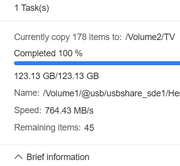
Is this a bug?
It shows 100% file transfer complete when there was still many files left to transfer.
F4-425 Plus with TOS 7 with 32GB RAM
2 X 2TB (SSD) RAID 1 / EXT4 (OS/APPS)
4 x 28TB RAID 10 / BTRFS (MEDIA)
2 X 2TB (SSD) RAID 1 / EXT4 (OS/APPS)
4 x 28TB RAID 10 / BTRFS (MEDIA)


Re: TOS 7 Beta Is Available for Testing
При установке на f4-424 tos 7 вытащил hdd и установил tos 7 как ранее на nvme. Теперь не отображаются файлы этих hdd в хранилище, но emby файлы отображаются
Re: TOS 7 Beta Is Available for Testing
The 2TB SSD I have installed as the hypercache for my RAID 10 array does not appear to be working correctly.
If I transfer 50GB the speed drops after awhile down to like 100MB/s
The cache drive should easily be able to absorb the 50GB and flush to the array in a orderly manner in the background.
what is going on?
If I transfer 50GB the speed drops after awhile down to like 100MB/s
The cache drive should easily be able to absorb the 50GB and flush to the array in a orderly manner in the background.
what is going on?
F4-425 Plus with TOS 7 with 32GB RAM
2 X 2TB (SSD) RAID 1 / EXT4 (OS/APPS)
4 x 28TB RAID 10 / BTRFS (MEDIA)
2 X 2TB (SSD) RAID 1 / EXT4 (OS/APPS)
4 x 28TB RAID 10 / BTRFS (MEDIA)
-
Pingjockey
- Posts: 6
- Joined: 17 Apr 2024, 09:37
Re: TOS 7 Beta Is Available for Testing
So, it's hard to saw without additional information. What sort of appliance, what sort of connection, what sort of SSD's, how many SSD's, How many HDD's and what is the connection speed coming from whatever device is sending the traffic to the NAS. Did this start happening before or after the install of TOS 7? That could help figure out what the issue(s) are and come up with a solution!JSCFORCE wrote: ↑16 Dec 2025, 07:58 The 2TB SSD I have installed as the hypercache for my RAID 10 array does not appear to be working correctly.
If I transfer 50GB the speed drops after awhile down to like 100MB/s
The cache drive should easily be able to absorb the 50GB and flush to the array in a orderly manner in the background.
what is going on?
Re: TOS 7 Beta Is Available for Testing
Easy.Pingjockey wrote: ↑16 Dec 2025, 08:35So, it's hard to saw without additional information. What sort of appliance, what sort of connection, what sort of SSD's, how many SSD's, How many HDD's and what is the connection speed coming from whatever device is sending the traffic to the NAS. Did this start happening before or after the install of TOS 7? That could help figure out what the issue(s) are and come up with a solution!JSCFORCE wrote: ↑16 Dec 2025, 07:58 The 2TB SSD I have installed as the hypercache for my RAID 10 array does not appear to be working correctly.
If I transfer 50GB the speed drops after awhile down to like 100MB/s
The cache drive should easily be able to absorb the 50GB and flush to the array in a orderly manner in the background.
what is going on?
F4-425 Plus - 32GB of ram
4x28TB ironwolf pro in RAID 10 / BTRFS
2xWD_BLACK SN850X 2TB in RAID 1 / EXT4 as the OS drive.
1xWD_BLACK SN850X 2TB set as read/write hypercache for the raid 10 array.
I have this USB flash drive plugged in the back
https://www.amazon.com/dp/B0F6MP7HSF
it's *very* fast. should have above 1000MB/s sustained read or write.
On both reading and writing I don't think the cache is working as I think it should, maybe I'm just ignorant.
But if I start watching a video and I pause it when I come back to the video an hour later I should be able to unpause it INSTANTLY without having to wait for the array to wake up.
I would greatly appreciate if TM can make the cache drive operate as a real read/write cache, buffering ALL I/O operations completely shielding us from the slow response and throughput of the array.
P.S. I bought a very large, very nice UPS and I'm using it exclusively for my router and NAS, so If there is ever a large transfer in progress the NAS should always be able to finish the transfer from the write cache to the array safely.
1500VA/1000W/296Wh
should be able to power both of them for hours. so I would like to get the full benefit of the cache.
Last edited by JSCFORCE on 16 Dec 2025, 09:11, edited 1 time in total.
F4-425 Plus with TOS 7 with 32GB RAM
2 X 2TB (SSD) RAID 1 / EXT4 (OS/APPS)
4 x 28TB RAID 10 / BTRFS (MEDIA)
2 X 2TB (SSD) RAID 1 / EXT4 (OS/APPS)
4 x 28TB RAID 10 / BTRFS (MEDIA)


Re: TOS 7 Beta Is Available for Testing
You can refer to the following method: viewtopic.php?t=9417
To contact our team, please send email to following addresses, remember to replace (at) with @
Technical team: support(at)terra-master.com (for technical support)
Service team: service(at)terra-master.com (for purchasing, return, replacement)
Technical team: support(at)terra-master.com (for technical support)
Service team: service(at)terra-master.com (for purchasing, return, replacement)