How to update an expired SSL certificate?


Re: How to update an expired SSL certificate?
Hello, please try to switch the Tnas Online server region to Europe.
To contact our team, please send email to following addresses, remember to replace (at) with @
Technical team: support(at)terra-master.com(for technical support)
Service team: service(at)terra-master.com(for purchasing, return, replacement, RMA service)
Technical team: support(at)terra-master.com(for technical support)
Service team: service(at)terra-master.com(for purchasing, return, replacement, RMA service)
Re: How to update an expired SSL certificate?
Having to repeatedly reattach network drives, more than once of year, is unacceptable.
Every time I'm trying to do a basic file transfer to tnas 6 system there's an issue and have to reconnect.
Guess my expectations are higher as in the past used shared drives on a Windows server OS...
Every time I'm trying to do a basic file transfer to tnas 6 system there's an issue and have to reconnect.
Guess my expectations are higher as in the past used shared drives on a Windows server OS...
Re: How to update an expired SSL certificate?
Your question is unrelated to SSL certificate updates. Are you mapping the NAS as a network drive on Windows and then transferring data from Windows to the NAS? Is there any error message when the issue occurs? We need more information to determine the specific problem.prax211 wrote: ↑22 Jan 2026, 04:56 Having to repeatedly reattach network drives, more than once of year, is unacceptable.
Every time I'm trying to do a basic file transfer to tnas 6 system there's an issue and have to reconnect.
Guess my expectations are higher as in the past used shared drives on a Windows server OS...
To contact our team, please send email to following addresses, remember to replace (at) with @
Technical team: support(at)terra-master.com(for technical support)
Service team: service(at)terra-master.com(for purchasing, return, replacement, RMA service)
Technical team: support(at)terra-master.com(for technical support)
Service team: service(at)terra-master.com(for purchasing, return, replacement, RMA service)

Re: How to update an expired SSL certificate?
F2-425+ was giving me certificate errors so I logged into TNAS portal
Control Panel - Security -> Certificate
highlighted the terra-master.com entry and hit the small refresh icon directly above the list. It renewed the certificate through Jan 2027
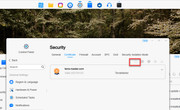
Control Panel - Security -> Certificate
highlighted the terra-master.com entry and hit the small refresh icon directly above the list. It renewed the certificate through Jan 2027
-
LinSeattle

- Posts: 1
- Joined: 05 Mar 2026, 00:05

Re: How to update an expired SSL certificate?
I just bought a new F4-425+ and despite updating the master certificate, I still have the SSL certificate issue when using the browser.
How do I fix this? Is there an option to add a self-signed SSL certificate to ensure my traffic is secure? How would I do that (where should it be located) and instructions for having the system recognize it.
How do I fix this? Is there an option to add a self-signed SSL certificate to ensure my traffic is secure? How would I do that (where should it be located) and instructions for having the system recognize it.

Re: How to update an expired SSL certificate?
If you have your own domain name and a valid SSL certificate (e.g., obtained from Let's Encrypt), you can upload it to TNAS.
Go to TOS Control Panel > General Settings > Security > SSL Certificates.
Click "Add" and upload your certificate file (usually containing the private key, certificate, and possibly an intermediate certificate).
Set this certificate as the one used for your HTTPS service.
To contact our team, please send email to following addresses, remember to replace (at) with @
Technical team: support(at)terra-master.com(for technical support)
Service team: service(at)terra-master.com(for purchasing, return, replacement, RMA service)
Technical team: support(at)terra-master.com(for technical support)
Service team: service(at)terra-master.com(for purchasing, return, replacement, RMA service)


Re: How to update an expired SSL certificate?
My TOS6 does not have Certificate buy keep saying my cert has expired.
"Go to TOS Control Panel > General Settings > Security > SSL Certificates.
Click "Add" and upload your certificate file (usually containing the private key, certificate, and possibly an intermediate certificate)."
Where can I get the key and certificate file?
"Go to TOS Control Panel > General Settings > Security > SSL Certificates.
Click "Add" and upload your certificate file (usually containing the private key, certificate, and possibly an intermediate certificate)."
Where can I get the key and certificate file?

Re: How to update an expired SSL certificate?
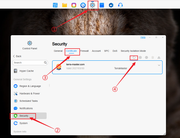
If you need to update the certificate for terramaster.com, you can refer to the steps in the image to update the certificate. If you need to use a different certificate, you will need to generate or purchase a certificate externally and then import it into TOS. We cannot provide specific technical assistance for external purchases; you can consult relevant resources.AlanTse wrote: ↑30 Mar 2026, 06:12 My TOS6 does not have Certificate buy keep saying my cert has expired.
"Go to TOS Control Panel > General Settings > Security > SSL Certificates.
Click "Add" and upload your certificate file (usually containing the private key, certificate, and possibly an intermediate certificate)."
Where can I get the key and certificate file?
-
pennypacker

- Posts: 29
- Joined: 12 Nov 2024, 18:52

Re: How to update an expired SSL certificate?
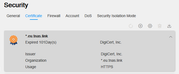
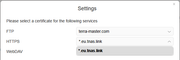
Hi there. Any news on updating the tnas.link domain / certificate? My *.eu.tnas.link certificate has been expired since Dec 25, cannot be renewed and HTTPS can only use the expired certificate.TMtina wrote: ↑26 Oct 2025, 17:13 Hello, we have noticed that the certificate for the tnas.link domain has recently expired. Our team is currently processing the renewal. This will not affect your normal access to the device or the use of its core functions. Thank you for your patience and understanding.
Wealthy industrialist, philanthropist, and uhh, bicyclist.

Re: How to update an expired SSL certificate?
Hi.
Based on the images you provided, it appears you are using TOS5. In TOS5, you can usually update your eu.tnas.link automatically by simply disabling and then re-enabling the TNAS.online service.
Detailed instructions for this method are available on the first page of this thread.
"(2)If your system version is TOS 4 (excluding models F2-210 and F4-210) or TOS 5, you can update the certificate by restarting the TNAS.online service, provided that the network connection is normal. If the TNAS.online restart is unsuccessful, restarting the entire TNAS device will also complete the certificate update process."
To contact our team, please send email to following addresses, remember to replace (at) with @:
Technical team: support(at)terra-master.com (for technical support)
Service team: service(at)terra-master.com (for purchasing, return, replacement, RMA service)
Technical team: support(at)terra-master.com (for technical support)
Service team: service(at)terra-master.com (for purchasing, return, replacement, RMA service)