

[Help] Can't enable TNAS online
[Help] Can't enable TNAS online
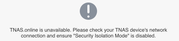
When pick TNAS.online tab, I met the issue I couldn't check the checkbox. After I restarted the NAS, now I see TNAS.online is NOT available, though I don't have Security Isolation Mode enabled. Please help. Thanks.

Re: [Help] Can't enable TNAS online
Please first install any app in the APP Center to simply check if the NAS's internet connection is available.
To contact our team, please send email to following addresses, remember to replace (at) with @:
Technical team: support(at)terra-master.com (for technical support)
Service team: service(at)terra-master.com (for purchasing, return, replacement, RMA service)
Technical team: support(at)terra-master.com (for technical support)
Service team: service(at)terra-master.com (for purchasing, return, replacement, RMA service)
Re: [Help] Can't enable TNAS online
Yes. I can't download any app now. it wasn't like this before. what's the next step?
Re: [Help] Can't enable TNAS online
This may help you:
viewtopic.php?t=5939
viewtopic.php?t=5939
To contact our team, please send email to following addresses, remember to replace (at) with @:
Technical team: support(at)terra-master.com (for technical support)
Service team: service(at)terra-master.com (for purchasing, return, replacement, RMA service)
Technical team: support(at)terra-master.com (for technical support)
Service team: service(at)terra-master.com (for purchasing, return, replacement, RMA service)
Re: [Help] Can't enable TNAS online
Thanks.This works. seems I can't enable static ip.

Re: [Help] Can't enable TNAS online
If your network connection becomes abnormal after setting a manual IP, it is usually caused by an incorrect DNS configuration.
Please set your DNS to a commonly used public DNS server in your region, such as 8.8.8.8 or 1.1.1.1
To contact our team, please send email to following addresses, remember to replace (at) with @:
Technical team: support(at)terra-master.com(for technical support)
Service team: service(at)terra-master.com(for purchasing, return, replacement, RMA service)
Technical team: support(at)terra-master.com(for technical support)
Service team: service(at)terra-master.com(for purchasing, return, replacement, RMA service)
Re: [Help] Can't enable TNAS online
When setting a static IP, you need to ensure the configuration is correct. If you are not sure how to check, you can keep the DHCP settings when changing from DHCP to a static IP and only modify the IP part.
To contact our team, please send email to following addresses, remember to replace (at) with @:
Technical team: support(at)terra-master.com (for technical support)
Service team: service(at)terra-master.com (for purchasing, return, replacement, RMA service)
Technical team: support(at)terra-master.com (for technical support)
Service team: service(at)terra-master.com (for purchasing, return, replacement, RMA service)