[Help] "others" takes up a lot of data cant access it

RAID, Volume, storage pool, hard drive, USB, SSD cache and iSCSI LUN
Post Reply
User avatar
Lekonidus
Posts: 4
Joined: 02 Dec 2025, 17:44
Israel

[Help] "others" takes up a lot of data cant access it

Post by Lekonidus »

Hi,
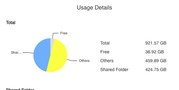
ive attached a screenshot of the usage detailes and as you can see there is more than 50% of "others" data, about 460GBs of data.
ive tried to look at the GUI and there was just the files from the "Shared folder" i could find.
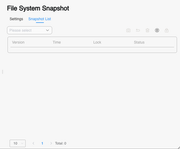
i dont have any backup enabled (no snapshots at least in the GUI), im on tos 6 beta 6.0.585 after i was on tos 5 before.
It's BTRFS.
Image

Image

Image
User avatar
TMzethar
TM Support
Posts: 2821
Joined: 27 Oct 2020, 16:43

Re: [Help] "others" takes up a lot of data cant access it

Post by TMzethar »

Hi.
"Others" includes personal directories, applications, app installation packages, file system snapshots, folder snapshots, logs, and other content.
If the usage is high, it is generally due to a large amount of data in personal directories or snapshots capturing a lot of data.
Please first check the data volume of your personal directories.
To contact our team, please send email to following addresses, remember to replace (at) with @:
Technical team: support(at)terra-master.com (for technical support)
Service team: service(at)terra-master.com (for purchasing, return, replacement, RMA service)
User avatar
Lekonidus
Posts: 4
Joined: 02 Dec 2025, 17:44
Israel

Re: [Help] "others" takes up a lot of data cant access it

Post by Lekonidus »

TMzethar wrote: 03 Dec 2025, 14:52 Hi.
"Others" includes personal directories, applications, app installation packages, file system snapshots, folder snapshots, logs, and other content.
If the usage is high, it is generally due to a large amount of data in personal directories or snapshots capturing a lot of data.
Please first check the data volume of your personal directories.
Thanks for the suggestion, all of my personal files are in the "Shared Folder". i verefied that all of my files are in the directories i expect them to be, and they amount to exactly the amount of storage that is represented by the pie chart.

there is something else that is hidden, and is taking up all of this storage. i suspect maybe remains of TOS 5 version of the NAS maybe it saved it all for some reason because it is only beta version of TOS 6?
even if so i could not find even in terminal how to see what is inside this "others".
User avatar
TMzethar
TM Support
Posts: 2821
Joined: 27 Oct 2020, 16:43

Re: [Help] "others" takes up a lot of data cant access it

Post by TMzethar »

What I mean are personal home directories that have the same name as the usernames. These are not shared folders but are categorized under 'Others'. Please count all the personal home directories and check if their total size reaches 400+GB.
'Others' is not a specific directory. There isn't the kind of 'residual' files you might imagine that could occupy half a volume.

Additionally, I suggest you check the Backup-File System Snapshot and app-Snapshot, review and delete unnecessary snapshots. It's possible that files you once deleted were captured in snapshots, which would continue to occupy the space.
To contact our team, please send email to following addresses, remember to replace (at) with @:
Technical team: support(at)terra-master.com (for technical support)
Service team: service(at)terra-master.com (for purchasing, return, replacement, RMA service)
User avatar
Lekonidus
Posts: 4
Joined: 02 Dec 2025, 17:44
Israel

Re: [Help] "others" takes up a lot of data cant access it

Post by Lekonidus »

TMzethar wrote: 03 Dec 2025, 17:34 What I mean are personal home directories that have the same name as the usernames. These are not shared folders but are categorized under 'Others'. Please count all the personal home directories and check if their total size reaches 400+GB.
'Others' is not a specific directory. There isn't the kind of 'residual' files you might imagine that could occupy half a volume.

Additionally, I suggest you check the Backup-File System Snapshot and app-Snapshot, review and delete unnecessary snapshots. It's possible that files you once deleted were captured in snapshots, which would continue to occupy the space.
I have a stale Btrfs snapshot that is not visible in TFSS but is taking up space on disk. I cannot delete it via CLI because of 'Permission Denied' errors even with sudo.
i belive the only way forward is to wipe the whole drive..
User avatar
Gremlin
Gold Member
Posts: 1628
Joined: 02 Dec 2022, 22:31
Great Britain

Re: [Help] "others" takes up a lot of data cant access it

Post by Gremlin »

I think you need to update your TOS version to current. Changes were made to how snapshots are shown and identified.
F5-221 TOS7.0.0777 - 4x4TB (Ironwolf) Traid
F2-424 TOS7.0.0777 - 2x500GB nvme (P3) Traid, 2x6TB HDD (HGST) Traid
F2-221 TOS7.0.0777 - 1x3TB Ext4, 1x4TB Btrfs
F2-425+ TOS7.0.0777 - 2x500GB nvme (P3) Traid, 2x6TB HDD (EXOS) Traid
User avatar
TMzethar
TM Support
Posts: 2821
Joined: 27 Oct 2020, 16:43

Re: [Help] "others" takes up a lot of data cant access it

Post by TMzethar »

Please show me these two directories so that we can understand more about the snapshot situation.

Code: Select all

ll /var/subvols/8vEbTxkKvwa/@syssnapshot
ll /var/subvols/8vEbTxkKvwa/@snapshot
To contact our team, please send email to following addresses, remember to replace (at) with @:
Technical team: support(at)terra-master.com (for technical support)
Service team: service(at)terra-master.com (for purchasing, return, replacement, RMA service)
Post Reply

Return to “Storage”