[Help] How do I use Transmission??

Photo, music, video management; Video streaming, decoding, transcoding.
Post Reply
User avatar
rv13
Posts: 7
Joined: 16 Nov 2025, 21:22
Singapore

[Help] How do I use Transmission??

Post by rv13 »

I could get qBittorrent to work but I can't figure out how Transmission works.

Do I need to install plugins? Where do I start to search for content and commence downloading?

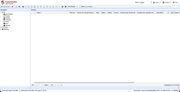
I clicked the + sign and it seems to be for uploading of torrents?

I've attached the screen that I see on my desktop

Image
User avatar
TMnight
TM Support
Posts: 181
Joined: 30 Sep 2022, 16:40

Re: [Help] How do I use Transmission??

Post by TMnight »

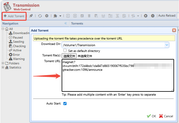
You don't need to install any additional plugins. Just gently click the "+" icon on the interface, then copy the magnet link, and you can start the download.
To contact our team, please send email to following addresses, remember to replace (at) with @:
Technical team: support(at)terra-master.com(for technical support)
Service team: service(at)terra-master.com(for purchasing, return, replacement, RMA service)
User avatar
rv13
Posts: 7
Joined: 16 Nov 2025, 21:22
Singapore

Re: [Help] How do I use Transmission??

Post by rv13 »

TMnight wrote: 29 Nov 2025, 16:46 You don't need to install any additional plugins. Just gently click the "+" icon on the interface, then copy the magnet link, and you can start the download.
What's the best way to derive the magnet link? I'm a total Noob...been using Synology's Download Station all these years.
User avatar
TMzethar
TM Support
Posts: 2815
Joined: 27 Oct 2020, 16:43

Re: [Help] How do I use Transmission??

Post by TMzethar »

The usage method is similar to qBittorrent. In Transmission, this location supports uploading torrent files, as well as using magnet links.
Image
For more usage methods and operational suggestions, please refer to relevant tutorials on the Internet.
To contact our team, please send email to following addresses, remember to replace (at) with @:
Technical team: support(at)terra-master.com (for technical support)
Service team: service(at)terra-master.com (for purchasing, return, replacement, RMA service)
Post Reply

Return to “DLNA/Multimedia Services”