Hi
I just got a f4 425 and have two 1TB SSD drives installed. I cannot for the life of me see how to set it up as a multi-drive system - it just kept defaulting to RAID and showing two drives as a single volume.
I have done the Storage Pool thing - eventually I reset the whole device and chose "expert" mode when it asked me which disk to use as the system disk - I specified one disk only. Now when booted it shows me two storage pools - one for each drive. But how do I get the two drives to appear as two separate volumes? I just want to go to Network on my Mac and see two network volumes available that I can use as separate drives. This must be possible? Any advice appreciated, thanks.
[Help]How to set up f4 425 as separate disks [SOLVED]

Re: [Help]How to set up f4 425 as separate disks
Storage Pool --> Volumes (create 1 or more)
Volume ---> Shared Folders (Create 1 or more)
"volumes" are not directly accessed via network shares, only shared folders.
Note default installation will auto create 'Homes' Folder(s) in the first Volume (Typically Volume 1) which can be enabled/disabled via Control Panel
Volume ---> Shared Folders (Create 1 or more)
"volumes" are not directly accessed via network shares, only shared folders.
Note default installation will auto create 'Homes' Folder(s) in the first Volume (Typically Volume 1) which can be enabled/disabled via Control Panel
F5-221 TOS7.0.1201 - 4x4TB (Ironwolf) Traid
F2-424 TOS7.0.1278 - 2x500GB nvme (P3) Traid, 2x6TB HDD (HGST) Traid
F2-221 TOS7.0.1278 - 1x3TB Ext4, 1x4TB Btrfs
F2-425+ TOS7.0.1278 - 2x500GB nvme (P3) Traid, 2x6TB HDD (EXOS) Traid
F2-424 TOS7.0.1278 - 2x500GB nvme (P3) Traid, 2x6TB HDD (HGST) Traid
F2-221 TOS7.0.1278 - 1x3TB Ext4, 1x4TB Btrfs
F2-425+ TOS7.0.1278 - 2x500GB nvme (P3) Traid, 2x6TB HDD (EXOS) Traid
-
Grandcentral

- Posts: 3
- Joined: 16 Nov 2025, 17:22

Re: [Help]How to set up f4 425 as separate disks
OK thanks but it doesn't address my other question - I have two 1TB drives installed and whatever I do I cannot get the second one to show up as available to create folder on, even though it shows it is installed correctly.
My question is - how do I force the system not to treat it as a RAID? I want them to be available as two separate disks.
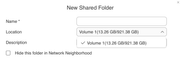
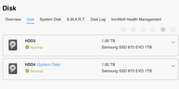
My question is - how do I force the system not to treat it as a RAID? I want them to be available as two separate disks.
-
Grandcentral
- Posts: 3
- Joined: 16 Nov 2025, 17:22
Re: [Help]How to set up f4 425 as separate disks [SOLVED]
Ah I figured it out - I found a way to create a new volume using the second drive and create a pool on that.