

Hello, since mid-September I've been getting random and occasional reboots on my F6-424. I've had one on TOS_X642.0_6.0.770 (15 September) and two on TOS_X642.0_6.0.783 (27 September and 8 October). I'm not sure if there have been other instances before, but those are the email notifications I can find.
They happen randomly, when the NAS is not in active use.
I can't find anything wrong, there are no power issues, and it didn't happen before the last update (as far as I can remember). I just get a notification that "TNAS was shut down abnormally". I assumed it's some kind of kernel panic but I can't find any logs. dmesg, last and journalctl (and really everything else in /var/log) only start from the reboot.
The NAS has 6 disks installed, and an official Terramaster 16 GB RAM stick. I don't have any additional apps enabled, just the stock ones; I had tried the Surveillance app but it doesn't work well with my Tapo cameras so I uninstalled it, and tried VirtualBox but also had some issues with it and decided to uninstall it as well.
The only maybe "odd" thing is that I use it as a destination for Time Machine backup (on a volume created on a USB disk) and lately Time Machine has been taking a long time to backup, but I'm not sure if that's related in any way. I'm using the default Backup app for that. Note that for some reason the Backup app does NOT show the Time Machine backups in the Backups List page, even though I'm using it to back up two Macs to it (and /Volume2/TimeMachine does have two .sparsebundle directories, one per computer). Still, that shouldn't lead to a kernel panic.
Note that earlier this summer, when I installed the 6th disk and upgraded the array from TRAID to TRAID+, a support call was needed via TeamViewer as TOS did not show the array as upgraded to TRAID+. It was sorted out by changing a flag on the array itself so it would show properly in the web interface, but it was a cosmetic bug as the array itself was effectively RAID6 already. All disks pass SMART and everything is within the expected range.
Is there anywhere else logs are saved persistently so I can check them to see what happened exactly, or do I just create /var/log/journal for systemd to write logs to? Right now journald.conf has storage=auto (it's actually commented out) but there's no log directory so it's only kept in memory.
Honestly this is making me quite uneasy about trusting the NAS (even though it's my second TerraMaster), as it really just shouldn't happen since it's pretty much a stock device.
Thanks in advance.
[Help] Abnormal reboot of F6-424


Re: [Help] Abnormal reboot of F6-424
I experienced the same situation on my F2-424 and never really found a definitive answer. At the time I was testing different UPS setups. Eventually I moved that unit to another physical power supply after turning off the ups settings (although still connected to a UPS) and the issue went away. I continued to use the same physical power supply (a non-TM heavy duty unit) on an F2-221 and never had an issue with that machine.
F5-221 TOS7.0.1278 - 4x4TB (Ironwolf) Traid
F2-424 TOS7.0.1278 - 2x500GB nvme (P3) Traid, 2x6TB HDD (HGST) Traid
F2-221 TOS7.0.1278 - 1x3TB Ext4, 1x4TB Btrfs
F2-425+ TOS7.0.1278 - 2x500GB nvme (P3) Traid, 2x6TB HDD (EXOS) Traid
F2-424 TOS7.0.1278 - 2x500GB nvme (P3) Traid, 2x6TB HDD (HGST) Traid
F2-221 TOS7.0.1278 - 1x3TB Ext4, 1x4TB Btrfs
F2-425+ TOS7.0.1278 - 2x500GB nvme (P3) Traid, 2x6TB HDD (EXOS) Traid
Re: [Help] Abnormal reboot of F6-424
Hi Gremlin, thanks for that! My F6 is connected to a UPS, but it's a "dumb" one without a USB connection at all, and the UPS settings on the NAS are all turned off. We have had the occasional power surge during thunderstorms and the UPSes in the house all beeped, but kept going just fine. In one case one such brownout managed to "knock out" my router, which required a hard reboot, but the NAS seemed unaffected. These reboots also all happened quite randomly.
I will try fully power cycling both the NAS and the UPS, and the official power brick as well (I'll keep it disconnected for a while, in case something's up with it). The battery in the UPS seems to be healthy, as I did have a blackout a while back and it stayed up just fine. IIRC I replaced it last year.
In the meantime I've completely disabled the Time Machine backup and I'll keep that USB disk completely disconnected, just to make sure that it's not related.
Being unable to consistently reproduce the issue reliably is pretty annoying... let's see if there's any way to get the logs to be persistent, at least to see if it's coming from within (like a kernel panic) or caused by some external power issue like it was for you!
I will try fully power cycling both the NAS and the UPS, and the official power brick as well (I'll keep it disconnected for a while, in case something's up with it). The battery in the UPS seems to be healthy, as I did have a blackout a while back and it stayed up just fine. IIRC I replaced it last year.
In the meantime I've completely disabled the Time Machine backup and I'll keep that USB disk completely disconnected, just to make sure that it's not related.
Being unable to consistently reproduce the issue reliably is pretty annoying... let's see if there's any way to get the logs to be persistent, at least to see if it's coming from within (like a kernel panic) or caused by some external power issue like it was for you!

Re: [Help] Abnormal reboot of F6-424
Hello! We sincerely apologize for the unsatisfactory experience. Please follow the steps below: Navigate to the top navigation bar on the TOS desktop, then click "Support & Help" > "Debug Mode" and enable it. The next time the device malfunctions, please export the relevant logs and send them to us. Once we receive the logs, our professional technical engineers will immediately conduct a thorough analysis to identify the root cause of the automatic restarts.
To contact our team, please send email to following addresses, remember to replace (at) with @
Technical team: support(at)terra-master.com (for technical support)
Service team: service(at)terra-master.com (for purchasing, return, replacement, RMA service)
Technical team: support(at)terra-master.com (for technical support)
Service team: service(at)terra-master.com (for purchasing, return, replacement, RMA service)


Re: [Help] Abnormal reboot of F6-424
If the issue started after updating to a specific version, you can consider rolling back to the previous version to see if the problem still exists
Re: [Help] Abnormal reboot of F6-424
@TMJack, it just happened again, out of nowhere (I just heard it beep and reboot). I've emailed support with a link to the logs.
Re: [Help] Abnormal reboot of F6-424
Well, looks like the issue is faulty RAM. I ran memtest86+ via SystemRescue (https://www.system-rescue.org/) and this happened...
This is TerraMaster-branded RAM that was sent to me free of charge in July; is it covered under warranty?
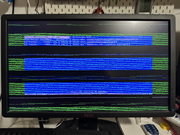
I sent more details through email.
Thanks!
This is TerraMaster-branded RAM that was sent to me free of charge in July; is it covered under warranty?
I sent more details through email.
Thanks!
-
crisisacting

- Silver Member
- Posts: 531
- Joined: 20 Jan 2022, 16:42
Re: [Help] Abnormal reboot of F6-424
It should carry a 24 month warranty: https://www.terra-master.com/pages/warranty-returns
Re: [Help] Abnormal reboot of F6-424
FYI: I noticed my F2-424 experienced another unexplained "abnormal reboot" on Oct 2nd. The RAM is TM oem as supplied with the device. I was away at the time and only noticed much later. No unusual settings, using TM power supply. Fortunately it seems not to affect the system or storage devices. It is most odd.
F5-221 TOS7.0.1278 - 4x4TB (Ironwolf) Traid
F2-424 TOS7.0.1278 - 2x500GB nvme (P3) Traid, 2x6TB HDD (HGST) Traid
F2-221 TOS7.0.1278 - 1x3TB Ext4, 1x4TB Btrfs
F2-425+ TOS7.0.1278 - 2x500GB nvme (P3) Traid, 2x6TB HDD (EXOS) Traid
F2-424 TOS7.0.1278 - 2x500GB nvme (P3) Traid, 2x6TB HDD (HGST) Traid
F2-221 TOS7.0.1278 - 1x3TB Ext4, 1x4TB Btrfs
F2-425+ TOS7.0.1278 - 2x500GB nvme (P3) Traid, 2x6TB HDD (EXOS) Traid
Re: [Help] Abnormal reboot of F6-424
Hello! We sincerely apologize for the inconvenience you've experienced. To address this issue, we recommend trying to adjust a parameter in the BIOS. The specific steps are as follows. If the problem persists, we can arrange a memory replacement for you.
Enter the BIOS setup interface and navigate to the following path:
Chipset → System Agent (SA) Configuration → Memory Configuration → SAGV option, and set it to "Disabled".
After making the change, please save the settings and restart your device. If the issue remains unresolved, we are available to provide further assistance in troubleshooting.
Enter the BIOS setup interface and navigate to the following path:
Chipset → System Agent (SA) Configuration → Memory Configuration → SAGV option, and set it to "Disabled".
After making the change, please save the settings and restart your device. If the issue remains unresolved, we are available to provide further assistance in troubleshooting.
To contact our team, please send email to following addresses, remember to replace (at) with @
Technical team: support(at)terra-master.com (for technical support)
Service team: service(at)terra-master.com (for purchasing, return, replacement, RMA service)
Technical team: support(at)terra-master.com (for technical support)
Service team: service(at)terra-master.com (for purchasing, return, replacement, RMA service)