Engage in discussions, seek assistance, and report issues related to client applications, including: TNAS PC for Windows and macOS, TNAS mobile for iOS and Android, as well as smart TV applications and clients.
Hello,
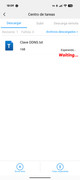
I just installed the latest version (783) on my F2-424 and can’t download files from my mobile app. Until now it was working perfectly and I could download everything well (on the NAS had version 750) but after updating to the latest version I can no longer. It remains in the "waiting" state and does not download anything.
It should be noted that the installation has been new, from scratch to avoid this type of problems. I have also completely deleted the mobile app and re-downloaded from scratch, correctly assigning the required permissions and the problem persists.
Any idea what might have happened?? or directly is issue from the latest version of TOS?
Thank you for your attention!
We've observed the issue you reported and are actively investigating it. Currently, this issue primarily occurs when downloading files using the TNAS mobile app fails in a local area network (LAN) environment. You can first use TNAS Online to remotely access the NAS; downloading files in a remote environment will not be affected.
To contact our team, please send email to following addresses, remember to replace (at) with @
Technical team: support(at)terra-master.com (for technical support)
Service team: service(at)terra-master.com (for purchasing, return, replacement, RMA service)
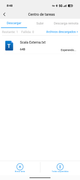
Thank you for your answer. I tried also without being connected to the network of the NAS, accessing from outside as comments but the problem persists as a sample in the image. I do not know what happens or why it has been damaged by reinstalling the software, I will be afraid to update to future versions if things like this are going to happen that something that worked perfectly and I use a lot for my work, now no more. See if we can soon have a solution.
Thank you for your answer. I tried also without being connected to the network of the NAS, accessing from outside as comments but the problem persists as a sample in the image. I do not know what happens or why it has been damaged by reinstalling the software, I will be afraid to update to future versions if things like this are going to happen that something that worked perfectly and I use a lot for my work, now no more. See if we can soon have a solution.
I just updated the app and still have the same problem. Before installing it, I have deleted any traces related to it, even the download folder (TNASMobile) of the application and what I could observe is that it does not create it again, it is as if I was really not accessing my mobile memory for lack of permissions, but it has all assigned so I do not know how to tell you, even in a "raw" way to download the files on my terminal.
Please ensure TNAS mobile has storage permissions. After retrying, please send the logs to us for analysis.
Log Path: /Download/TNASmobile_log
Email: [email protected]
To contact our team, please send email to following addresses, remember to replace (at) with @:
Please ensure TNAS mobile has storage permissions. After retrying, please send the logs to us for analysis.
Log Path: /Download/TNASmobile_log
Email: [email protected]
Hello TMtina,
I just sent my log to the email as you requested, to try and figure out why I can’t download the files from there to my smartphone.
Please attempt to disable the VPN connection that is automatically enabled on your phone when logging into TNAS mobile via TNAS.online, and then try downloading the file again.
To contact our team, please send email to following addresses, remember to replace (at) with @:
Technical team: support(at)terra-master.com (for technical support)
Service team: service(at)terra-master.com (for purchasing, return, replacement, RMA service)
TMzethar wrote: ↑24 Oct 2025, 18:18
Please attempt to disable the VPN connection that is automatically enabled on your phone when logging into TNAS mobile via TNAS.online, and then try downloading the file again.
Hello zethar,
I just checked and with the VPN disconnected if I can download files from outside the local network!! but not within the NAS network. With the VPN active I can not download in any way. I do not know if with this data we can limit where the problem may come from.
TMzethar wrote: ↑24 Oct 2025, 18:18
Please attempt to disable the VPN connection that is automatically enabled on your phone when logging into TNAS mobile via TNAS.online, and then try downloading the file again.
Hello zethar,
I just checked and with the VPN disconnected if I can download files from outside the local network!! but not within the NAS network. With the VPN active I can not download in any way. I do not know if with this data we can limit where the problem may come from.
Thank you again.
A greeting.
Hello, this issue is caused by the recent expiration of the certificate configured for the TOS system. We are currently addressing it. In the meantime, please use your own remote access methods (such as TNAS Online or DDNS) to download the files.