

I've just set up a F6-424 Max with TOS6. I put two 1tb SSDs in the m.2 slots -- one for system and the other for the hyper cache. I just realized that there's a whole lotta wasted space on that system drive. Is it possible to use that extra space for snapshots? I haven't added the Snapshot app yet -- could I save the snapshots there? I'd prefer not to put them on my TRAID volume.
Both those SSDs are Gen4. I have another new Gen4 SSD that's only 256gb -- I assume that'd be enough for just the System Drive. If I *can't* use the unused space for Snapshots, can I just clone the 1tb System SSD to the smaller 256gb drive?
Thanks for the help. Although I've had NASes for a long-time, this is my first TerraMaster so I expect I'll be back with questions. This community seems really helpful.
Thanks, again.
Wasted space on system SSD?


Re: Wasted space on system SSD?
Hello, thank you for your support of TerraMaster!
For the 1TB SSD used as the system drive, you can use the remaining space to create a storage pool and volume. This way, you can install applications such as snapshots under that volume. Remember to modify the installation path.
Additionally, you can also install a 256GB SSD and set it as the second system drive. To do this, go to Control Panel > Storage Manager > Disk > System Disk > Add System Disk.
Re: Wasted space on system SSD?
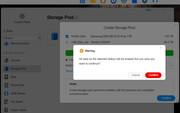
When I try to create a storage pool on "the 1TB SSD used as the system drive," as you suggested, it warns me that all data on the selected drive will be erased. Does that really mean the (only) system disk will be erased? How will the NAS be able to boot?


Re: Wasted space on system SSD?
No, it means any data OUTSIDE the system partitions will be erased. For example, a storage pool/volume might have been created in an earlier installation and that would be wiped.
F5-221 TOS7.0.1278 - 4x4TB (Ironwolf) Traid
F2-424 TOS7.0.1278 - 2x500GB nvme (P3) Traid, 2x6TB HDD (HGST) Traid
F2-221 TOS7.0.1278 - 1x3TB Ext4, 1x4TB Btrfs
F2-425+ TOS7.0.1278 - 2x500GB nvme (P3) Traid, 2x6TB HDD (EXOS) Traid
F2-424 TOS7.0.1278 - 2x500GB nvme (P3) Traid, 2x6TB HDD (HGST) Traid
F2-221 TOS7.0.1278 - 1x3TB Ext4, 1x4TB Btrfs
F2-425+ TOS7.0.1278 - 2x500GB nvme (P3) Traid, 2x6TB HDD (EXOS) Traid
