
Hello.
I have a T6-423 with latest TOS 6.0.783
Although I think the error is from a long time ago.
My system is working reliably and thus I am using it more and more... And I am doing manual tasks from the CLI, scp, rsync... from other server to the NAS.
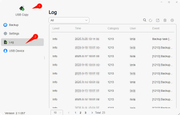
I see that the USB Copy, that I am using to backup some of the most important folders to a external usb 4Tb drive (Seagate formatted with ext4), it is failing in most of them with an error that the symbolic links are supported.
Not only I have the error, but I am not sure if it affects only to that file that is skipped and it continues, or if it aborts the full process. I assume that it only skip that file, since I have more than one pair of errors, but just to be sure... On the other hand, it would be handy to show the file on the message...
It looks like I could not paste the screenshot to this message.
it is something like:
/buildAgent/work/44312589e391674/backend/service/sync_task/synctask.go:1368 1. backup file file 1). USBCopy/service/sync_task.(*TaskOperate).incrementBackkup.func1
/buildAgent/work/44312589e391674/backend/service/sync_task/synctask.go:1368 2. The file is a symbolic link, and the symbolic link is not supported for backup 1). USBCopy/service/sync_task.
[Help] USB Copy and links
[Help] USB Copy and links
IT Infrastructure/SRE
XT9 Mesh, HomeLab, Syn DS920+, Terramaster T6-423,F4-424Pro, MacBook, HyperOptic 1Gb ipv6.
XT9 Mesh, HomeLab, Syn DS920+, Terramaster T6-423,F4-424Pro, MacBook, HyperOptic 1Gb ipv6.


Re: [Help] USB Copy and links
Hello, the system currently does not support backing up symbolic links (soft links). Therefore, such files will be displayed as “Backup Failed,” which is a normal behavior. You can check the specific file paths in the log interface to help identify and verify them.
To contact our team, please send email to following addresses, remember to replace (at) with @:
Technical team: support(at)terra-master.com(for technical support)
Service team: service(at)terra-master.com(for purchasing, return, replacement, RMA service)
Technical team: support(at)terra-master.com(for technical support)
Service team: service(at)terra-master.com(for purchasing, return, replacement, RMA service)