Migrate app installs + app data folders to new drive

Tell us what new features you'd love to see or any upgrades you think we should make!
Post Reply
User avatar
ATOMFIX
Posts: 16
Joined: 27 Sep 2025, 20:46
Great Britain

Migrate app installs + app data folders to new drive

Post by ATOMFIX »

Took some time to install another SSD. Moved the system disk from my TRAID HDD setup to my SSD drive but what I didn't realize is that it didn't move the app installations / configuration or metadata for that app.

Can we have the option to migrate all app installs / app data from old drive to new system disk that I created? I prefer not to delete > reinstall. I don't want to go down the route of setting Plex back up :shock:
Plex F6-424 - 3x 12TB - 1x 4TB - 500GB SSD - 1TB NVME
User avatar
TMzethar
TM Support
Posts: 2819
Joined: 27 Oct 2020, 16:43

Re: Migrate app installs + app data folders to new drive

Post by TMzethar »

A method that can be tried but is not guaranteed to succeed for all apps:
1. Uninstall the app (keep data and settings).
2. Change the app's installation directory from the HDD volume to the SSD volume.
3. Reinstall the app.
4. Log in to Terminal and copy the app&configuration folder under /Volume1/@apps/ to /Volume2/@apps/.
5. If the app has a dedicated shared folder corresponding to it besides the app and its configurations, please rename the shared folder. Then restart the app to generate a new dedicated shared folder on the SSD volume.
To contact our team, please send email to following addresses, remember to replace (at) with @:
Technical team: support(at)terra-master.com (for technical support)
Service team: service(at)terra-master.com (for purchasing, return, replacement, RMA service)
User avatar
ATOMFIX
Posts: 16
Joined: 27 Sep 2025, 20:46
Great Britain

Re: Migrate app installs + app data folders to new drive

Post by ATOMFIX »

Yes this worked. I now have Plex installed on the SSD instead. But still. There needs to be an easier and more efficient way to move apps within TOS. Can you look at this for future updates please.
Plex F6-424 - 3x 12TB - 1x 4TB - 500GB SSD - 1TB NVME
User avatar
TMroy
TM Support
Posts: 3060
Joined: 10 Mar 2020, 14:04
China

Re: Migrate app installs + app data folders to new drive

Post by TMroy »

Once an application is installed, it can be quite difficult to change its installation path and related configuration files, and the process varies significantly between different applications. Unfortunately, we currently have no plans for this.
To contact our team, please send email to following addresses, remember to replace (at) with @:
Support team: support(at)terra-master.com (for technical support only)
Service team: service(at)terra-master.com (for purchasing, return, replacement, RMA service)
User avatar
ATOMFIX
Posts: 16
Joined: 27 Sep 2025, 20:46
Great Britain

Re: Migrate app installs + app data folders to new drive

Post by ATOMFIX »

TMroy wrote: 05 Oct 2025, 13:57 Once an application is installed, it can be quite difficult to change its installation path and related configuration files, and the process varies significantly between different applications. Unfortunately, we currently have no plans for this.
I see ok. Thanks for getting back to me on this.
Plex F6-424 - 3x 12TB - 1x 4TB - 500GB SSD - 1TB NVME
User avatar
justin
Posts: 1
Joined: 23 Oct 2025, 21:53
Australia

Re: Migrate app installs + app data folders to new drive

Post by justin »

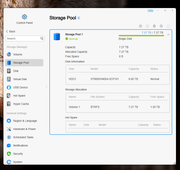
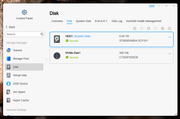
I have TOS installed on an 8TB HDD and I have recently added an M.2 SSD. I want to use the new "migrate system disk" feature to put system and apps on the new SSD but I want some things to remain on the original 8TB hdd.

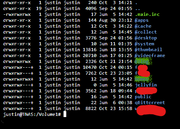
I want the following things to remain on the 8TB SSD:

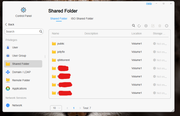
- The eight shared folders except for the `/homes` directories which can go anywhere
- The downloaded torrent contents in two of the shared folders
- The jellyfin media content in a shared folder

I want the following to move to the SSD:

- TOS
- Jellyfin, Jllyfin user accounts, jellyfin generated files and metadata
- qBittorrent and the torrent list and progress
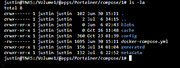
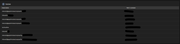
- Portainer and the directores bound to one stack that are inside the portainer app files (see screenshot)

I expect that the migration process will leave Volume1 on the HDD, and a new volume number will be created on the new SSD to contain the new TOS system files.

Is this what the "migrate system disk" feature will do? If not, which directories should I manually backup and restore to preserve Jellyfin and qBittorrent? I can already see where the important directories are for my one Portainer stack so I can move those with the terminal and make the stack from scratch on the new SSD if needed.
Image

Image

Image

Image

Image

Image

Image
User avatar
TMbuddy
TM Product Manager
Posts: 96
Joined: 29 Nov 2024, 14:29
China

Re: Migrate app installs + app data folders to new drive

Post by TMbuddy »

justin wrote: 25 Oct 2025, 16:04
Hello, migrating the system disk does not transfer the data from your HDD to the SSD. All your data will remain intact, as the data partition and the system partition are separate and do not interfere with each other.
Post Reply

Return to “New Requests & Proposals”