It seems that Bay 3 and 4 on my unit just don't work or do anything.
I have switched my drives around and confirmed that all drives work when in Bay 1 or 2. I have tried only using bay 3 or 4 to rule out overloading. I have tried the firmware update in the other popular post, but since the bays don't connect or show up, the tool doesn't see them to even check the firmware version.
I'm at a loss, and frankly the fact that the bays seem to be dead on the hardware level kind of has me worried that even if they start working, I may be asking for a drive to get corrupted by using it.
Whats the deal here?
[Help] D4-320 Bay 3 and 4 won't recognize any drives [SOLVED]
-
cristobal5050

- Posts: 1
- Joined: 10 Oct 2025, 00:57



Re: [Help] D4-320 Bay 3 and 4 won't recognize any drives [SOLVED]
It is possible the bay 3 and 4 are defective, please contact our service team for warranty service. Find the service email from my signature.
To contact our team, please send email to following addresses, remember to replace (at) with @:
Support team: support(at)terra-master.com (for technical support only)
Service team: service(at)terra-master.com (for purchasing, return, replacement, RMA service)
Support team: support(at)terra-master.com (for technical support only)
Service team: service(at)terra-master.com (for purchasing, return, replacement, RMA service)
-
kaabastrike

- Posts: 1
- Joined: 27 Nov 2025, 11:54

Re: [Help] D4-320 Bay 3 and 4 won't recognize any drives
The fact that bays 3 and 4 are not working despite the fact that the drives work in bays 1 and 2 is cause for concern. Have you considered examining the connection cords in those specific bays? A defective cable may be to blame for the lack of detection. Additionally, contacting customer service may provide more insight or remedies to this hardware issue. Don't give up hope; there could be a simple solution to get those bays operating again!cristobal5050 wrote: ↑10 Oct 2025, 01:21 It seems that Bay 3 and 4 on my unit just don't work or do anything.
I have switched my drives around and confirmed that all drives work when in Bay 1 or 2. I have tried only using bay 3 or 4 to rule out overloading. I have tried the firmware update in the other popular post, but since the bays don't connect or show up, the tool doesn't see them to even check the firmware version.
I'm at a loss, and frankly the fact that the bays seem to be dead on the hardware level kind of has me worried that even if they start working, I may be asking for a drive to get corrupted by using it.
Whats the deal here?
-
crisisacting

- Silver Member
- Posts: 531
- Joined: 20 Jan 2022, 16:42
Re: [Help] D4-320 Bay 3 and 4 won't recognize any drives
Most TDAS enclosures use a backplane, not cables.kaabastrike wrote: ↑27 Nov 2025, 11:58 … Have you considered examining the connection cords in those specific bays? A defective cable may be to blame for the lack of detection.
…
Either one of the ASMedia chips has an issue or the connections themselves on the backplane.
Last edited by crisisacting on 28 Nov 2025, 04:01, edited 1 time in total.
-
theatersoft

- Posts: 2
- Joined: 28 Nov 2025, 03:37
Re: [Help] D4-320 Bay 3 and 4 won't recognize any drives
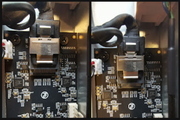
Make sure the SAS cable is fully inserted into the connector as shown in the left image. If it's inserted partway as in the right image you'll see the behavior you described.
-
crisisacting
- Silver Member
- Posts: 531
- Joined: 20 Jan 2022, 16:42
Re: [Help] D4-320 Bay 3 and 4 won't recognize any drives
That doesn't exist in one of these; here's the internals from a video review: https://youtu.be/ZdEqEWiA2CE?t=222
-
theatersoft
- Posts: 2
- Joined: 28 Nov 2025, 03:37
Re: [Help] D4-320 Bay 3 and 4 won't recognize any drives
That's right, I had the problem with a D4-320U which does have a cable connection between SATA bridges and backplane.