[Help] D8-332 Mac OS Error code - 50

RAID storage for video editing professionals or who care much about the speed
Post Reply
User avatar
Mr3studios
Posts: 1
Joined: 07 Oct 2025, 07:48
Australia

[Help] D8-332 Mac OS Error code - 50

Post by Mr3studios »

Help to understand and solve.

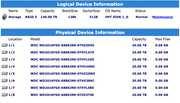
I Have a D8-332 Thunderbolt setup in Raid 5 (8 Disks 20TB Western Digital Red) - ExFat - Setup using iOS - M2 Tahoe.
I've copied 15TB onto the Raid then I get an error code - 50, unable to copy or create new folders.
I ran first aid on the drive it came back saying it failed, and the available space went from 124TB to 8TB. On computer restart & second Disk utility First aid the space came back it said it was successful, but still unable to write to the drive. I have tried reformatting the drives and recopying everything over but the same issue occurred.

Any solutions to this would be great.

Image

Image

Image
User avatar
TMzethar
TM Support
Posts: 2819
Joined: 27 Oct 2020, 16:43

Re: [Help] D8-332 Mac OS Error code - 50

Post by TMzethar »

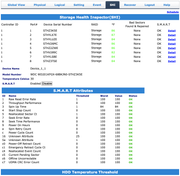
From the description and screenshots you mentioned, there is currently no information related to RAID/device/HDD errors.
Where did Error code -50 appear? Could you provide a screenshot related to it?
Does the 'Evet' interface record any anomalies?
You may try checking each HDD to see if there are any noteworthy S.M.A.R.T value abnormalities.
If you plan to use the D8-332 with a Mac for a long time, it is recommended to use the more stable and reliable APFS file system format.
To contact our team, please send email to following addresses, remember to replace (at) with @:
Technical team: support(at)terra-master.com (for technical support)
Service team: service(at)terra-master.com (for purchasing, return, replacement, RMA service)
Post Reply

Return to “Thunderbolt Series”