[Help] TNAS mobile asks for Genuine Software out ot private Network

Engage in discussions, seek assistance, and report issues related to client applications, including: TNAS PC for Windows and macOS, TNAS mobile for iOS and Android, as well as smart TV applications and clients.
Post Reply
User avatar
Heaguen
Posts: 4
Joined: 23 Sep 2025, 04:55
Brazil

[Help] TNAS mobile asks for Genuine Software out ot private Network

Post by Heaguen »

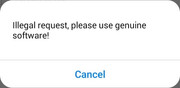
I have bought this TNAS F2-210, used it in the past 2 years and the TNAS Mobile always worked fine, though some months ago I kept on receiving this messages "Illegal request, please use genuine software!".

I'm using the app supplied by Terra Master download site, Android 14.

I can only access my TNAS out of my private network through TNAS.online site, not through the app... and having to access this way on the phone is horrible.

I tried to reset to factory, installed the now TOS 4.2.44, changed the name of my nas to one with no dashes, symbols or numbers, but nothing worked.

Can someone help me to solve it??
Image
User avatar
sianderson
Silver Member
Posts: 417
Joined: 02 Aug 2020, 03:42
Great Britain

Re: [Help] TNAS mobile asks for Genuine Software out ot private Network

Post by sianderson »

TNAS Mobile (the one that supported the F2-210) is no longer on the app store, the only one that is is for the newer models

i hope the new one will become backwards compatible and have one single app, but as the F2-210 is a discontinued legacy model i fear that it will just be left to become less useful as time goes on, unless they are waiting for Apple etc to approve the revised version of the app through the store?
F2-424 TOS 7.0.0765
F2-423 TOS 7.0.0765
F2-210 TOS 4.2.44
D4-320

C/O
F4-424 TOS 6.0.794
User avatar
Heaguen
Posts: 4
Joined: 23 Sep 2025, 04:55
Brazil

Re: [Help] TNAS mobile asks for Genuine Software out ot private Network

Post by Heaguen »

Yeah, I know it is not available anymore, but it can be downloaded at Terra Master Download link. So, I think it should be the genuine software.

If I can access th F2-210 at my private network using this App, why not outside? (I can access it through the TNAS.online site)

I cannot understand why it is not working at all....
User avatar
EthanLiu
TM Product Manager
Posts: 177
Joined: 13 Nov 2023, 14:25
China

Re: [Help] TNAS mobile asks for Genuine Software out ot private Network

Post by EthanLiu »

Heaguen wrote: 25 Sep 2025, 01:14
We have taken note of the remote access issue you encountered and have completed a preliminary investigation. It appears that certain internal network protocols in the TNAS mobile app may be causing the malfunction of TNAS.online remote access on mobile devices. However, due to the outdated version of the app, we are unable to pinpoint the exact cause.

Therefore, we recommend switching to a more stable DDNS (Dynamic Domain Name System) solution for remote access. You can configure DDNS on your TNAS device, and then use the assigned DDNS domain name in the mobile app to establish a connection, which should resolve the issue.
To contact our team, please send email to following addresses, remember to replace (at) with @
Technical team: support(at)terra-master.com (for technical support)
Service team: service(at)terra-master.com (for purchasing, return, replacement, RMA service)
User avatar
Heaguen
Posts: 4
Joined: 23 Sep 2025, 04:55
Brazil

Re: [Help] TNAS mobile asks for Genuine Software out ot private Network

Post by Heaguen »

EthanLiu wrote: 25 Sep 2025, 12:13
Heaguen wrote: 25 Sep 2025, 01:14
We have taken note of the remote access issue you encountered and have completed a preliminary investigation. It appears that certain internal network protocols in the TNAS mobile app may be causing the malfunction of TNAS.online remote access on mobile devices. However, due to the outdated version of the app, we are unable to pinpoint the exact cause.

Therefore, we recommend switching to a more stable DDNS (Dynamic Domain Name System) solution for remote access. You can configure DDNS on your TNAS device, and then use the assigned DDNS domain name in the mobile app to establish a connection, which should resolve the issue.
Tried that as well, still giving me the same errors... the weird thing is, it was working before... I think the issue was something in the new TOS. Is there any way for me to revert it?

I could not find the past stable TOS for me to use. That way I would revert it and use it the way i did before. I'd Like to really revert it to factory version... without any updates, or to a version where the TNAS mobile would work on. (Since the TNAS mobile version is the save as ever)
User avatar
sianderson
Silver Member
Posts: 417
Joined: 02 Aug 2020, 03:42
Great Britain

Re: [Help] TNAS mobile asks for Genuine Software out ot private Network

Post by sianderson »

EthanLiu wrote: 25 Sep 2025, 12:13
Heaguen wrote: 25 Sep 2025, 01:14
We have taken note of the remote access issue you encountered and have completed a preliminary investigation. It appears that certain internal network protocols in the TNAS mobile app may be causing the malfunction of TNAS.online remote access on mobile devices. However, due to the outdated version of the app, we are unable to pinpoint the exact cause.

Therefore, we recommend switching to a more stable DDNS (Dynamic Domain Name System) solution for remote access. You can configure DDNS on your TNAS device, and then use the assigned DDNS domain name in the mobile app to establish a connection, which should resolve the issue.
so are you saying the ONLY app you can download from the apple store version 3.4.038 will connect to the F2-210?

this version does not connect even on a local connection, so when you say its an outdated version using the latest version does not work, so what you really mean is you have no compatible version for the F2-210 anymore?

i dont see how a DDNS change will help make a none existent app connect?
F2-424 TOS 7.0.0765
F2-423 TOS 7.0.0765
F2-210 TOS 4.2.44
D4-320

C/O
F4-424 TOS 6.0.794
User avatar
TMjack
TM Support
Posts: 185
Joined: 27 Oct 2020, 08:41

Re: [Help] TNAS mobile asks for Genuine Software out ot private Network

Post by TMjack »

Dear Customer

Greetings! The latest TOS system version currently available for the F2-210 product is TOS 4.2, and the compatible TNAS Mobile client version is V2.4. Please note that the Android V2.4 client can only be downloaded from the official website's download center. Specifically, Apple device users can no longer download and install TNAS Mobile version 2.4 from the App Store.

We would like to emphasize that TNAS Mobile V3.4 is only compatible with TOS 5/6 systems and is not compatible with TOS 4.2. When using the F2-210 product with TNAS Mobile V2.4, if you attempt to connect by entering a TNAS.ONLINE address in the TNAS Mobile app, the connection will fail. To establish a remote connection successfully, you must enter the DDNS remote access address registered on your NAS in the TNAS Mobile app.
To contact our team, please send email to following addresses, remember to replace (at) with @
Technical team: support(at)terra-master.com (for technical support)
Service team: service(at)terra-master.com (for purchasing, return, replacement, RMA service)
User avatar
harry1028
Posts: 1
Joined: 02 Nov 2025, 04:37
United States of America

Re: [Help] TNAS mobile asks for Genuine Software out ot private Network

Post by harry1028 »

I had to reorganize my folders, files, and usage habits to address the recurring issue I faced when accessing my TNAS F2-220 remotely. After numerous unsuccessful attempts to restore functionality with OS 4.2 and the supposedly compatible TNAS Mobile client version V2.4, I opted to switch my NAS Media server app to Plex. Now, I can remotely access all my media files through Plex Photos and Plexamp (music). I relocated any document files requiring remote access to alternative storage solutions like Buffalo NAS, Google Drive, and OneDrive, while keeping only locally needed documents on my TNAS F2-220. The TNAS Mobile client version V2.4 still works locally, though I seldom use it due to my updated media access setup. Local access to my TNAS documents has always primarily been through my desktop or laptop. If you’re considering Plex, note that I encountered some initial challenges installing the Plex NAS app. I resolved these by uninstalling all previous Plex app versions, manually deleting leftover Plex files, resetting the system configuration (not restoring to factory settings), and installing the Plex tpk from the Plex website that specifies the correct version. To avoid conflicts with older remnants, I installed the downloaded Plex tpk via "Applications > Settings > Install application manually" instead of using the native Plex icon. I’m relieved I didn’t have to replace my functional TNAS F2-220 just to regain remote access to my media files. Hopefully, this helps someone!
User avatar
klevinsourd
Posts: 1
Joined: 09 Feb 2026, 17:18
United States of America

Re: [Help] TNAS mobile asks for Genuine Software out ot private Network

Post by klevinsourd »

Yeah, you’re not the only one running into this, unfortunately. A few TNAS users (me included) have seen this exact “Illegal request, please use genuine software!” message, even when using the official app from Terramaster.

From what I’ve gathered and tested:

It’s not your NAS and it’s not TOS 4.2.44. Factory reset, renaming the NAS, etc. don’t fix it.

The problem seems to be the TNAS Mobile app + newer Android versions (13/14). After some app updates, Terramaster added stricter checks and the app just starts rejecting legit devices.

Access via TNAS.online still works, which pretty much confirms it’s an app-side issue, not a license or firmware problem.

Things you can try (some worked for people, some didn’t):

Uninstall TNAS Mobile, then install an older APK version (from before this error started). Several users reported this as the only real workaround.

Disable battery optimization for the app and allow background network usage (doesn’t always fix it, but worth checking).

Try logging in via local IP only inside your LAN first, then enable remote access again.

What didn’t help for me and others:

Factory reset

Renaming the NAS

Reinstalling the same latest TNAS Mobile version

Reinstalling TOS

Honestly, until Terramaster fixes the app, the best solution on Android 14 is using an older TNAS Mobile APK or just sticking to the web interface on mobile (as bad as it is).

If you want something more stable, I ended up using VPN + local IP access on my phone, which completely avoids TNAS Mobile’s remote login nonsense.

You’re not doing anything wrong - this is just Terramaster being Terramaster
Post Reply

Return to “Mobile Apps and Desktop Clients”