
I have started to run out of space on my nas so i took of 1tb of files and moved to my pc for now but the problem is its still showing as the same amount of space
i have checked the files have moved and i have emptied the recycle bins in case i even set a schedule to empty all recycle bins to make sure and its still the same i have not gained any space ??
its remained the same even thought the files have come of the nas
[Help] cant get space back

Re: [Help] cant get space back
Hello, may I ask which version of the TOS system are you using? You can refer to this link to try freeing up your storage space:
viewtopic.php?t=6999
viewtopic.php?t=6999
To contact our team, please send email to following addresses, remember to replace (at) with @:
Technical team: support(at)terra-master.com(for technical support)
Service team: service(at)terra-master.com(for purchasing, return, replacement, RMA service)
Technical team: support(at)terra-master.com(for technical support)
Service team: service(at)terra-master.com(for purchasing, return, replacement, RMA service)
-
sianderson

- Silver Member
- Posts: 453
- Joined: 02 Aug 2020, 03:42

Re: [Help] cant get space back
i'm convinced i have a similar issue, but cant pinpoint where the space is being used at the moment i think im around 500gb difference between a drive and other drivesjwills70 wrote: ↑23 Aug 2025, 00:35 I have started to run out of space on my nas so i took of 1tb of files and moved to my pc for now but the problem is its still showing as the same amount of space
i have checked the files have moved and i have emptied the recycle bins in case i even set a schedule to empty all recycle bins to make sure and its still the same i have not gained any space ??
its remained the same even thought the files have come of the nas
i'm almost at the point of deleting everything from the drive and transfering it back from an identical drive, but as i still have space and it does now seem to be reclaiming new deletes its not an urgent issue its just curious for me where this 500gb is being used
im also thinking that i will stop using BTRFS and going back to EXT4 as TM have confirmed that EXT4 deletes straight away whereas BTRFS has extra things going on and will attempt to reclaim it when it can even though it gives the appearance of it being deleted
my setup is a bit overkill so bare with me
F2-423 has 1x 6tb and 1x 6tb USB
F2-210 has 1x 5tb and 1x 6tb USB
(the F2-423 has a 512gb M2 which is the system disk so the 6tb is only being used as a data disk)
however the F2-423 is showing its used around 500gb more than the other disks
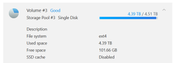
F2-423 Drive in Bay = Used Space 4.88TB (BTRFS)

F2-423 USB drive = Used Space 4.39TB (EXT4)

F2-210 Drive In Bay = Used Space 4.39TB (EXT4)
F2-424 TOS 7.0.1298
F2-423 TOS 7.0.1298
F2-210 TOS 4.2.44
D4-320
C/O
F4-424 TOS 6.0.794
F2-423 TOS 7.0.1298
F2-210 TOS 4.2.44
D4-320
C/O
F4-424 TOS 6.0.794
Re: [Help] cant get space back
i am using tnas 450 -T9 450TMtina wrote: ↑23 Aug 2025, 09:37 Hello, may I ask which version of the TOS system are you using? You can refer to this link to try freeing up your storage space:
viewtopic.php?t=6999
op tos 6.0770
i have tried the link but i have already tried this
i don't have a recycle bin in the folder from which the files were deleted which was moved from a folder on the nas to my pc using Windows 10
i have checked the folder and the files have defiently been moved and dont reside in the folder or on the nas
i also emptied all the recycling bins using a schedule just to make sure all bins were emptied
i deleted all snapshots just to make sure i have no apps installed except snapshot
i dont have TerraSync installed
Re: [Help] cant get space back
Please contact our online support through the official TerraMaster website. We will arrange for an engineer to perform a remote diagnosis for you.jwills70 wrote: ↑23 Aug 2025, 20:44i am using tnas 450 -T9 450TMtina wrote: ↑23 Aug 2025, 09:37 Hello, may I ask which version of the TOS system are you using? You can refer to this link to try freeing up your storage space:
viewtopic.php?t=6999
op tos 6.0770
i have tried the link but i have already tried this
i don't have a recycle bin in the folder from which the files were deleted which was moved from a folder on the nas to my pc using Windows 10
i have checked the folder and the files have defiently been moved and dont reside in the folder or on the nas
i also emptied all the recycling bins using a schedule just to make sure all bins were emptied
i deleted all snapshots just to make sure i have no apps installed except snapshot
i dont have TerraSync installed
To contact our team, please send email to following addresses, remember to replace (at) with @:
Technical team: support(at)terra-master.com(for technical support)
Service team: service(at)terra-master.com(for purchasing, return, replacement, RMA service)
Technical team: support(at)terra-master.com(for technical support)
Service team: service(at)terra-master.com(for purchasing, return, replacement, RMA service)
Re: [Help] cant get space back
Hi I have now emailed support twice and all they keep saying is to contact support via the main web page to arrange a technician to do a remote
but I have no idea how to do that the live chat does not work and all I can see is to email
Support at terra-master.com just going round in circles ??


Re: [Help] cant get space back
I ran into a similar occurance with my equipment.
I have a F2-423 with an attached D4-320. I am running TOS 6.0.770, the F2-423 has 20GB RAM and is equipped with 2x NVMe drives (256GB+1TB) & 2x HDD(8TB & 12TB). I had configured the NVMe drives as JBOD (Volume 1) and the HDD as TRAID using btrfs (Volume 2). The D4-320 has 2x HDD (8TB) (Volume 3) and was also configured as a TRAID using btrfs as the file system.
I noticed that total occupied space on the volumes would increase as files were added, but failed to decrease when files were deleted and the #recycle folder emptied. I tested by creating a test folder with 200GB worth of files, noted the total occupied space for the volume (1.2TB) then deleted the folder & emptied the recycle folder. The total occupied space stayed at 1.2TB. 12+ hours later I checked & the total occupied space was still being reported as 1.2TB even though the #recycle folder reported 0B and the total space occupied by shared folder files on the volume was < 1TB.
I backed up the files I needed to retain, then deleted and rebult volumes Volume 2 and Volume 3, specifying ext4 as the file system. I ran a similar test, adding 300GB of files, then deleting them & emptying the #recycle folder, checking occupied space reported for volume and folders at each step. Everything worked as expected. Overall Volume occupied space remained the same following deletion, but then dropped when the #recycle folder was emptied. At that point overall occupied space was consistant with the space occupied in the shared folder.
It would appear that ext4 is a more appropriate choice for my uses.
I have a F2-423 with an attached D4-320. I am running TOS 6.0.770, the F2-423 has 20GB RAM and is equipped with 2x NVMe drives (256GB+1TB) & 2x HDD(8TB & 12TB). I had configured the NVMe drives as JBOD (Volume 1) and the HDD as TRAID using btrfs (Volume 2). The D4-320 has 2x HDD (8TB) (Volume 3) and was also configured as a TRAID using btrfs as the file system.
I noticed that total occupied space on the volumes would increase as files were added, but failed to decrease when files were deleted and the #recycle folder emptied. I tested by creating a test folder with 200GB worth of files, noted the total occupied space for the volume (1.2TB) then deleted the folder & emptied the recycle folder. The total occupied space stayed at 1.2TB. 12+ hours later I checked & the total occupied space was still being reported as 1.2TB even though the #recycle folder reported 0B and the total space occupied by shared folder files on the volume was < 1TB.
I backed up the files I needed to retain, then deleted and rebult volumes Volume 2 and Volume 3, specifying ext4 as the file system. I ran a similar test, adding 300GB of files, then deleting them & emptying the #recycle folder, checking occupied space reported for volume and folders at each step. Everything worked as expected. Overall Volume occupied space remained the same following deletion, but then dropped when the #recycle folder was emptied. At that point overall occupied space was consistant with the space occupied in the shared folder.
It would appear that ext4 is a more appropriate choice for my uses.
F2-423 TOS 7.0.1298 20GB RAM, 2x NVMe drives (.25TB + 1TB JBOD as Volume1), 2x 12TB TRAID as Volume2 D4-320 4x 8TB TRAID as Volume3

Re: [Help] cant get space back
Hello! Regarding the issue you reported about the TNAS device's storage space not being released properly, we have taken note of the situation. May we ask if the problem has been resolved? If not, we will immediately arrange for a dedicated technical specialist to provide you with remote assistance.
We would like to clarify that our email support colleague previously suggested you contact our official online customer service primarily to quickly confirm your availability and coordinate a suitable time with our technical team via instant communication tools, thereby ensuring a more efficient problem-solving process. We are always committed to providing you with accurate and timely solutions.
We would like to clarify that our email support colleague previously suggested you contact our official online customer service primarily to quickly confirm your availability and coordinate a suitable time with our technical team via instant communication tools, thereby ensuring a more efficient problem-solving process. We are always committed to providing you with accurate and timely solutions.
To contact our team, please send email to following addresses, remember to replace (at) with @
Technical team: support(at)terra-master.com (for technical support)
Service team: service(at)terra-master.com (for purchasing, return, replacement, RMA service)
Technical team: support(at)terra-master.com (for technical support)
Service team: service(at)terra-master.com (for purchasing, return, replacement, RMA service)

Re: [Help] cant get space back
This is most likely the effect of BTRFS's snapshot feature. Even if you use BTRFS, not utilizing the snapshot feature can still meet your usage preferences.
To contact our team, please send email to following addresses, remember to replace (at) with @:
Technical team: support(at)terra-master.com (for technical support)
Service team: service(at)terra-master.com (for purchasing, return, replacement, RMA service)
Technical team: support(at)terra-master.com (for technical support)
Service team: service(at)terra-master.com (for purchasing, return, replacement, RMA service)