Laptop drive does not show up as a choice for sync

Laptop drive does not show up as a choice for sync
Extremely frustrating. I am using the latest TerraSync Client for the PC. I have the connection to my F8 SSD Plus NAS unit connected and working. When I run TerraSync Client from the TNAC PC app and try to set up a sync task, the local PC drives do not show up in the list of drives under the local directory dropdown and the existing NAS folders do not show up under the remote directory dropdown. What else do I have to do???????

Re: Laptop drive does not show up as a choice for sync
1) Remote Syncing Folder Not Displayed
The remote sync folder may not appear because the NAS shared folder has not been added to TerraSync's "Team Folders." To resolve this:
① Go to NAS > TerraSync > TerraSync Console > Manage Team Folders.
② Add the shared folder you wish to sync.
2)Local PC Folder Not Displayed
For this issue, we require additional details to investigate further:
① What is your Windows OS version? (e.g., Windows 10 21H2, Windows 11 22H2)
② Please restart TNAS PC and check if the issue persists.
The remote sync folder may not appear because the NAS shared folder has not been added to TerraSync's "Team Folders." To resolve this:
① Go to NAS > TerraSync > TerraSync Console > Manage Team Folders.
② Add the shared folder you wish to sync.
2)Local PC Folder Not Displayed
For this issue, we require additional details to investigate further:
① What is your Windows OS version? (e.g., Windows 10 21H2, Windows 11 22H2)
② Please restart TNAS PC and check if the issue persists.
To contact our team, please send email to following addresses, remember to replace (at) with @:
Technical team: support(at)terra-master.com(for technical support)
Service team: service(at)terra-master.com(for purchasing, return, replacement, RMA service)
Technical team: support(at)terra-master.com(for technical support)
Service team: service(at)terra-master.com(for purchasing, return, replacement, RMA service)
-
thomasmagnus

- Posts: 4
- Joined: 29 May 2025, 06:35

Re: Laptop drive does not show up as a choice for sync
Hello,
I have the same trouble using Save task Terrasync
Terramaster F6-424 TOS 6
TNAS PC 5.2.186
Windows 11 Professional 24H2
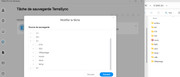
For Example the X drive have "archive" and "bd" folder and there are not found when I try to select them into TNAS PC.
I restart My PC
I try to run TNAS PC 5.2.186 as administrator
I have the same result.
Please ,do you have any idea how to solve this issue ?
I have the same trouble using Save task Terrasync
Terramaster F6-424 TOS 6
TNAS PC 5.2.186
Windows 11 Professional 24H2
For Example the X drive have "archive" and "bd" folder and there are not found when I try to select them into TNAS PC.
I restart My PC
I try to run TNAS PC 5.2.186 as administrator
I have the same result.
Please ,do you have any idea how to solve this issue ?
Last edited by thomasmagnus on 29 May 2025, 21:15, edited 1 time in total.

Re: Laptop drive does not show up as a choice for sync
Sorry for that, we need to upload to our engineer to verify it.
To contact our team, please send email to following addresses, remember to replace (at) with @
Technical team: support(at)terra-master.com(for technical support)
Service team: service(at)terra-master.com(for purchasing, return, replacement, RMA service)
Technical team: support(at)terra-master.com(for technical support)
Service team: service(at)terra-master.com(for purchasing, return, replacement, RMA service)
Re: Laptop drive does not show up as a choice for sync
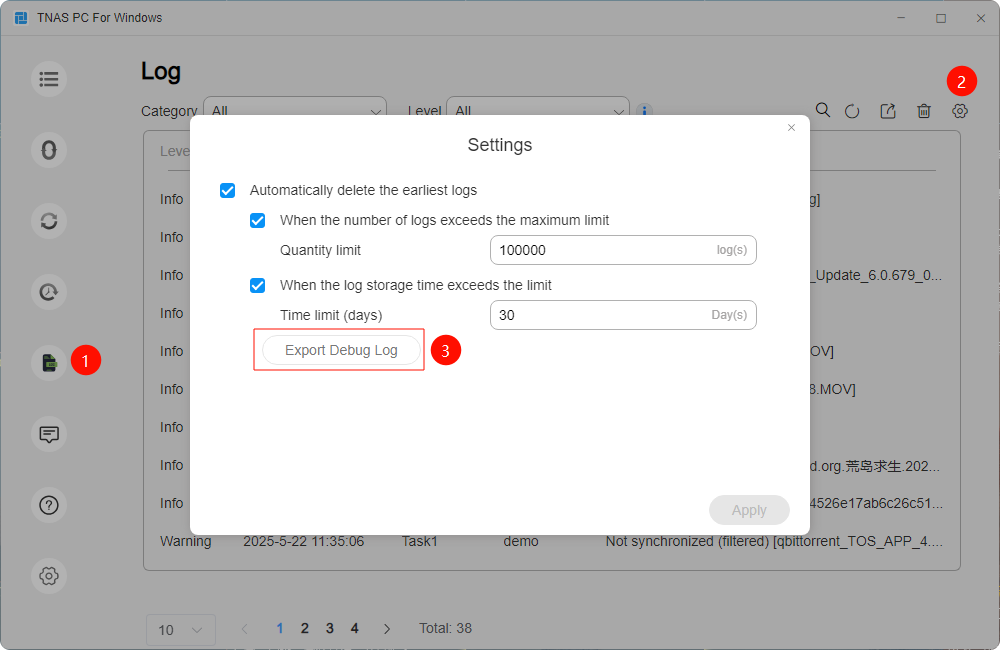
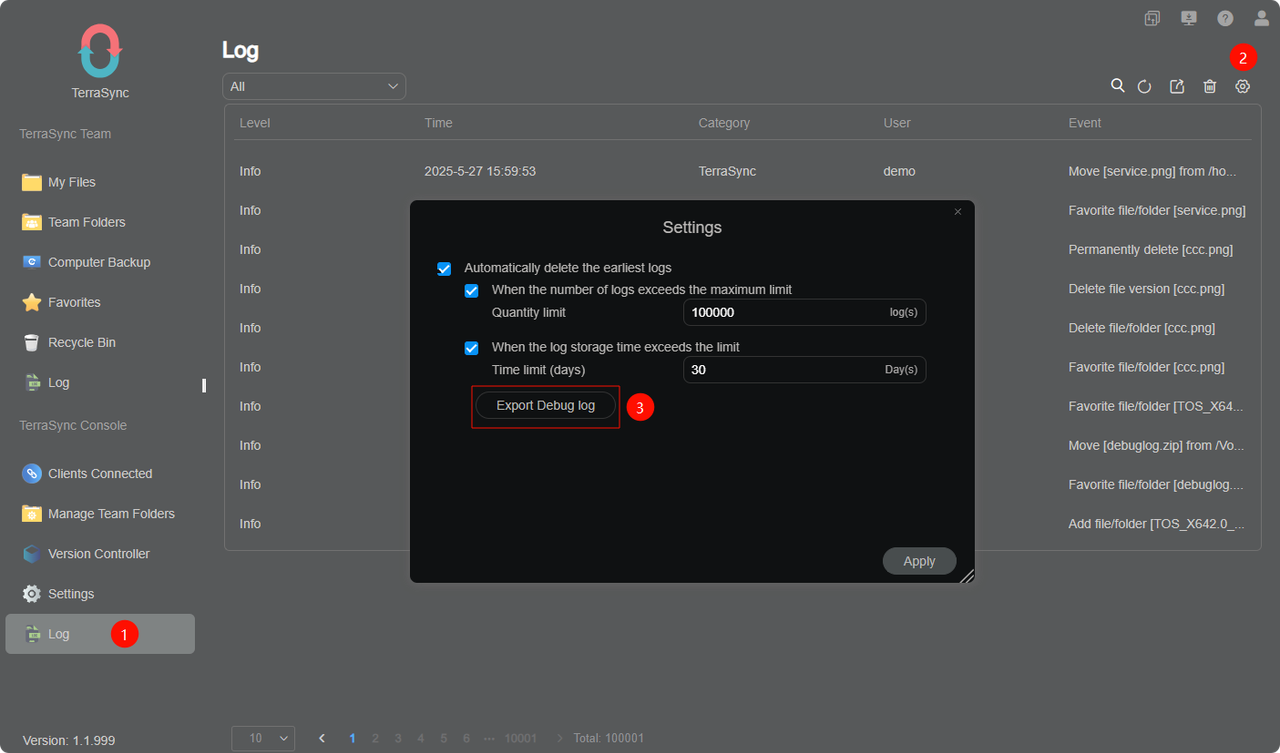
Hello, please send the debug logs of TNAS PC and TerraSync application to [email protected] for our engineers to analyze. If the cause cannot be found, remote assistance may be required to further investigate.thomasmagnus wrote: ↑29 May 2025, 06:50 Hello,
I have the same trouble using Save task Terrasync
Terramaster F6-424 TOS 6
TNAS PC 5.2.186
Windows 11 Professional 24H2
For Example the X drive have "archive" and "bd" folder and there are not found when I try to select them into TNAS PC.
I restart My PC
I try to run TNAS PC 5.2.186 as administrator
I have the same result.
If I Copy the "archive" folder to another drive I can select the folder "archive" on the new drive.
Please ,do you have any idea how to solve this issue ?
Method to obtain the debug logs:
To contact our team, please send email to following addresses, remember to replace (at) with @:
Technical team: support(at)terra-master.com(for technical support)
Service team: service(at)terra-master.com(for purchasing, return, replacement, RMA service)
Technical team: support(at)terra-master.com(for technical support)
Service team: service(at)terra-master.com(for purchasing, return, replacement, RMA service)
-
thomasmagnus
- Posts: 4
- Joined: 29 May 2025, 06:35
Re: Laptop drive does not show up as a choice for sync
Solution I found (not the best, in my opinion): After performing the following operations, the folder becomes visible on TNAS PC:
Solution 1 : Compressing the folder using the tar POSIX format and then extracting it to either another drive or the same location.
Solution 2 : Copying the folder to an FTP server (TOS 6), then transferring it back to the source PC using FTP or HTTP download from TOS 6.
Methods that failed:
Robocopy
Teracopy
Resetting NTFS attributes
Compressing the folder using ZIP or 7z format and then extracting it
Copying the folder to another drive
Solution 1 : Compressing the folder using the tar POSIX format and then extracting it to either another drive or the same location.
Solution 2 : Copying the folder to an FTP server (TOS 6), then transferring it back to the source PC using FTP or HTTP download from TOS 6.
Methods that failed:
Robocopy
Teracopy
Resetting NTFS attributes
Compressing the folder using ZIP or 7z format and then extracting it
Copying the folder to another drive
-
syarbrough
- Posts: 1
- Joined: 11 Aug 2025, 06:29

Re: Laptop drive does not show up as a choice for sync
I believe I found the fix for this issue as I recently purchased my first Terra-Master NAS and was running into the same thing.
TL;DR: Enable the folder, subfolders and files to have contents indexed
Solution:
1. Go to the properties for the folder
2. Under the Attributes, click Advanced
3. Check "Allow files in this folder to have contents indexed..."
4. Select "Apply changes to this folder, subfolders and files"
5. Once that's complete, it should show up.
This has worked for every folder I've tried it on as I had quite a few that were not showing up in TNAS PC sync tasks.
Hopefully that works for everyone and helps find the issue in the code.
TL;DR: Enable the folder, subfolders and files to have contents indexed
Solution:
1. Go to the properties for the folder
2. Under the Attributes, click Advanced
3. Check "Allow files in this folder to have contents indexed..."
4. Select "Apply changes to this folder, subfolders and files"
5. Once that's complete, it should show up.
This has worked for every folder I've tried it on as I had quite a few that were not showing up in TNAS PC sync tasks.
Hopefully that works for everyone and helps find the issue in the code.
Re: Laptop drive does not show up as a choice for sync
Thank you for your assistance. I have conveyed your point of view to the TerraSync project team for verification.
To contact our team, please send email to following addresses, remember to replace (at) with @:
Technical team: support(at)terra-master.com(for technical support)
Service team: service(at)terra-master.com(for purchasing, return, replacement, RMA service)
Technical team: support(at)terra-master.com(for technical support)
Service team: service(at)terra-master.com(for purchasing, return, replacement, RMA service)