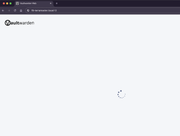
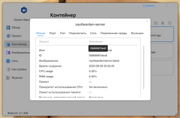
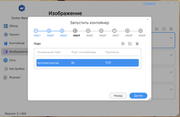
The web interface does not load until the login window and just spins like a circle of balls.
I can't copy the container ID to try to check its relevance manually. There is no update to the current version at all, I don't know how to use Portainer.
Hello, if the container is running normally, please try to access the container's web content using the local NAS IP + port. Additionally, you can download Portainer in the App Center.
Please be aware that port 80 of the NAS is already allocated for services related to the TNAS PC app. If you really need to use the NAS IP and port 80 for this container, you may consider releasing ports 80 and 443 in the control panel under Network-General.
However, this will make the TNAS PC app unusable.
Regarding the update method for containers, you can currently only delete the old container and image, then pull the new image and run it as new container again.
To contact our team, please send email to following addresses, remember to replace (at) with @:
Technical team: support(at)terra-master.com (for technical support)
Service team: service(at)terra-master.com (for purchasing, return, replacement, RMA service)
TMzethar wrote: ↑28 Jul 2025, 19:18
Please be aware that port 80 of the NAS is already allocated for services related to the TNAS PC app. If you really need to use the NAS IP and port 80 for this container, you may consider releasing ports 80 and 443 in the control panel under Network-General.
However, this will make the TNAS PC app unusable.
Regarding the update method for containers, you can currently only delete the old container and image, then pull the new image and run it as new container again.
Why did you release a product for free sale that does not work and is not going to work?
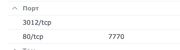
80 is the container port, I didn’t come up with these settings myself, I’m just copying the scheme that works on Syno.
Everything is done according to the manual. Your opinion is of little interest to me. If there are no instructions on how to make it work, then there is no need to write nonsense stuffing posts, spammer.
AES wrote: ↑06 Aug 2025, 01:58
Everything is done according to the manual. Your opinion is of little interest to me. If there are no instructions on how to make it work, then there is no need to write nonsense stuffing posts, spammer.
who created the manual? (i realise this question is probably little interest to you) but as TM support have already told you that port 80 is already in use hence why you cant set something else to use it (without releasing the port first)
are you asking for instructions on how to release port 80? or are you asking TM why another company created a manual that didnt know TM uses port 80? the idea of Docker is that 3rd party software companies can create products, hence the question about whos manual are you using? one created by TM or another company
F2-424 TOS 7.0.1278 F2-423 TOS 7.0.1278 F2-210 TOS 4.2.44 D4-320
Vaultwarden on TOS does not work, there are some strange people on the forum playing clowns who do not distinguish between the host and container ports.
Vaultwarden in Docker uses two main ports:
Port 80 is the main web port for accessing the Vaultwarden interface
Port 3012 is a port for WebSocket connections that provide real-time synchronization
When configured in docker-compose.yml, it looks like this:
ports:
- "80:80" # Mapping host port 80 to container port 80
- "3012:3012" # Mapping host port 3012 to container port 3012
Important: if these ports are already used by other applications, you can change them in the configuration. For example, you can use ports 8080 and 30120, respectively.
When working through Nginx or another proxy server, these ports may be configured differently, but inside the container they remain standard.
Are there any non-Docker clowns on the forum, as well as those who can read?
When a Docker container attempts to bind to a port that is already in use by the host system, this conflict will cause container startup failure or operational dysfunction.
This is governed by a fundamental networking rule: On a given IP address, for a specific transport layer protocol (TCP/UDP), each port number can only be listened by a single process at any moment.
The nature of port binding:
When executing docker run -p <host_port>:<container_port>, the Docker daemon attempts to bind to the specified <host_port> on the host OS's network interfaces (e.g., 0.0.0.0 for all interfaces).
If any existing process (including other Docker containers, host services like Nginx/MySQL/SSH, or native applications) is already listening on that same host IP:port combination with the same protocol (typically TCP), the Docker daemon's bind operation will fail with Address already in use.
To contact our team, please send email to following addresses, remember to replace (at) with @:
Support team: support(at)terra-master.com (for technical support only)
Service team: service(at)terra-master.com (for purchasing, return, replacement, RMA service)