
Applicable Versions: All versions
Applicable Models: All TNAS models
I. Model Overview
ARM Models:
Devices running TOS 4 (Realtek RTD 1296): F2-210, F4-210
Devices running TOS 5 (Realtek RTD 1619B): F2-211, F2-212, F4-211, F4-212, U4-212, U4-211
X86 (Legacy) Models:
F2-220, F2-221, F2-420, F2-422, F4-220, F4-221, F4-420, F4-421, F4-422, F5-220, F5-221, F5-420, F5-421, F5-422, F8-421, F8-422
X86 (UEFI) Models:
F2-223, F2-423, F4-223, F4-423, F4-424, F4-424 Pro, F4-424 Max, F6-424, F6-424 Max, F8 SSD, F8 SSD Plus, T6-423, T9-423, T9-450, T9-450 Pro, T12-423, T12-450, T12-500 Pro, U12-423, U12-500 Plus
II. Use Scenarios and Solutions
Scenario 1: Switching from an ARM NAS to an X86 NAS
Example: How to use the hard drives from F2-210/F4-210 in F4-423.
Solution:
In most cases, you can move the hard drives from the F2-210/F4-210 to the F4-423 and reinstall the TOS 5.1 system. After installation, the data should be usable.
Note:
If the installation process warns of formatting or data deletion, do not proceed, and in this case, upgrading to TOS 6 will not be possible.
It is recommended to back up your data first, then install the system on the new device.
Scenario 2: Swapping Hard Drives Between Identical TNAS Models
Solution:
Hard drives can be "seamlessly" transferred between identical TNAS models. Simply shut down the old TNAS, insert the hard drives into the new TNAS, and power it on for direct usage.
Scenario 3: Hard Drive Compatibility Within ARM or X86 Models
ARM Models:
Devices running TOS 4 (Realtek RTD 1296): Hard drives from F2-210 and F4-210 can be swapped and used directly.
Devices running TOS 5 (Realtek RTD 1619B): Hard drives from F2-211, F2-212, F4-211, F4-212, U4-212, and U4-211 can be swapped and used directly.
X86 Models:
For legacy boot models: Hard drives from F2-220, F2-221, F2-420, F2-422, F4-220, F4-221, F4-420, F4-421, F4-422, F5-220, F5-221, F5-420, F5-421, F5-422, F8-421, and F8-422 can be swapped and used directly.
For UEFI boot models: Hard drives from F2-223, F2-423, F4-223, F4-423, F4-424, F4-424 Pro, F4-424 Max, F6-424, F6-424 Max, T6-423, T9-423, T9-450, T9-450 Pro, T12-423, T12-450, T12-500 Pro, U12-423, and U12-500 Plus can be swapped and used directly.
Note:
Hard drives cannot be directly swapped between models with different boot modes (legacy vs. UEFI). Reinstallation of the TOS system will be required in such cases.
Scenario 4: Using a Large Hard Drive as a Data Transfer Station
Solution:
Prepare an external hard drive enclosure, such as a TDAS, to serve as a transfer station. After transferring data, install the old hard drives into the new NAS and reinstall the system.
How to migrate hard drives from an existing TNAS to a newly purchased TNAS?
How to migrate hard drives from an existing TNAS to a newly purchased TNAS?
To contact our team, please send email to following addresses, remember to replace (at) with @:
Technical team: support(at)terra-master.com(for technical support)
Service team: service(at)terra-master.com(for purchasing, return, replacement, RMA service)
Technical team: support(at)terra-master.com(for technical support)
Service team: service(at)terra-master.com(for purchasing, return, replacement, RMA service)


Re: How to Use Hard Drives from an TNAS in a Newly Purchased TNAS
Hi. In another thread here I have been asking about how to setup my new F4-423. I only just found this thread and it's describing exactly what I want to do as an end goal, convert from my existing F4-210 (ARM) to F4-423. I had read in some other forums that I could not move my 4x 8TB RAID5 set of drives into the 423 directly. I have a old F4-210 and my plan is replace it with the F4-423 (upgraded my LAN to 2.5Gb).TMnight wrote: ↑15 Nov 2024, 16:34 Scenario 1: Switching from an ARM NAS to an X86 NAS
Example: How to use the hard drives from F2-210/F4-210 in F4-423.
Solution:
In most cases, you can move the hard drives from the F2-210/F4-210 to the F4-423 and reinstall the TOS 5.1 system. After installation, the data should be usable.
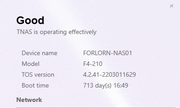
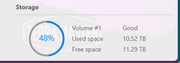
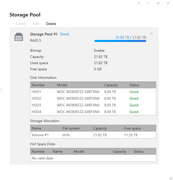
My upgrade path was going to be to get the F4-423 up and running with TOS6 on a SSD and 4x 4TB SATA HDDs and then copy the data from the F4-210 to the F4-423. THEN once done and verified, I would one at a time "fail" each 4TB drive in the 423 and replace with a 8TB (out of the 210) one by one and let the RAID5 array rebuild each time until I have eventually replaced all 4 4TB with 8TB. Once that's done I could then extend the 423's RAID5 set to full the capacity of the 4x 8TB and be back to the NAS capacity I have with the 210 currently.
As described by Scenario 1, it would seem I'm making this a longer process than necessary. If I am reading it correctly, I can get my 423 up and running with TOS6 on a M.2, and then just move the existing 4x 8TB RAID5 set of drives from the 210 to the 423? I'm assuming I will need configure the boot order in 423 BIOS in some specific way so it does not try to boot from the RAID5 set, correct?
As a protection I was planning to connect a extra 16TB HDD I have laying around to the 210 via USB and make a backup of the RAID set before doing anything.
BurnsyD
F4-210 (TOS4.2.41) 4x8TB <- retired
F4-423 (TOS6.0.750) 4x8TB (21.8TB usable) + 2xM.2 (1 for TOS, 1 for HyperCache)
F4-210 (TOS4.2.41) 4x8TB <- retired
F4-423 (TOS6.0.750) 4x8TB (21.8TB usable) + 2xM.2 (1 for TOS, 1 for HyperCache)

Re: How to Use Hard Drives from an TNAS in a Newly Purchased TNAS
Your original plan is also feasible and may be more appropriate in terms of results. Having TOS6 directly recognize the old TNAS disk is a form of adaptive compatibility and is also the simplest approach.
There is no need to set the BIOS boot (based on the method you were previously told in other posts.) Adjusting the BIOS boot order is also feasible, allowing TNAS to boot from the new system on the NVMe SSD first.
To contact our team, please send email to following addresses, remember to replace (at) with @:
Technical team: support(at)terra-master.com (for technical support)
Service team: service(at)terra-master.com (for purchasing, return, replacement, RMA service)
Technical team: support(at)terra-master.com (for technical support)
Service team: service(at)terra-master.com (for purchasing, return, replacement, RMA service)
Re: How to Use Hard Drives from an TNAS in a Newly Purchased TNAS
I have my old 210 running "USB Copy" to backup it's RAID5 array (4x 8TB, 10.5TB "used") to a USB external 16TB drive. I'm not sure how long that will take, the "USB Copy" TOS4 app does not appear to offer realtime completion progress.
I put one M.2 SSD in the 423 and have it up and running 6.0.750. I've shut it down completely and rebooted it multiple times with no HDD's installed and it's reliably coming up in TOS6 every time (thanks for all the help in that other thread).
When the 210 looks to have completed the rsync to the external USB, I'll power it down and put that RAID5 drive set in the 423 and see what happens.
I put one M.2 SSD in the 423 and have it up and running 6.0.750. I've shut it down completely and rebooted it multiple times with no HDD's installed and it's reliably coming up in TOS6 every time (thanks for all the help in that other thread).
When the 210 looks to have completed the rsync to the external USB, I'll power it down and put that RAID5 drive set in the 423 and see what happens.
BurnsyD
F4-210 (TOS4.2.41) 4x8TB <- retired
F4-423 (TOS6.0.750) 4x8TB (21.8TB usable) + 2xM.2 (1 for TOS, 1 for HyperCache)
F4-210 (TOS4.2.41) 4x8TB <- retired
F4-423 (TOS6.0.750) 4x8TB (21.8TB usable) + 2xM.2 (1 for TOS, 1 for HyperCache)
Re: How to Use Hard Drives from an TNAS in a Newly Purchased TNAS
It took a day and a half to "backup" the 10.5TB from my 210 to the external 16TB.BurnsyD17 wrote: ↑30 Jul 2025, 23:56 I have my old 210 running "USB Copy" to backup it's RAID5 array (4x 8TB, 10.5TB "used") to a USB external 16TB drive. I'm not sure how long that will take, the "USB Copy" TOS4 app does not appear to offer realtime completion progress.
I put one M.2 SSD in the 423 and have it up and running 6.0.750. I've shut it down completely and rebooted it multiple times with no HDD's installed and it's reliably coming up in TOS6 every time (thanks for all the help in that other thread).
When the 210 looks to have completed the rsync to the external USB, I'll power it down and put that RAID5 drive set in the 423 and see what happens.
I shut it down, pulled the 4x 8TB drives and put them in the 423 and powered up. It sat for over a day in the booting up process (seen on HDMI) never even getting to the point in the TOS6 boot where it switches the HDMI to a higher resolution display font. HDD LED's steady on, no activity indicated.

Gave up after a day. Powered it off. Ejected the drives and powered up. Fully boots and I'm in TOS6 desktop from browser. Plug in the 4 HDD's and they all show up, but no RAID5 set is seen. Yes, I was very careful to plug them into the 423 in the exact same order left to right as they had been in the 210. Re-read a ton of threads here, saw nothing indicating how in TOS6 to "adopt" (or whatever it's called) that BTRFS RAID5 set into TOS6.
Just decided to give up. Had the array's data backed up to two separate 16TB drives, decided I was tired of mucking around with this for day after day so I just created a new RAID5 BTRFS Storage Pool / Volume on the drives and restored my data to it from one of the 16TB drive backups.
So, the end of my attempted migration journey that I as a user couldn't figure out how to do correctly. Oh well.
BurnsyD
F4-210 (TOS4.2.41) 4x8TB <- retired
F4-423 (TOS6.0.750) 4x8TB (21.8TB usable) + 2xM.2 (1 for TOS, 1 for HyperCache)
F4-210 (TOS4.2.41) 4x8TB <- retired
F4-423 (TOS6.0.750) 4x8TB (21.8TB usable) + 2xM.2 (1 for TOS, 1 for HyperCache)
-
lordgosford
- Posts: 1
- Joined: 12 Aug 2025, 08:27

Re: How to Use Hard Drives from an TNAS in a Newly Purchased TNAS
I have a F2-212 with 2 drives and upgrading to a F4-212 and adding 2 additional drives.
Can I move my existing drives from the F2-212 to the F4-212 without losing any data?
Also, should I move them first, then add the new drives later, or put all 4 drives in the new tnas all at once?
Thank you
Can I move my existing drives from the F2-212 to the F4-212 without losing any data?
Also, should I move them first, then add the new drives later, or put all 4 drives in the new tnas all at once?
Thank you


Re: How to Use Hard Drives from an TNAS in a Newly Purchased TNAS
Hello, you can move the existing hard drive to F4-212 without losing data.
You can first install the new hard drive and then install the old one, or you can first install the old hard drive and then add the new one.
You can first install the new hard drive and then install the old one, or you can first install the old hard drive and then add the new one.
To contact our team, please send email to following addresses, remember to replace (at) with @
Technical team: support(at)terra-master.com(for technical support)
Service team: service(at)terra-master.com(for purchasing, return, replacement, RMA service)
Technical team: support(at)terra-master.com(for technical support)
Service team: service(at)terra-master.com(for purchasing, return, replacement, RMA service)

Re: How to Use Hard Drives from an TNAS in a Newly Purchased TNAS
I have a F2-210 ARM Tos4 that I want to upgrade to F2-425 I just purchased. The F2-425 should have Tos6 installed and intel processor. I am running RAID 0 with 2 4T drives. Can I directly swap drives into F2-425?
Re: How to Use Hard Drives from an TNAS in a Newly Purchased TNAS
Since the system partition of TOS 4 does not meet the requirements of TOS 6 and there are no available slots, you cannot directly replace the hard disk onto the F2-425. You need to use an additional hard disk to install the system, and then import both hard disks into the NAS.
To contact our team, please send email to following addresses, remember to replace (at) with @
Technical team: support(at)terra-master.com(for technical support)
Service team: service(at)terra-master.com(for purchasing, return, replacement, RMA service)
Technical team: support(at)terra-master.com(for technical support)
Service team: service(at)terra-master.com(for purchasing, return, replacement, RMA service)


Re: How to Use Hard Drives from an TNAS in a Newly Purchased TNAS
I have an F5-221 running TOS6 (6.0.794) with 5 drives and I want to move the drives over to a F6-424 MAX.
My concern is:
Note:
Hard drives cannot be directly swapped between models with different boot modes (legacy vs. UEFI). Reinstallation of the TOS system will be required in such cases.
When they say a reinstallation of the TOS system, do they mean the data is preserved, and I only need to reinstall the TOS?, or a complete start over?
Also, I checked the Boot mode and it is (Legacy+UEFI) if that helps.
My concern is:
Note:
Hard drives cannot be directly swapped between models with different boot modes (legacy vs. UEFI). Reinstallation of the TOS system will be required in such cases.
When they say a reinstallation of the TOS system, do they mean the data is preserved, and I only need to reinstall the TOS?, or a complete start over?
Also, I checked the Boot mode and it is (Legacy+UEFI) if that helps.