
I go to the users, press the (+) fill in the information and the NEXT button does nothing.
Thanks, Mitch Mikesell
[Help] cannot add new users to tos 6
Re: [Help] cannot add new users to tos 6
I notice that sssd is not running. should it be. do you use the unix adduser command or something home grown a terramaster?

Re: [Help] cannot add new users to tos 6
Linux kernel 6.1.120+ (TOS 6.0.750)
Regarding the issue you encountered, can you provide a screenshot?
The inability to click 'Next' might be due to incorrect or incomplete input, or not meeting the required conditions. Please pay attention to any related error messages or prompts.
Regarding the issue you encountered, can you provide a screenshot?
The inability to click 'Next' might be due to incorrect or incomplete input, or not meeting the required conditions. Please pay attention to any related error messages or prompts.
To contact our team, please send email to following addresses, remember to replace (at) with @:
Technical team: support(at)terra-master.com (for technical support)
Service team: service(at)terra-master.com (for purchasing, return, replacement, RMA service)
Technical team: support(at)terra-master.com (for technical support)
Service team: service(at)terra-master.com (for purchasing, return, replacement, RMA service)
Re: [Help] cannot add new users to tos 6
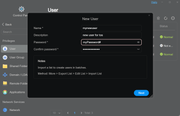
did all of those things. next button does not work.
Re: [Help] cannot add new users to tos 6
I can add a user through useradd, but the user never shows up on the user screen in tos 6.094. user exists but can't login or do anything. this is messed up.


Re: [Help] cannot add new users to tos 6
This issue might be related to database communication. Please execute the following command in the terminal:
systemctl status [email protected]
Check whether the database service is normal.
systemctl status [email protected]
Check whether the database service is normal.
To contact our team, please send email to following addresses, remember to replace (at) with @
Technical team: support(at)terra-master.com(for technical support)
Service team: service(at)terra-master.com(for purchasing, return, replacement, RMA service)
Technical team: support(at)terra-master.com(for technical support)
Service team: service(at)terra-master.com(for purchasing, return, replacement, RMA service)
Re: [Help] cannot add new users to tos 6
TNAS:/# systemctl status [email protected]
● [email protected] - PostgreSQL Cluster 13-main
Loaded: loaded (/lib/systemd/system/[email protected]; enabled-runtime; vendor preset: enabled)
Active: active (running) since Wed 2025-07-23 15:40:04 MDT; 21h ago
Main PID: 585 (postgres)
Tasks: 11 (limit: 38151)
Memory: 77.0M
CPU: 8.032s
CGroup: /system.slice/system-postgresql.slice/[email protected]
├─ 585 /usr/lib/postgresql/13/bin/postgres -D /etc/postgresql/13/main -c unix_socket_directories=/var/run/postgresql -c config_file=/etc/postgresql/13/main/postgresql.conf -c hba_file=/etc/postgresql/13/main/pg_hba.conf -c ident_file=/etc/postgresql/13/main/pg_ident.conf -c external_pid_file=/var/run/postgresql/13-main.pid
● [email protected] - PostgreSQL Cluster 13-main
Loaded: loaded (/lib/systemd/system/[email protected]; enabled-runtime; vendor preset: enabled)
Active: active (running) since Wed 2025-07-23 15:40:04 MDT; 21h ago
Main PID: 585 (postgres)
Tasks: 11 (limit: 38151)
Memory: 77.0M
CPU: 8.032s
CGroup: /system.slice/system-postgresql.slice/[email protected]
├─ 585 /usr/lib/postgresql/13/bin/postgres -D /etc/postgresql/13/main -c unix_socket_directories=/var/run/postgresql -c config_file=/etc/postgresql/13/main/postgresql.conf -c hba_file=/etc/postgresql/13/main/pg_hba.conf -c ident_file=/etc/postgresql/13/main/pg_ident.conf -c external_pid_file=/var/run/postgresql/13-main.pid

Re: [Help] cannot add new users to tos 6
When adding a user through useradd, the user will not appear on the user page of TOS 6. Since the username added through useradd is not written into the database, it is recommended that you add a new user on the user page. From the error screenshot, it is found that the password you use does not comply with the rules:
1. Contains uppercase and lowercase letters
2. Contains numbers
3. Minimum password length 8
Please try to use a password that complies with the rules.
To contact our team, please send email to following addresses, remember to replace (at) with @:
Technical team: support(at)terra-master.com(for technical support)
Service team: service(at)terra-master.com(for purchasing, return, replacement, RMA service)
Technical team: support(at)terra-master.com(for technical support)
Service team: service(at)terra-master.com(for purchasing, return, replacement, RMA service)