

Hi
Can someone please help me? I don’t have advanced knowledge of the TerraMaster NAS environment, and since the update, I can no longer access the NAS through my web browser.
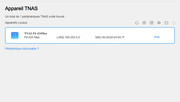
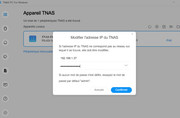
I tried changing the IP address using the TNAS PC application, but it doesn’t seem to work.
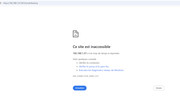
For example, if I assign the IP address 190.150.0.1, the login page doesn’t open in my browser.
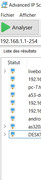
Additionally, the NAS is not detected by the Advanced IP Scanner software.
I’m really lost and I just don’t want to lose my data.
[Help] No Access F6-424Max After TOS 6.0.750 Update – Not Detected on Network
-
crisisacting

- Silver Member
- Posts: 531
- Joined: 20 Jan 2022, 16:42
Re: [Help] No Access F6-424Max After TOS 6.0.750 Update – Not Detected on Network
First, try plugging into the other LAN port (LAN 1).
A 169.254.×.× address is an automatic private address assigned by the OS, in this case TOS, when it cannot communicate with a DHCP server to obtain an IP address assignment.
A 169.254.×.× address is an automatic private address assigned by the OS, in this case TOS, when it cannot communicate with a DHCP server to obtain an IP address assignment.
Re: [Help] No Access F6-424Max After TOS 6.0.750 Update – Not Detected on Network
Thanks for the suggestion. I tried switching to the other LAN port on the NAS and also changed the port on the router, but unfortunately it didn’t solve the issue.crisisacting wrote: ↑12 Jul 2025, 00:06 First, try plugging into the other LAN port (LAN 1).
A 169.254.×.× address is an automatic private address assigned by the OS, in this case TOS, when it cannot communicate with a DHCP server to obtain an IP address assignment.
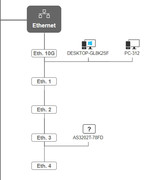
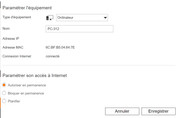
I checked on my modem, and the device appears under the name PC-312 — the MAC address matches my NAS, so I’m sure it’s the same device.
However, I still can’t access it via the browser or TNAS PC.
-
crisisacting
- Silver Member
- Posts: 531
- Joined: 20 Jan 2022, 16:42
Re: [Help] No Access F6-424Max After TOS 6.0.750 Update – Not Detected on Network
yeah, ××:64:7E is likely LAN 1 on your TNAS.
Try running this command in command prompt/Windows terminal to see if there's a cached address assigned
Code: Select all
arp /aRe: [Help] No Access F6-424Max After TOS 6.0.750 Update – Not Detected on Network
thankscrisisacting wrote: ↑12 Jul 2025, 00:29yeah, ××:64:7E is likely LAN 1 on your TNAS.
Try running this command in command prompt/Windows terminal to see if there's a cached address assignedAlso, try another network cable.Code: Select all
arp /a
I’ll look for another network cable and give it a try — if I can find one, lol.

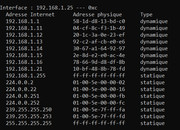
Update: I swapped the cables with the modem and I'm now connected through LAN2, but the result is still the same.
Re: [Help] No Access F6-424Max After TOS 6.0.750 Update – Not Detected on Network
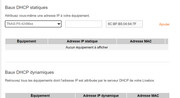
I found an option to assign a static IP address.
Could this be a possible solution to my issue?
If TOS isn't able to get an IP from the DHCP server, maybe setting a static IP would allow me to access the NAS again?
Please let me know if it's safe to try this, and if so, what settings you recommend.
Could this be a possible solution to my issue?
If TOS isn't able to get an IP from the DHCP server, maybe setting a static IP would allow me to access the NAS again?
Please let me know if it's safe to try this, and if so, what settings you recommend.
-
crisisacting
- Silver Member
- Posts: 531
- Joined: 20 Jan 2022, 16:42
Re: [Help] No Access F6-424Max After TOS 6.0.750 Update – Not Detected on Network
That'll only work if the TNAS takes the assignment.
Attempt the static address, reboot the TNAS & then see if you can ping the static address & it responds to those pings.
Attempt the static address, reboot the TNAS & then see if you can ping the static address & it responds to those pings.


Re: [Help] No Access F6-424Max After TOS 6.0.750 Update – Not Detected on Network
The static address to be assigned should be from the same network segment as you local lan BUT not an address within the current DHCP pool of your dhcp server (router presumably) or an already assigned static address from other devices
eg
Router 192.168.10.1
DHCP Pool 192.168.10.2 - 192.168.10.100
assign a unique address between 192.168.10.101 - 192.168.10.254
{Some routers can assign a static address from within the DHCP pool, but not normally - check your documentation.}
eg
Router 192.168.10.1
DHCP Pool 192.168.10.2 - 192.168.10.100
assign a unique address between 192.168.10.101 - 192.168.10.254
{Some routers can assign a static address from within the DHCP pool, but not normally - check your documentation.}
F5-221 TOS7.0.1278 - 4x4TB (Ironwolf) Traid
F2-424 TOS7.0.1278 - 2x500GB nvme (P3) Traid, 2x6TB HDD (HGST) Traid
F2-221 TOS7.0.1278 - 1x3TB Ext4, 1x4TB Btrfs
F2-425+ TOS7.0.1278 - 2x500GB nvme (P3) Traid, 2x6TB HDD (EXOS) Traid
F2-424 TOS7.0.1278 - 2x500GB nvme (P3) Traid, 2x6TB HDD (HGST) Traid
F2-221 TOS7.0.1278 - 1x3TB Ext4, 1x4TB Btrfs
F2-425+ TOS7.0.1278 - 2x500GB nvme (P3) Traid, 2x6TB HDD (EXOS) Traid
Re: [Help] No Access F6-424Max After TOS 6.0.750 Update – Not Detected on Network
Thank you for the explanation.
But honestly, this is a bit beyond my current knowledge — the screenshot I shared is from my modem interface. I'm using a Livebox 7 (Orange – France), and I don’t know how to assign a static IP outside of the DHCP pool.
I’m starting to regret doing this update… I feel like I made a big mistake.
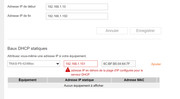
I saw the support guide for reinstalling TOS when it's installed on an M.2 SSD, but in my case, TOS was installed on regular HDDs, because I had reserved the M.2 SSDs exclusively for cache purposes.
Is there any way to reinstall or recover TOS in this situation, without losing my data?
Thanks a lot in advance for any guidance or shared experience.