[Help] Migrating from TRAID to TRAID+ didn't add the new disk (degraded array)

RAID, Volume, storage pool, hard drive, USB, SSD cache and iSCSI LUN
Post Reply
User avatar
jollino
Posts: 50
Joined: 24 Jul 2024, 02:33
Italy

[Help] Migrating from TRAID to TRAID+ didn't add the new disk (degraded array)

Post by jollino »

Hi, I have an F6-424 with five 8 TB disks. I added a sixth 8 TB disk, and started the migration from TRAID to TRAID+.
In the migration dialog I clicked "confirm", it went grey but after a minute or so it came back just the same. I clicked it again, and after another minute I got the notification that the array is degraded.

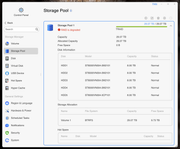
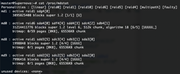
It looks like HDD6 (sdh) is not part of the array:

Image

Image

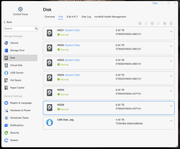
The disk is properly available:

Image

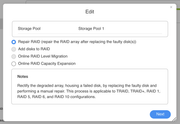
If I try to 'edit' the array, I can repair or expand the capacity:

Image

Any help would be most welcome, I have no idea what went wrong but I'm quite concerned.
Last edited by jollino on 14 Jun 2025, 03:06, edited 1 time in total.
User avatar
jollino
Posts: 50
Joined: 24 Jul 2024, 02:33
Italy

Re: [Help] Migrating from TRAID to TRAID+ made the array degraded

Post by jollino »

Trying "Repair" didn't do anything; everything remained as it is.

For reference, this is the current status of the array:

Code: Select all

/dev/md0:
        Version : 1.2
  Creation Time : Sun Jul 21 14:51:56 2024
     Raid Level : raid6
     Array Size : 31214411776 (29768.38 GiB 31963.56 GB)
  Used Dev Size : 7803602944 (7442.10 GiB 7990.89 GB)
   Raid Devices : 6
  Total Devices : 5
    Persistence : Superblock is persistent

  Intent Bitmap : Internal

    Update Time : Fri Jun 13 20:59:41 2025
          State : clean, degraded 
 Active Devices : 5
Working Devices : 5
 Failed Devices : 0
  Spare Devices : 0

         Layout : left-symmetric-6
     Chunk Size : 512K

           Name : Supernova:UTOSUSER-X86-S64  (local to host Supernova)
           UUID : fcce2553:830a7f3a:8e1719ee:68cbc0b0
         Events : 12477

    Number   Major   Minor   RaidDevice State
       0       8        4        0      active sync   /dev/sda4
       1       8       20        1      active sync   /dev/sdb4
       2       8       36        2      active sync   /dev/sdc4
       3       8       52        3      active sync   /dev/sdd4
       4       8       84        4      active sync   /dev/sdf4
       -       0        0        5      removed
And these are the devices (the new disk is sdh)

Code: Select all

NAME          MAJ:MIN RM  SIZE RO TYPE  MOUNTPOINTS
sda             8:0    1  7.3T  0 disk  
├─sda1          8:1    1  285M  0 part  
├─sda2          8:2    1  7.6G  0 part  
│ └─md9         9:9    0  7.6G  0 raid1 /
├─sda3          8:3    1  1.9G  0 part  
│ └─md8         9:8    0  1.9G  0 raid1 [SWAP]
└─sda4          8:4    1  7.3T  0 part  
  └─md0         9:0    0 29.1T  0 raid6 
    └─vg0-lv0 252:0    0 29.1T  0 lvm   /home
                                        /Volume1
                                        /var/subvols/8vEbTxkKvwa
sdb             8:16   1  7.3T  0 disk  
├─sdb1          8:17   1  285M  0 part  
├─sdb2          8:18   1  7.6G  0 part  
│ └─md9         9:9    0  7.6G  0 raid1 /
├─sdb3          8:19   1  1.9G  0 part  
│ └─md8         9:8    0  1.9G  0 raid1 [SWAP]
└─sdb4          8:20   1  7.3T  0 part  
  └─md0         9:0    0 29.1T  0 raid6 
    └─vg0-lv0 252:0    0 29.1T  0 lvm   /home
                                        /Volume1
                                        /var/subvols/8vEbTxkKvwa
sdc             8:32   1  7.3T  0 disk  
├─sdc1          8:33   1  285M  0 part  
├─sdc2          8:34   1  7.6G  0 part  
│ └─md9         9:9    0  7.6G  0 raid1 /
├─sdc3          8:35   1  1.9G  0 part  
│ └─md8         9:8    0  1.9G  0 raid1 [SWAP]
└─sdc4          8:36   1  7.3T  0 part  
  └─md0         9:0    0 29.1T  0 raid6 
    └─vg0-lv0 252:0    0 29.1T  0 lvm   /home
                                        /Volume1
                                        /var/subvols/8vEbTxkKvwa
sdd             8:48   1  7.3T  0 disk  
├─sdd1          8:49   1  285M  0 part  
├─sdd2          8:50   1  7.6G  0 part  
│ └─md9         9:9    0  7.6G  0 raid1 /
├─sdd3          8:51   1  1.9G  0 part  
│ └─md8         9:8    0  1.9G  0 raid1 [SWAP]
└─sdd4          8:52   1  7.3T  0 part  
  └─md0         9:0    0 29.1T  0 raid6 
    └─vg0-lv0 252:0    0 29.1T  0 lvm   /home
                                        /Volume1
                                        /var/subvols/8vEbTxkKvwa
sdf             8:80   1  7.3T  0 disk  
├─sdf1          8:81   1  285M  0 part  
├─sdf2          8:82   1  7.6G  0 part  
├─sdf3          8:83   1  1.9G  0 part  
└─sdf4          8:84   1  7.3T  0 part  
  └─md0         9:0    0 29.1T  0 raid6 
    └─vg0-lv0 252:0    0 29.1T  0 lvm   /home
                                        /Volume1
                                        /var/subvols/8vEbTxkKvwa
sdg             8:96   0  3.6T  0 disk  
├─sdg1          8:97   0  285M  0 part  
├─sdg2          8:98   0  7.6G  0 part  
├─sdg3          8:99   0  1.9G  0 part  
└─sdg4          8:100  0  3.6T  0 part  
  └─md1         9:1    0  3.6T  0 raid1 
    └─vg1-lv1 252:1    0  3.6T  0 lvm   /Volume2
                                        /var/subvols/8vEbTxkKvwb
sdh             8:112  1  7.3T  0 disk  
├─sdh1          8:113  1  285M  0 part  
├─sdh2          8:114  1  7.6G  0 part  
├─sdh3          8:115  1  1.9G  0 part  
└─sdh4          8:116  1  7.3T  0 part  
nbd0           43:0    0    0B  0 disk  
nbd1           43:32   0    0B  0 disk  
nbd2           43:64   0    0B  0 disk  
nbd3           43:96   0    0B  0 disk  
nbd4           43:128  0    0B  0 disk  
nbd5           43:160  0    0B  0 disk  
nbd6           43:192  0    0B  0 disk  
nbd7           43:224  0    0B  0 disk  
nbd8           43:256  0    0B  0 disk  
nbd9           43:288  0    0B  0 disk  
nbd10          43:320  0    0B  0 disk  
nbd11          43:352  0    0B  0 disk  
nbd12          43:384  0    0B  0 disk  
nbd13          43:416  0    0B  0 disk  
nbd14          43:448  0    0B  0 disk  
nbd15          43:480  0    0B  0 disk  
User avatar
jollino
Posts: 50
Joined: 24 Jul 2024, 02:33
Italy

Re: [Help] Migrating from TRAID to TRAID+ didn't add the new disk (degraded array)

Post by jollino »

Well, trying "repair" AGAIN seems to have finally worked. I suppose something is wonky with TOS 6.0.694 because both operations (migration and repair) needed TWO attempts, and the migration didn't trigger a repair. I'd say that the double start is clearly a bug, and the lack of automatic repair probably too.

Note that when I did a storage pool expansion last week (4 to 5 disks, TRAID/RAID5), it worked on the first attempt but I still had to manually expand the volume within. However, that was actually mentioned on the relevant forum post. That's why I'm not sure that starting the repair manually should be needed.

Still, it shouldn't just say "configuring" and then do nothing the first time. How do I submit a proper bug report?
User avatar
MikeZhang
TM Support
Posts: 381
Joined: 05 Sep 2023, 22:21

Re: [Help] Migrating from TRAID to TRAID+ didn't add the new disk (degraded array)

Post by MikeZhang »

jollino wrote: 14 Jun 2025, 03:12
Please follow our guide to migrate to TRAID+
viewtopic.php?t=6404
To contact our team, please send email to following addresses, remember to replace (at) with @

Technical team: support(at)terra-master.com(for technical support)
Service team: service(at)terra-master.com(for purchasing, return, replacement, RMA service)
User avatar
jollino
Posts: 50
Joined: 24 Jul 2024, 02:33
Italy

Re: [Help] Migrating from TRAID to TRAID+ didn't add the new disk (degraded array)

Post by jollino »

Hello Mike,
I did follow those instructions, but the bug remains as I described:
1) After choosing "Array Online Migration", TOS only showed "Configuring" for a while and then did nothing. Note that at this point it said "TRAID" for both "Current array" and "Expanded array", which I believe may be another glitch.
2) I did it again, it showed "Configuring" again, and apparently only converted the array from RAID5 and RADI6 (leaving it degraded), without initiating the rebuild

Then,
1) I manually tried "Repair array", TOS only showed "Configuring" for a while and then did nothing.
2) I did it again, it showed "Configuring" again, and started the rebuild process.

I don't know if the first step is expected to leave the array degraded (but it asked me for which disk I wanted to add, so why ask me if it wasn't going to start the rebuild immediately?). However, the fact that the first attempt did nothing in both steps is definitely a bug.

Anyway, the rebuild is complete and I think I should be done:

Code: Select all

md0 : active raid6 sdh4[6] sda4[0] sdf4[4] sdd4[3] sdc4[2] sdb4[1]
      31214411776 blocks super 1.2 level 6, 512k chunk, algorithm 18 [6/6] [UUUUUU]
      bitmap: 0/59 pages [0KB], 65536KB chunk
However, TOS still only shows TRAID, not TRAID+:
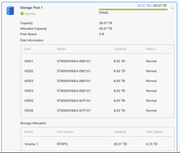
Image

Can you please confirm that, despite the hiccups, the migration was done correctly and I'm currently looking at a TRAID+ array? (It's currently the same as a RAID6, obviously, since all disks are 8 TB; but I will eventually replace them with bigger disks and I want to be able to take adavntage of TRAID's features.)
User avatar
TMeric
TM Product Manager
Posts: 227
Joined: 03 Jul 2023, 11:01

Re: [Help] Migrating from TRAID to TRAID+ didn't add the new disk (degraded array)

Post by TMeric »

Thank you for your help. We will verify the issue you mentioned in the laboratory.
To contact our team, please send email to following addresses, remember to replace (at) with @:

Technical team: support(at)terra-master.com(for technical support)
Service team: service(at)terra-master.com(for purchasing, return, replacement, RMA service)
User avatar
jollino
Posts: 50
Joined: 24 Jul 2024, 02:33
Italy

Re: [Help] Migrating from TRAID to TRAID+ didn't add the new disk (degraded array)

Post by jollino »

Hi Eric, you're welcome. I also think that the Storage Pool page should say TRAID+ rather than TRAID: it can be deduced that it's effectively RAID6 by doing the math on the disks' size and total usable space, but it should be visible at a glance that the pool is protected by double parity rather than single parity.
Let me know if you need any other data, I'll be happy to help.
User avatar
TMeric
TM Product Manager
Posts: 227
Joined: 03 Jul 2023, 11:01

Re: [Help] Migrating from TRAID to TRAID+ didn't add the new disk (degraded array)

Post by TMeric »

jollino wrote: 15 Jun 2025, 14:45 Hi Eric, you're welcome. I also think that the Storage Pool page should say TRAID+ rather than TRAID: it can be deduced that it's effectively RAID6 by doing the math on the disks' size and total usable space, but it should be visible at a glance that the pool is protected by double parity rather than single parity.
Let me know if you need any other data, I'll be happy to help.
Yes, we agree with your point of view. If we require more information, we will contact you again. Thank you for your kind assistance.
To contact our team, please send email to following addresses, remember to replace (at) with @:

Technical team: support(at)terra-master.com(for technical support)
Service team: service(at)terra-master.com(for purchasing, return, replacement, RMA service)
User avatar
TMbuddy
TM Product Manager
Posts: 96
Joined: 29 Nov 2024, 14:29
China

Re: [Help] Migrating from TRAID to TRAID+ didn't add the new disk (degraded array)

Post by TMbuddy »

jollino wrote: 15 Jun 2025, 14:45
Thank you for your feedback. Based on capacity calculations and your terminal screenshot, we confirm that your array is indeed configured as RAID6, and the current behavior is abnormal.

To resolve this issue efficiently, we recommend scheduling a remote diagnostic session to investigate and address the problem. If you agree, please contact our online support team via Live Chat on TerraMaster official website. Kindly provide details of the issue or share this thread’s link for reference, and we’ll promptly arrange remote assistance.

We appreciate your trust in TerraMaster. Should you have any further questions, we’re here to help.
Post Reply

Return to “Storage”