

Please help to understand!
Have D5 Thunderbolt 3 and 2 Raids (3 disks 8TB) and (2 Disks 16 Tb)
on first raid speed around 500 mb/s on this was ok, but today ir drop to 150!
speed depends of free space?
connect to mac min m4 pro.
[Help] D5 Thunderbolt 3 (5 disks) low speed! [SOLVED]
[Help] D5 Thunderbolt 3 (5 disks) low speed! [SOLVED]
Last edited by mrpstudio on 25 May 2025, 13:01, edited 1 time in total.


Re: [Help] D5 Thunderbolt 3 (5 disks) low speed!
Is it possible that the RAID mode has failed, causing resources to be occupied during synchronization? Check the RAID status in RAID Manager and provide a screenshot.
To contact our team, please send email to following addresses. "(at)" = "@"
Technical team: support(at)terra-master.com
Service team: service(at)terra-master.com
Technical team: support(at)terra-master.com
Service team: service(at)terra-master.com
Re: [Help] D5 Thunderbolt 3 (5 disks) low speed!
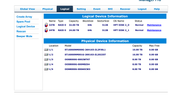
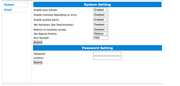
this is that Raid Manager shows. No any errors!
And i free space - 24Tb total - 19 free now
Re: [Help] D5 Thunderbolt 3 (5 disks) low speed!
It is recommended to use AJA software for testing. If the speed does not improve, back up your data and recreate the RAID mode. Steps: 1. Back up your data. 2. Delete the corresponding RAID group. 3. Re-select the hard drives to create the desired RAID mode, noting that you should choose the second option for quick initialization before creating the RAID mode; no other options need to be selected.
viewtopic.php?t=2822
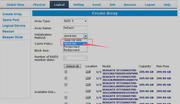
Note: Please back up your data before proceeding.
To contact our team, please send email to following addresses. "(at)" = "@"
Technical team: support(at)terra-master.com
Service team: service(at)terra-master.com
Technical team: support(at)terra-master.com
Service team: service(at)terra-master.com


Re: [Help] D5 Thunderbolt 3 (5 disks) low speed!
I have 5x4TB - chosen for cost not speed.
When I had an iMac 2017 running whatever the latest macOS was I got speeds between 300 and 400.
When I got a Mac Mini M4, guess what, my speeds dropped to the same as yours, between 150 and 200.
If I had to guess, I bet you have two monitors connected to the other TB ports?
try connecting a monitor via HDMI and the only thing connected to the TB ports is the storage.
On Reddit, it has been agreed that there is a problem with 2x monitor and Storage.
Some people have luck connecting second monitor after it boots.
Most agree its something Apple has done to limit its power.
Me?
I decided this was such a potential problem I sold the Mini and am about to buy a used Studio instead.
When I had an iMac 2017 running whatever the latest macOS was I got speeds between 300 and 400.
When I got a Mac Mini M4, guess what, my speeds dropped to the same as yours, between 150 and 200.
If I had to guess, I bet you have two monitors connected to the other TB ports?
try connecting a monitor via HDMI and the only thing connected to the TB ports is the storage.
On Reddit, it has been agreed that there is a problem with 2x monitor and Storage.
Some people have luck connecting second monitor after it boots.
Most agree its something Apple has done to limit its power.
Me?
I decided this was such a potential problem I sold the Mini and am about to buy a used Studio instead.
============================
D5 /TB3 / 5x4TB
Mac Studio / macOS 26 - Tahoe
D5 /TB3 / 5x4TB
Mac Studio / macOS 26 - Tahoe
Re: [Help] D5 Thunderbolt 3 (5 disks) low speed!
What speeds are you getting now?
I don't have a problem with my RAID and now have a Mac Studio - yet only getting 100 for read and write.
I don't have a problem with my RAID and now have a Mac Studio - yet only getting 100 for read and write.
============================
D5 /TB3 / 5x4TB
Mac Studio / macOS 26 - Tahoe
D5 /TB3 / 5x4TB
Mac Studio / macOS 26 - Tahoe
Re: [Help] D5 Thunderbolt 3 (5 disks) low speed!
Have just started a Verify as it seems the only option to check whether there is a problem.
As its not done 1% in ten minutes I am betting nearer a week than not to finish.
As its not done 1% in ten minutes I am betting nearer a week than not to finish.
============================
D5 /TB3 / 5x4TB
Mac Studio / macOS 26 - Tahoe
D5 /TB3 / 5x4TB
Mac Studio / macOS 26 - Tahoe
Re: [Help] D5 Thunderbolt 3 (5 disks) low speed!
It passed the test.
I am now getting 100 write and 200 read (at best!) with 5x4tb RAID5.
These speeds are too low for it to be usable for video editing.
As there are no suggestions, time to switch brands me thinks.
I am now getting 100 write and 200 read (at best!) with 5x4tb RAID5.
These speeds are too low for it to be usable for video editing.
As there are no suggestions, time to switch brands me thinks.
============================
D5 /TB3 / 5x4TB
Mac Studio / macOS 26 - Tahoe
D5 /TB3 / 5x4TB
Mac Studio / macOS 26 - Tahoe