

Hi all (concerned on this topic),
after a couple of weeks and a number of tries my understanding is OpenVPN on TerraMaster is not updated, or the user interface is not helping.
I've successfully configured an OpenVPN server on one Amazon Linux VPS (AWS Lightsail). Then I spent a lot of time configuring in many different ways an OpenVPN client on my TNAS (control panel - network - VPN connection). Just to be more precise, here below the very short form of my last 3 ovpn files.
__________________________________________________________________________
_OpenVPN server.conf working on AWS Lightsail only with W10 OpenVPN Connect.ovpn
port 1194
proto udp
dev tun
auth-retry nointeract
ca /home/ec2-user/.../ca.crt
cert /home/ec2-user/.../server.crt
key /home/ec2-user/.../server.key
dh /home/ec2-user/.../dh2048.pem
topology subnet
server 10.8.0.0 255.255.255.0
ifconfig-pool-persist ipp.txt
keepalive 10 120
tls-auth /home/ec2-user/.../ta.key 0
max-clients 10
persist-key
persist-tun
explicit-exit-notify 1
__________________________________________________________________________
_OpenVPN client working on W10 with OpenVPN Connect installed.ovpn
client
dev tun
proto udp
remote myremoteserver 1194
resolv-retry infinite
nobind
persist-key
persist-tun
ca C:\\...\\ca.crt
cert C:\\...\\client.crt
key C:\\...\\client.key
remote-cert-tls server
tls-auth C:\\...\\ta.key 1
__________________________________________________________________________
_OpenVPN client not working on TNAS 6 - network-VPN connection.ovpn
client
auth-retry nointeract
dev tun
proto udp
remote myremoteserver 1194
resolv-retry infinite
nobind
persist-key
persist-tun
ca /Volume1/homes/super/.../ca.crt
cert /Volume1/homes/super/.../client.crt
key /Volume1/homes/super/.../client.key
remote-cert-tls server
tls-auth /Volume1/homes/super/.../ta.key 1
The certicates and keys are the same, located in different places, but the same. The tunnel is well established between my W10 PC and the VPS in Frankfurt, while I don't want to keep my PC always online, which is the case of my NAS. Any suggestion/help?
[Help] OpenVPN on TNAS 6 not working
Re: [Help] OpenVPN on TNAS 6 not working
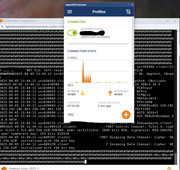
Linux server - W10 client

Re: [Help] OpenVPN on TNAS 6 not working
Thank you for your feedback. We will verify the issue you mentioned as soon as possible.
To contact our team, please send email to following addresses, remember to replace (at) with @:
Technical team: support(at)terra-master.com(for technical support)
Service team: service(at)terra-master.com(for purchasing, return, replacement, RMA service)
Technical team: support(at)terra-master.com(for technical support)
Service team: service(at)terra-master.com(for purchasing, return, replacement, RMA service)
Re: [Help] OpenVPN on TNAS 6 not working
Hi, Easter is gone, as well as two weeks. No news about my issue? Maybe I did something wrong or you can suggest a workaround. It isn't so difficult to build a test with my scripts....

Re: [Help] OpenVPN on TNAS 6 not working
Thank you for your patient waiting! At present, we have arranged relevant personnel to conduct the verification work. Once we have definite information, we will inform you immediately.
To contact our team, please send email to following addresses, remember to replace (at) with @
Technical team: support(at)terra-master.com (for technical support)
Service team: service(at)terra-master.com (for purchasing, return, replacement, RMA service)
Technical team: support(at)terra-master.com (for technical support)
Service team: service(at)terra-master.com (for purchasing, return, replacement, RMA service)

Re: [Help] OpenVPN on TNAS 6 not working
We have relevant improvement plans on our list. Please wait for future TOS versions.
To contact our team, please send email to following addresses, remember to replace (at) with @:
Technical team: support(at)terra-master.com (for technical support)
Service team: service(at)terra-master.com (for purchasing, return, replacement, RMA service)
Technical team: support(at)terra-master.com (for technical support)
Service team: service(at)terra-master.com (for purchasing, return, replacement, RMA service)


Re: [Help] OpenVPN on TNAS 6 not working
I installed the latest versions and it is still not corrected why it is still an important feature to secure its data and its does not seem urgent why? I pay a service that I can no longer use and you do not communicate any last date since January ... My F6-424 Max is a disappointment too much bug and crash I am disgusted ...


Re: [Help] OpenVPN on TNAS 6 not working
I apologize for the poor experience you've had. This issue is a new problem that arose from recent updates. We have identified it and reported it through a ticket. It will be fixed in the next version. Here's a temporary solution to address the current usage issues:
1. Edit the ovpn configuration file and temporarily change {your_vpn_url.com} in `remote {your_vpn_url.com} {your_port}` to an IP address, such as 127.0.0.1. Example:
```
remote vpn.google.com 443
change to:
remote 127.0.0.1 443
```
2. Ensure that `script-security 2` exists in the ovpn configuration file. If this line is missing or its value is not 2, add it or modify it to 2.
3. Create the VPN using this configuration file.
4. Modify `/etc/openvpn/import/importOpen/{your_config_name}/VPNConfig.ovpn` and revert `remote 127.0.0.1 443` back to the original domain, such as `remote vpn.google.com 443`.
To contact our team, please send email to following addresses. "(at)" = "@"
Technical team: support(at)terra-master.com
Service team: service(at)terra-master.com
Technical team: support(at)terra-master.com
Service team: service(at)terra-master.com


Re: [Help] OpenVPN on TNAS 6 not working
I'm having trouble with the OpenVPN server too. I can get to the NAS from a tunnel created outside my local network using Http. But any other addresses on the local network are not reachable. Enabling VPN compression makes the connection unusable, Enabling "allow clients to access the local network" has no effect.
Re: [Help] OpenVPN on TNAS 6 not working
Please first gather a log and provide it to us. After enabling Debug mode under Support and Help, try connecting to the VPN again; related actions will be recorded in the debug log. Send this information via email to [email protected]. If the data is large, you can send it through a cloud drive link.
To contact our team, please send email to following addresses. "(at)" = "@"
Technical team: support(at)terra-master.com
Service team: service(at)terra-master.com
Technical team: support(at)terra-master.com
Service team: service(at)terra-master.com