[Community Share] Share Your TerraMaster NAS in Action – Real Scenes, Real Stories, Real Rewards!

Official latest events and event descriptions.
User avatar
TMsupport6
TM Support
Posts: 56
Joined: 22 Jul 2020, 16:31

[Community Share] Share Your TerraMaster NAS in Action – Real Scenes, Real Stories, Real Rewards!

Post by TMsupport6 »

Dear TerraMaster Users,

We’re excited to invite you to a new round of community sharing this time, we want to see your TerraMaster NAS in real-life action!

Share Real-World Usage Scenes

We’re collecting real usage scene photos—not just the product, but how and where it fits into your actual work or lifestyle. Whether it's tucked into a home office setup, running quietly in your media center, working hard in a server rack, or traveling with your creative gear—we’d love to see it all.

Date: May 13, 2025 – July 13, 2025

How to participate:
1.Tell us briefly how and where you use it
2.At least one real-world usage photo

Prizes:
We’ll select outstanding participants to receive exclusive TerraMaster gifts!
  • First Prize (1 winner): TerraMaster F2-424 NAS
  • Second Prize(2 winners): TerraMaster D5 Hybrid
  • Third Prize (10 winners): $30 Amazon gift card
Winners will be announced on July 18 on the TerraMaster official forum.

Note: Selected photos may be featured on TerraMaster’s official social media channels or promotional materials.

Best regards,
The TerraMaster Forum Management Team
User avatar
McCoder67
Posts: 22
Joined: 14 Oct 2024, 03:19
Denmark

Re: [Community Share] Share Your TerraMaster NAS in Action – Real Scenes, Real Stories, Real Rewards!

Post by McCoder67 »

you want a real story ?

I bought a F4-424 Pro for my home office, to replace my aging Synology DS218+

My Synology had dual 8TB drives mirrored but was running out of space, so time for an upgrade. I got drawn in by the lower price/better hardware and the idea of TRAID

So i bought the F4-424 Pro and a 12TB drive and started moving everything from the Synology , and once done i was a happy man.

The happiness didn't last though, one of the 8TB drives started giving warnings so i purchased another 12TB drive and that's when disaster struck. Adding the new 12TB to the TRAID pool was a disaster, 72% into the adding of the new drive the NAS stopped responding and after consulting with Terramaster support, who told me i could just restart the NAS without risk, i did so, and the operation continued. When it was done, everything was wrong, the directory structure was there , and the files seemed to be there, but when trying to open the files it failed.

I contacted Terramaster support, and a helpful engineer remoted to my NAS and looked around for half an hour, after which he reported that everything was gone and i had two options : hiring help to try to recover my data or restore a backup

Stupid as i was , i didn't have a recent backup so i was out of luck

the Terramaster has been sitting on a shelf turned off since then, i don't really trust it anymore , and i still haven't decided whether to format the corrupted drives and reuse them , or try to run the ReclaiMe recovery tool on them
User avatar
sianderson
Silver Member
Posts: 417
Joined: 02 Aug 2020, 03:42
Great Britain

Re: [Community Share] Share Your TerraMaster NAS in Action – Real Scenes, Real Stories, Real Rewards!

Post by sianderson »

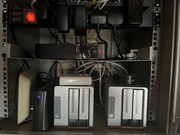
i started out with the F2-210 as an entry level NAS drive, it replaced a full tower server after i started down the route of downsizing and moving things into a comms cabinet in my house to try and contain my gadgets and gizmos, i primarily used the server for file storage and to stream video content to various TV's around the house

after a few teething issues were resolved via software updates with the F2-210, it then became a solid NAS drive that would just sit there working and backups scheduled daily to an external USB drive, with the added downloaded software of Plex from the built in Application Store, but even though there were lots of apps, i was always wondering what if it could do this, or what if it could do that and was trying to work out how i could justify the cost of the Rack mounted versions for the cabinet to give me those capabilities

When i was given the F2-423 this just shows what i was missing by going for the entry level model, having the F2-423 with extra RAM added now runs a virtual server and has taken prime spot on the network easily handling the workloads that i throw at it, also as a software developer being able to run Virtual Machines on it has made it such a versatile server much more than just a NAS drive

so now i have the F2-423 as the main NAS drive / server, with the F2-210 running as a network connected backup, ready to take over file sharing should anything happen to the F2-423, also with the USB drive as a backup

the next step would be to replace the USB drive with a DAS to also provide extra backup capability of multiple drives

please be kind with the photo this is just a home based network cabinet not a professional install

Image
F2-424 TOS 7.0.0765
F2-423 TOS 7.0.0765
F2-210 TOS 4.2.44
D4-320

C/O
F4-424 TOS 6.0.794
User avatar
warxcore
Posts: 2
Joined: 30 May 2025, 06:28
United States of America

Re: [Community Share] Share Your TerraMaster NAS in Action – Real Scenes, Real Stories, Real Rewards!

Post by warxcore »

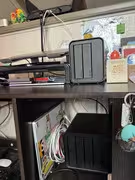
Initially I started with some external SSD's I had around and eventually bought a F2-212 to start my first NAS home server. After that I expanded and got the D4-320 to add more storage and to store a backup for the F2-212. I honestly enjoy the look of the devices and how they sit on the desk. Mainly used for storage as I run programs on other computers that just access what's needed.


Image
User avatar
thomasgpeters
Posts: 6
Joined: 22 Feb 2025, 21:45
United States of America

Re: [Community Share] Share Your TerraMaster NAS in Action – Real Scenes, Real Stories, Real Rewards!

Post by thomasgpeters »

Imagery Business Systems, LLC is excited about this opportunity to show what we've been doing with our TerraMaster NAS. Introducing API-in-a-Box built using the community edition of WebGenAI specifically for TerraMaster users with GenAI-Logic at its core deployable in any TerraMaster NAS. The best thing about deploying to TNAS is the ease of use and simple deployment.
Image

API-in-a-Box lets you build custom APIs from an AI prompt based on your own ideas. Users can describe their business application using natural language prompt. E.g.,
You are the manager of an automotive center selling previously owned exotic cars, remodeling services, scheduled maintenance plans for routine services as well as collision and engine enhancements. Create an application that will help manage my business, keep track of customer inquiries and sales opportunities as well as invoicing and parts inventory management
Okay, what happens when entering this prompt with Api-in-a-Box?
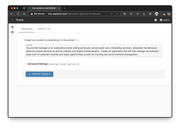
Image

WebGenAI, the core running in API-in-a-Box, analyses the prompt using OpenAI with scientific precision, delivering an open-source full-stack business application including the back-end database, the front-end user interface, and best of all, a fully functioning middleware with business logic and security. An OpenAI key will be required beforehand.

GenAI-Logic advanced setting enables many configuration settings. Open the Advanced setting to try a few.
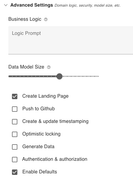
Image.

E.g., you can have API-in-a-Box push your projects to GitHub repository. Once the application is complete, API-in-a-Box will display the application landing page. Click the Open App button to open your new application.

Image

Your new application is a fully function, full-stack business application, and best of all it's all open-source and ready for further customizations. The source code is based in python and can be opened in your faviorite IDE such as Microsoft Visual Studio Code. Based on
ApiLogicServer software you can add business rules, customize the UI or add an authorization feature to secure your business data. As you explore, you'll discover API-in-a-Box will deliver a solution with an advanced admin application based on Python's Flask module and integrates with your backend using SQL Alchemy for database ORM interactions.
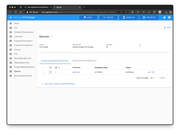
Image

Don't hesitate, please visit Imagery Business Systems, LLC, scroll to the bottom of the page for support or if you are interested in a live demonstration.
Thomas Peters (terra-master partner), (Imagery Business Systems, LLC)
User avatar
izedgrudged
Posts: 6
Joined: 29 Oct 2024, 17:36
United States of America

Re: [Community Share] Share Your TerraMaster NAS in Action – Real Scenes, Real Stories, Real Rewards!

Post by izedgrudged »

Hi TerraMaster Team,

Thanks for organizing this awesome community event—count me in!

I’ve been using my TerraMaster NAS (F4-423) as the heart of my home office and media setup. It handles everything from automated backups and Plex streaming to Docker containers for home automation. Super quiet, reliable, and it blends perfectly into my minimalist workspace.

Best,
Andrew Kirby
User avatar
alessandroportante
Posts: 1
Joined: 04 Jun 2025, 04:08
Italy

Re: [Community Share] Share Your TerraMaster NAS in Action – Real Scenes, Real Stories, Real Rewards!

Post by alessandroportante »

Hello!

Thanks for the opportunity!

I use two TerraMaster TD2 thunderbolt3 DAS units in my daily workflow. One is an SSD-based system configured in RAID 0 for fast performance. It handles active projects, media editing, and real-time backups. The second unit is configured with traditional hard drives in RAID 1, serving as reliable cold storage for archiving and redundancy.

Both are seamlessly integrated into my workspace and connected to my monitor setup, making file access and management incredibly efficient. This setup supports everything from creative work to long-term storage without a hitch.

I can’t seem to upload pictures… so here is a download link so you can view the setup!

https://we.tl/t-kTUxXNOQKj

Alessandro Portante :)
User avatar
cyberspider
Posts: 2
Joined: 04 Jun 2025, 08:54
United States of America

Re: [Community Share] Share Your TerraMaster NAS in Action – Real Scenes, Real Stories, Real Rewards!

Post by cyberspider »

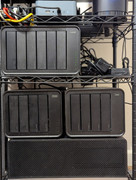
My journey into the world of network-attached storage began simply enough, with the unassuming yet reliable TerraMaster F2-423. My initial goal was straightforward: a central hub for my files, easily accessible, with the peace of mind that comes from robust data security. I believed this foundational setup would be sufficient.

Oh, how wonderfully wrong I was!

As a natural tinkerer, I soon discovered the rich ecosystem of options and applications within the TerraMaster Operating System (TOS). Curiosity quickly led to exploration, and before long, I found myself needing more space – and more possibilities. Enter the D4-320, a dedicated playground for my burgeoning "experiments" data pool. This foray into the deeper functionalities of my NAS was undeniably cool, and then came the irresistible allure of the 2024 series. The sleek, sophisticated black design sparked an immediate sense of envy. Witnessing its elegant form in person was the tipping point. I dove headfirst into the TerraMaster experience, enthusiastically welcoming the powerful F6-424 MAX into my home network.

This "little guy" has become the beating heart of my digital life. It effortlessly manages my primary storage, hosts my personal cloud via NextCloud, and beautifully organizes my extensive photo and video libraries. Recently, I've even begun migrating my reading collection, starting with my cherished digital comics. My Windows PC seamlessly backs up to the TerraMaster, while my MacBook recognizes it as a dedicated Time Machine volume. Best of all, every system on my network enjoys access to the same user folder, eliminating the tedious chore of manual file transfers, regardless of which device I'm using. It so completely handles everything I throw at it, so the F2 now lives offsite for a remote backup.

The sheer ease and convenience are transformative. I honestly can't recall the days of wrestling with Windows shared folders and the constant worry of whether my PC would be awake when I needed a file remotely. It's truly a liberating experience.

Finally, just to ensure my Mac has all the breathing room it needs, I recently added the D8 Hybrid. While a couple of extra NVMe slots would have sufficed, the allure of expanded options was too strong to resist.

My TerraMaster setup has evolved from a simple storage solution into a comprehensive digital command center, and I couldn't be happier with the seamless integration and effortless functionality it brings to my daily life.


Image
User avatar
OrionXie
TM Support
Posts: 151
Joined: 14 Apr 2025, 18:30
Saudi Arabia

Re: [Community Share] Share Your TerraMaster NAS in Action – Real Scenes, Real Stories, Real Rewards!

Post by OrionXie »

McCoder67 wrote: 29 May 2025, 22:04
I apologize for the poor experience you had. We will follow up on your issue via email, so please keep an eye out for our message.
To contact our team, please send email to following addresses. "(at)" = "@"
Technical team: support(at)terra-master.com
Service team: service(at)terra-master.com
User avatar
OrionXie
TM Support
Posts: 151
Joined: 14 Apr 2025, 18:30
Saudi Arabia

Re: [Community Share] Share Your TerraMaster NAS in Action – Real Scenes, Real Stories, Real Rewards!

Post by OrionXie »

McCoder67 wrote: 29 May 2025, 22:04
We have reviewed your remote meeting notes. Initially, you had two 8TB RAID arrays, and later added two 12TB hard drives. The first drive synced successfully, but when adding the second drive, the sync failed, causing both disks in the array to lose their superblock information. Therefore, we cannot resolve this issue and recommend considering data recovery.
To contact our team, please send email to following addresses. "(at)" = "@"
Technical team: support(at)terra-master.com
Service team: service(at)terra-master.com
Post Reply

Return to “Community Events”