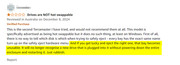
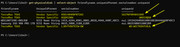
Today I own D4-320. But I'm having the same issue as this Amazon user (yellow).
“If you get lucky and eject the right one, that bay becomes unusable. It will no longer recognise a new drive that is plugged into it without powering down the entire enclosure and restarting it.”
In order to fix the issue, I also tried updating the firmware (210830_D1_63_F7.bin). But it does not work.
Does anyone know how to deal with the issue? Will there be a firmware fix later?
kingbert wrote: ↑29 May 2025, 17:04
Today I own D4-320. But I'm having the same issue as this Amazon user (yellow).
“If you get lucky and eject the right one, that bay becomes unusable. It will no longer recognise a new drive that is plugged into it without powering down the entire enclosure and restarting it.”
In order to fix the issue, I also tried updating the firmware (210830_D1_63_F7.bin). But it does not work.
Does anyone know how to deal with the issue? Will there be a firmware fix later?
Hello, we sincerely apologize for the inconvenience caused regarding the D4-320 not supporting hot-swapping of hard drives.
I would like to share the reasoning behind this design. Due to some hard drives on the market continuing to generate heat even after being safely removed from the computer, we implemented this design to address the issue. Specifically, when a hard drive is safely removed from the D4-320, we cut off the 5V power supply to the drive, which helps prevent overheating. However, this also results in the issue where a new drive may not be recognized when inserted.
To contact our team, please send email to following addresses, remember to replace (at) with @