

No, not a failure of the NAS power, but the power coming into the house apparently went down last night, for long enough to run the batteries down in both UPS units and shut the whole system down. This morning I powered everything back up, and everything except the NAS is working normally again, but neither the computer nor TNAS PC can find the F5-221. All 5 hard drive lights are solid green, and the LAN light is flashing, and the lights on the switch ports the cable is connected to indicate that it is connected, but nothing can see it. I tried a different cable and connected it directly to the router, and the router config page showed that the port had become active, but still couldn't see the NAS connected to it. Even an "arp -a" command couldn't see it, and it wasn't in the router's arp table. I can only assume this means that the NAS got itself reset to a different subnet than the rest of the network, but how can I find what it is set to? (I did power the NAS down by the power button on the front and power it back up, a couple of times, but that didn't help.) Does this mean I am at the point of starting it back up with all the hard drives removed to get it to reset itself? Or is there a simpler way? I don't remember what TOS it is running, I know it hasn't been updated to TOS 6, and I don't think it is TOS 5.
Thanks
F5-221 not showing up on network after power failure


Re: F5-221 not showing up on network after power failure
HDMI Connection Check (Preferred Method)
If possible, with the device powered on normally:
a. Connect an HDMI cable to monitor the NAS system boot process
b. Attempt terminal login to the NAS system
c. Observe system status through direct display output
Alternative Diagnostic Method
If HDMI access is unavailable:
a. Power down the unit completely
b. Remove ALL hard drives (critical step)
Important: Note each drive's original bay position before removal
c. Reboot the empty chassis
d. Monitor device detection status via TNAS PC utility
Re: F5-221 not showing up on network after power failure
Thanks, ColaChen. I didn't think this unit had an HDMI, but I just checked and there is one there. But what do I need to do to "Attempt terminal login to the NAS system"? That sounds like a Linux thing and I know almost nothing about Linux. Do I need to plug a keyboard into the USB plug in the back, or is that a terminal access from a computer? If I can't do that, I assume my data will be safe in the process of rebooting without the hard drives?
Re: F5-221 not showing up on network after power failure
Yes, a keyboard is required. When a hard disk is present and the system has completed booting, if the prompt "TNAS login:" appears, it indicates that the system has started normally. At this point, you can log in to the NAS by entering the super administrator username and password. Additionally, starting the system after removing the hard disk will not affect your data.
Re: F5-221 not showing up on network after power failure
Well, that was an experience! While I was waiting for your reply I decided to try to plug in a monitor to see what I could see before I restarted it, but in the process of hooking up the monitor I accidentally hit the power button and shut it down. When I got it hooked up and powered it on, the monitor came up to some info about the SATA controller, and one of the ""HDD may not be available, contact the HDD manufacturer. Press <Space> to continue." I grabbed a keyboard and pressed <Space> and then it said "Press any key to continue." Before I could press any key, it continued without me. For several minutes there was stuff scrolling by so fast I couldn't hardly see it, let alone read it, but I did see some errors go by and some stuff about hard drives, but it also showed 5 bays with 5 drives. Eventually it stopped at
Welcome to TNAS!
TNAS-9BD8 login: quotacheck: scanning /dev/mapper/ etc., etc
JF 3355
disable wake up
quatacheck: checked 10973 directories and 24337 files
and then just sat there with a blinking cursor. I switched the monitor back to the PC, and TNAS PC was able to see the NAS, and I got logged into it, and everything seemed to be OK. But I noticed that the IP address was static, and I thought if I would set it back to DHCP, I might avoid later problems. When I reset it to DHCP it changed the IP address to a different number, which would mess up the media servers which will be looking for the video files I have stored on it. After I got the router set to reserve the previous IP address, I tried to reboot it, but it wouldn't respond to the "Restart" or "Shut down" commands from TOS. and I finally had to resort to the power button to restart it and get its old IP address back. When it restarted, it went through the same process, with all the errors, and finally came down to the same "Welcome to TNAS!" and the same quotacheck lines, but then again TNAS PC was able to find it OK. When I got logged in, I went to the TOS Control Panel and checked on the hard drive status, and apparently I do have one "at risk." I believe I have a couple of spares around, if I can remember where I stashed them away. As I understand, those are hot swap drives, and the best practice is to remove the defective one and replace it while the NAS is running. Is that correct?
Welcome to TNAS!
TNAS-9BD8 login: quotacheck: scanning /dev/mapper/ etc., etc
JF 3355
disable wake up
quatacheck: checked 10973 directories and 24337 files
and then just sat there with a blinking cursor. I switched the monitor back to the PC, and TNAS PC was able to see the NAS, and I got logged into it, and everything seemed to be OK. But I noticed that the IP address was static, and I thought if I would set it back to DHCP, I might avoid later problems. When I reset it to DHCP it changed the IP address to a different number, which would mess up the media servers which will be looking for the video files I have stored on it. After I got the router set to reserve the previous IP address, I tried to reboot it, but it wouldn't respond to the "Restart" or "Shut down" commands from TOS. and I finally had to resort to the power button to restart it and get its old IP address back. When it restarted, it went through the same process, with all the errors, and finally came down to the same "Welcome to TNAS!" and the same quotacheck lines, but then again TNAS PC was able to find it OK. When I got logged in, I went to the TOS Control Panel and checked on the hard drive status, and apparently I do have one "at risk." I believe I have a couple of spares around, if I can remember where I stashed them away. As I understand, those are hot swap drives, and the best practice is to remove the defective one and replace it while the NAS is running. Is that correct?
Re: F5-221 not showing up on network after power failure
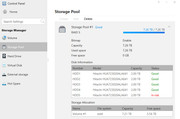
Yes, it is RAID 5.
Re: F5-221 not showing up on network after power failure
Okay, if you have a RAID set up, you can refer to the instructions in the following link viewtopic.php?t=6815 . If you encounter any issues during the operation, feel free to contact us.
Re: F5-221 not showing up on network after power failure
Now I'm getting confused. I'm not getting the "Raid Degraded" message, the info in the Volume section is showing the volume is good.
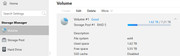
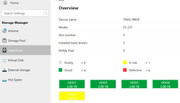
It's only when I look at the info of the individual drives that it shows one a "At Risk," but none defective.
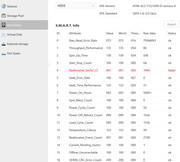
Digging deeper into the SMART info on the drive, the only problem listed is an issue with reallocated sectors. Does that mean I'm not in a critical situation just yet, the drive is still taking care of itself and I can wait until it fails? (But then I have to move fast!)
Also, in the link you sent, there is some discussion about difference in TOS 5 and TOS 6, but I'm still running TOS 4.2.40. Is that proccedure still the same?
It's only when I look at the info of the individual drives that it shows one a "At Risk," but none defective.
Digging deeper into the SMART info on the drive, the only problem listed is an issue with reallocated sectors. Does that mean I'm not in a critical situation just yet, the drive is still taking care of itself and I can wait until it fails? (But then I have to move fast!)
Also, in the link you sent, there is some discussion about difference in TOS 5 and TOS 6, but I'm still running TOS 4.2.40. Is that proccedure still the same?
-
crisisacting

- Silver Member
- Posts: 531
- Joined: 20 Jan 2022, 16:42
Re: F5-221 not showing up on network after power failure
That RAW value of 1994 reallocated sectors against that HDD's total sectors of 3907029168, means that 0.00000051036219957905% of the drive sectors have been reallocated, which is miniscule, but still any value is an indication of potential issues in the future.dclaxon wrote: ↑18 May 2025, 23:55 … Digging deeper into the SMART info on the drive, the only problem listed is an issue with reallocated sectors. Does that mean I'm not in a critical situation just yet, the drive is still taking care of itself and I can wait until it fails? (But then I have to move fast!)
Maybe pull that drive, low level format it & then rebuild the RAID after re-adding it; if the reallocated sector count value increases from that 1994 after the format or after the rebuild, then it might warrant obtaining another one or more of these HGST 7k3000 TCG encryption drives as a replacement and/or spares.