Issue: qBittorrent seems able to save files and create directories under its own directory on the volume, but when a category is set to move a completed torrent to a location, the app does not appear to have permission to create directories in the location I set the finished download to move to.
example: category set volume1/files before torrent added, setting to Keep incomplete torrents in a selected directory set, torrent added, the file starts to download to temporary directory set in settings, but on completion, the file stays in the temp directory rather than move to the directory set in the category.
on investigating the logs it seems qBittorrent doesn't have permission to save in the directory I have setup the file to move to.
File error alert. Torrent: name. File: "/Volume1/Files/file.test". Reason: "file.test file_stat (/Volume1/Files/file.test) error: Permission denied"
The user setup for the WebUI has the same name and pass as an account created on TOS5.1 NAS and has permission to the directory I want the file to move to.
any suggestions would be appreciated.
how does one set the permission for the qbittorrent app?
[Help] Qbittorrent 5.0.2 permission denied TOS 5.1

Re: [Help] Qbittorrent 5.0.2 permission denied TOS 5.1
I am currently having a very similar same error. I can download a single file correctly / without error, after installation into the application download folder. And after that, when I switch the download location to centralised position to make it easy for my arr stack to see, each file errors. eg. I currently have qBittorrent linked to a Sonarr4 instance.
I have tried a number of steps to fix without success, namely:
- Setting permissions by user and usergroup to the new shared download folder so all had "read/write" permissions, under TOS 5
- Upgrading to TOS 6
- Setting permissions by user, usergroup and application to the new shared download folder, so all had "read/write" permissions, under TOS 6
If I 'force download' under QBittorrent, it will d/l for a second or two, then error out again.
At this stage unresolved. Very frustrating.
This is the error I receive:
(W) 2025-05-12T06:42:49 - File error alert. Torrent: "[Filename]". File: "/usr/local/Volume1/Downloads/[Filename]". Reason: "[Filename] file_open (/usr/local/Volume1/Downloads/[Filename]) error: Permission denied"
I have tried a number of steps to fix without success, namely:
- Setting permissions by user and usergroup to the new shared download folder so all had "read/write" permissions, under TOS 5
- Upgrading to TOS 6
- Setting permissions by user, usergroup and application to the new shared download folder, so all had "read/write" permissions, under TOS 6
If I 'force download' under QBittorrent, it will d/l for a second or two, then error out again.
At this stage unresolved. Very frustrating.
This is the error I receive:
(W) 2025-05-12T06:42:49 - File error alert. Torrent: "[Filename]". File: "/usr/local/Volume1/Downloads/[Filename]". Reason: "[Filename] file_open (/usr/local/Volume1/Downloads/[Filename]) error: Permission denied"
Re: [Help] Qbittorrent 5.0.2 permission denied TOS 5.1
Hey JAero, the only thing I can think of is that I created the directory before I installed qbittorrent, but I tried uninstalling and reinstalling, but that didn't fix it.
Maybe it's a permission-setting bug. The next thing I'm going to try is replacing the permissions on subdirectories from the permissions menu to see if the app is getting the root shared folder permissions but that's not applying to the subdirectories. I will post again once I have tried that and a new download.
Maybe it's a permission-setting bug. The next thing I'm going to try is replacing the permissions on subdirectories from the permissions menu to see if the app is getting the root shared folder permissions but that's not applying to the subdirectories. I will post again once I have tried that and a new download.
Re: [Help] Qbittorrent 5.0.2 permission denied TOS 5.1
ok, a breakthrough of sorts, in my case at least it appears ensuring the system user group "media" has access to the directory with Read/Write, seems to allow qbittorrent to modify enough to create the directory for the torrent on adding, and moving the files from the temp location to the said folder after completion.
I tried making a new torrent category to a new subdirectory, and on adding the torrent qBittorrent was successfully able to make the directory and on completion of the torrent it moved and made a subdirectory for the file (per the settings I have in qBittorrent to do as such)
let me know if the same change works for you.
I tried making a new torrent category to a new subdirectory, and on adding the torrent qBittorrent was successfully able to make the directory and on completion of the torrent it moved and made a subdirectory for the file (per the settings I have in qBittorrent to do as such)
let me know if the same change works for you.
Re: [Help] Qbittorrent 5.0.2 permission denied TOS 5.1
Unfortunately, whatever had started working stopped the moment i tried a different directory again.. so back to the drawing board.
Re: [Help] Qbittorrent 5.0.2 permission denied TOS 5.1
That is frustrating to read. I have tried a few routes with no success, so far, namely:
- I updated the TOS 6 to the latest version, 6.0.673-00165
- I tried restoring qBittorent's downloads to its original directory
- I tried having different directories for the default save path and the incomplete torrent save path
- I created new users with names to match that of the applications (ie. qBittorent)
Continuing to work on the assumption that this is a permissions issue, I checked the 'Processes' tab which lists Processes and their corresponding Users. Here I can see a mix of Users that are available to permission in the GUI, and Users that are not in the GUI, ie. when qBittorrent is running there is a User listed as 'torrent'. Without a straightforward way to edit the permissions / shared folder access of that User, I can only think fixing this issue might be beyond my ability.


Re: [Help] Qbittorrent 5.0.2 permission denied TOS 5.1
In TOS 6, a new application user option has been added. Please ensure that qBittorrent has the appropriate read and write permissions under the application user options.
To contact our team, please send email to following addresses, remember to replace (at) with @
Technical team: support(at)terra-master.com(for technical support)
Service team: service(at)terra-master.com(for purchasing, return, replacement, RMA service)
Technical team: support(at)terra-master.com(for technical support)
Service team: service(at)terra-master.com(for purchasing, return, replacement, RMA service)
Re: [Help] Qbittorrent 5.0.2 permission denied TOS 5.1
Unfortunately as was mentioned in the original post, application permission control was the reason I upgraded to TOS 6 to try to resolve the issue, and it has not.
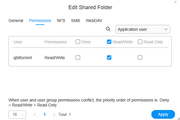
Although a 'torrent' Application user is present under the 'Edit Shared Folder', permissions tab and has r/w permissions for the folder, this has not made a difference. There is no 'qBittorent' Application user under the GUI.
Re: [Help] Qbittorrent 5.0.2 permission denied TOS 5.1
Thanks at CursaYang,
I tried updating mine to the latest TOS version for the app user permissions and although I had a whole series of issues along the way, I'm now at a point where qBittorrent seems to be behaving itself (for now)
I have the permissions for the shares set to application > qBittorrent > read-write and have not encountered an issue with no permissions so far.
Re: [Help] Qbittorrent 5.0.2 permission denied TOS 5.1
just for reference here is what i see in my shared folder permissions under application in version 6.0.673 can you take a screenshot of yours?JAero wrote: ↑17 May 2025, 12:49Unfortunately as was mentioned in the original post, application permission control was the reason I upgraded to TOS 6 to try to resolve the issue, and it has not.
Although a 'torrent' Application user is present under the 'Edit Shared Folder', permissions tab and has r/w permissions for the folder, this has not made a difference. There is no 'qBittorent' Application user under the GUI.