Hi Everyone,
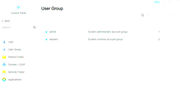
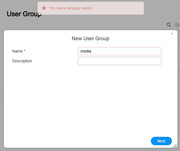
After performing an upgrade to TOS 6 I noticed that my previously configured users and groups are not showing. I would just recreate them, however when I try to do that the system tells me the names are already in use. I can't delete them, because they aren't shown and I can't recreate them because it says they exist.
Has anyone encountered this before? Thanks!
Missing users and groups after ugrade to TOS6


Re: Missing users and groups after ugrade to TOS6
What was the TOS system version on your device prior to the upgrade? And have you attempted to restart the device?
To contact our team, please send email to following addresses, remember to replace (at) with @
Technical team: support(at)terra-master.com (for technical support)
Service team: service(at)terra-master.com (for purchasing, return, replacement, RMA service)
Technical team: support(at)terra-master.com (for technical support)
Service team: service(at)terra-master.com (for purchasing, return, replacement, RMA service)
-
bconnor218

- Posts: 16
- Joined: 17 Jul 2022, 22:29

Re: Missing users and groups after ugrade to TOS6
It was TOS 5 previously. And yes I've restarted several times with no luck.
-
bconnor218
- Posts: 16
- Joined: 17 Jul 2022, 22:29
Re: Missing users and groups after ugrade to TOS6
If restarting the device fails to resolve your issue, you may attempt a system reinstallation as a troubleshooting step.bconnor218 wrote: ↑02 May 2025, 21:18 It was TOS 5 previously. And yes I've restarted several times with no luck.
Should the problem persist after applying the above measures, we recommend exporting and emailing your system logs to our support team (as an attachment). Our engineers will then analyze the logs to diagnose the root cause.
Alternatively, if the issue remains unidentified during initial diagnostics, we can arrange for remote technical assistance by our engineering specialists to resolve the problem directly on your device.
To contact our team, please send email to following addresses, remember to replace (at) with @
Technical team: support(at)terra-master.com (for technical support)
Service team: service(at)terra-master.com (for purchasing, return, replacement, RMA service)
Technical team: support(at)terra-master.com (for technical support)
Service team: service(at)terra-master.com (for purchasing, return, replacement, RMA service)